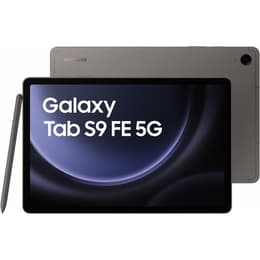

Galaxy Tab S9 (11.0", 2023) Vs Galaxy Tab S9 FE (10.9", 2023)

Galaxy Tab S9 (11.0", 2023)
Starting at

Refurbished price:£370.00

Versus £1,060.32 new

See options
Galaxy Tab S9 FE (10.9", 2023)
Starting at

Refurbished price:£227.00

Versus £606.86 new

See options

Ratings

The Samsung Galaxy Tab S9 (released in August 2023) and the Samsung Galaxy Tab S9 FE (released in October 2023) are two tablets from the same generation, offering distinct experiences within the Android ecosystem. While both devices run on the Android operating system with Samsung's One UI, the Tab S9 is positioned as a higher-tier device with a premium display and more powerful internal components, whereas the Tab S9 FE offers a more accessible option with a focus on core tablet functionalities.

Scores

Durability

Both the Galaxy Tab S9 and the Galaxy Tab S9 FE benefit from Samsung's commitment to software longevity, ensuring users receive updates for an extended period.

  • Software Support: Both tablets are expected to receive four major Android OS upgrades and five years of security updates from their respective launch dates. This means the Tab S9 FE, being released slightly later, will have its software support extended by a couple of months compared to the Tab S9. [17, 35]
  • Build Quality: Both devices feature a robust aluminum unibody design with flat sides and rounded edges, contributing to their overall durability. They also share an IP68 rating for water and dust resistance, a feature that enhances their practical lifespan by protecting against environmental elements. [1, 12, 13, 42]
  • Repairability: While specific iFixit scores are not available for the Tab S9 FE, general assessments suggest a moderate repairability for Samsung tablets, with accessible batteries but delicate screen removal processes. The cost of repair for components like the screen is often a notable percentage of the device's initial value. [3, 41]

Year of Release

2023

2023

Compatible with latest Update

Yes

Yes

OS

Android

Android

Performance

The performance capabilities of the Galaxy Tab S9 and Tab S9 FE cater to different user demands, primarily due to their internal processing units and memory configurations.

  • Processing Power: The Galaxy Tab S9 is equipped with a current-generation, high-performance processor, enabling it to handle demanding applications, intensive multitasking, and graphic-heavy gaming with smooth responsiveness. [1, 6, 15, 31] In contrast, the Galaxy Tab S9 FE utilizes a mid-range processor, which is well-suited for everyday tasks such as web browsing, video streaming, and light productivity, though it may show limitations with more intensive applications or advanced gaming. [7, 12, 16, 30, 35]
  • Multitasking and Storage: The Tab S9 offers configurations with up to 12GB of RAM, providing ample headroom for seamless multitasking and keeping multiple applications open without frequent reloads. The Tab S9 FE typically comes with 6GB or 8GB of RAM, which is sufficient for general use but may experience app refreshes with heavy multitasking. Both tablets offer 128GB or 256GB of internal storage and support microSD card expansion for additional space. [1, 8, 9, 12, 16, 21, 28, 31, 39, 42]
  • Battery Behavior: The Galaxy Tab S9 features an 8,400 mAh battery, while the Tab S9 FE has an 8,000 mAh battery. [1, 8, 15, 16, 43] Despite the slightly smaller capacity, the Tab S9 FE's less power-intensive display and processor often result in comparable or even longer battery life for general usage, with users reporting up to 12-17 hours of browsing or video playback. The Tab S9 typically provides a full day of mixed use, around 9-10 hours of screen-on time. Both support 45W fast charging. [6, 10, 12, 15, 16, 22, 32, 37, 39]

Memory (GB)

8 GB

6 GB

Processor

Qualcomm SM8550-AC Snapdragon 8 Gen 2

Exynos 1380

Screen quality

The visual experience on these two tablets is a significant differentiator, stemming from their underlying display technologies and specifications.

  • Display Technology and Vibrancy: The Galaxy Tab S9 features an 11-inch Dynamic AMOLED 2X display, known for its deep blacks, vibrant colors, and high contrast, making it particularly well-suited for media consumption and detailed visual work. [1, 6, 13, 24] The Galaxy Tab S9 FE, on the other hand, comes with a 10.9-inch IPS LCD screen, which provides good clarity and color reproduction for general use, though it does not offer the same level of contrast or color depth as an AMOLED panel. [5, 7, 13, 16, 27, 30]
  • Resolution and Smoothness: The Tab S9 boasts a resolution of 1600 x 2560 pixels, resulting in a sharp image with approximately 274 pixels per inch. It also features an adaptive 120Hz refresh rate, which contributes to smoother scrolling and a more fluid experience in compatible applications and games. [1, 2, 4, 19, 24, 43] The Tab S9 FE has a resolution of 1440 x 2304 pixels, offering a clear display at around 249 pixels per inch, and a 90Hz refresh rate, which is smoother than standard 60Hz displays but less fluid than the Tab S9's 120Hz. [8, 13, 16, 27, 30]
  • Brightness and Viewing Experience: The Tab S9's AMOLED panel generally offers higher peak brightness, improving visibility in bright environments and enhancing HDR content. The Tab S9 FE's LCD screen, while bright enough for indoor use, may be less comfortable to view under direct sunlight. The slightly larger screen size of the Tab S9 also provides a marginally more expansive viewing area. [6, 13, 14, 27, 29, 30]

Resolution

1600 x 2560

1440 x 2304

Screen type

Dynamic AMOLED 2X

IPS LCD

Pixel density

280ppp

250ppp

Audiovisual

While tablets are not typically primary photography devices, both the Galaxy Tab S9 and Tab S9 FE offer camera systems suitable for common tablet-based tasks like video calls and document scanning.

  • Rear Camera Capabilities: The Galaxy Tab S9 is equipped with a 13-megapixel rear camera, which is capable of capturing clear images and scanning documents effectively. [1, 2, 4, 19, 24, 30, 43] The Galaxy Tab S9 FE features an 8-megapixel rear camera, which is adequate for basic photography needs and QR code scanning, but may produce less detailed results compared to the Tab S9. [5, 7, 9, 17, 21, 27, 28, 29, 35, 42]
  • Front Camera and Video Calls: Both tablets include a 12-megapixel ultrawide front-facing camera, positioned on the longer edge for a more natural video call experience in landscape orientation. This camera is well-suited for video conferencing, offering clear images and supporting 4K video recording on the Tab S9. [1, 2, 4, 19, 24, 25, 30, 31, 43] The Tab S9 FE's front camera also performs well for video calls, with some users noting its wider field of view. [17, 25, 35, 42]
  • Audio Experience: The Galaxy Tab S9 features a quad-speaker setup tuned by AKG with Dolby Atmos support, delivering a rich and immersive audio experience for media consumption. [1, 2, 4, 19, 31] The Galaxy Tab S9 FE comes with stereo speakers, which provide good sound quality for general use, though they may not offer the same depth or volume as the quad-speaker system of the Tab S9. [25]

Miscellaneous

Beyond core performance and display, several practical features and design elements differentiate the Galaxy Tab S9 and Tab S9 FE.

  • Connectivity and Ports: Both tablets offer modern connectivity options, including Wi-Fi 6 (Wi-Fi 6E on S9) and Bluetooth 5.3, with optional 5G cellular connectivity available for both models. They both utilize a USB Type-C port for charging and data transfer. However, the Tab S9's USB Type-C 3.2 port offers faster data transfer speeds and broader external display compatibility compared to the Tab S9 FE's USB Type-C PD 2.0 port, which may limit video output to external monitors. [1, 2, 4, 8, 13, 19, 28, 29]
  • Biometric Security: The Galaxy Tab S9 incorporates an under-display fingerprint sensor for convenient and secure unlocking. [1, 17, 18] The Galaxy Tab S9 FE features a fingerprint sensor integrated into the power button, located on the side of the device. [17, 27] Both methods provide reliable biometric authentication.
  • Design and Handling: The Galaxy Tab S9 is slightly thinner at 5.9mm and lighter at 498g compared to the Tab S9 FE, which measures 6.5mm thick and weighs 524g. [1, 2, 4, 8, 13, 19, 23] Both tablets include the S Pen stylus, which magnetically attaches to the back for charging and storage, enhancing their utility for note-taking and creative tasks. [1, 12, 13, 29, 35, 42]

Weight

129 g

129 g

Screen size (in)

11.0

10.9

Network

Wi-Fi

Wi-Fi + 5G

Carrier compatibility

Unlocked

Unlocked

Connector

USB Type-C

USB Type-C

User feedback for the Galaxy Tab S9 often highlights its exceptional AMOLED display and powerful performance as key strengths, making it a strong choice for media consumption, gaming, and demanding productivity tasks. Users appreciate the fluidity of the 120Hz refresh rate and the vibrant visuals. Some common concerns include its battery life, which, while sufficient for a full day, can be impacted by the power-hungry display, and its higher initial cost. [6, 15, 22, 31]

The Galaxy Tab S9 FE is frequently praised for its solid all-around performance for its segment, good battery life, and the inclusion of the S Pen, making it a compelling option for students and casual users. Its IP68 rating is also a notable advantage for a tablet in its category. Criticisms often point to its LCD screen not matching the vibrancy of AMOLED panels and its mid-range processor struggling with the most graphically intensive applications. [7, 12, 16, 27, 29, 35, 37, 39]

Users prioritizing a top-tier visual experience, high-performance computing for creative work or advanced gaming, and a sleek, lightweight design will find the Galaxy Tab S9 well-suited to their needs. Conversely, users seeking a reliable tablet for everyday tasks, note-taking, media consumption, and general productivity, who also value robust build quality and extended battery life, may lean towards the Galaxy Tab S9 FE. Both devices offer a quality-assured refurbished option, providing a sustainable choice for consumers.

See all articles

Our recent comparisons