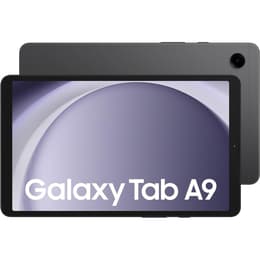
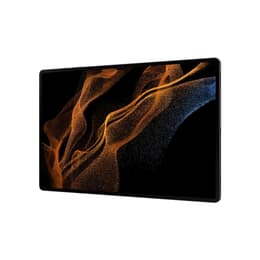

Galaxy Tab A9 (8.7", 2023) Vs Galaxy Tab S8 (11.0", 2022)

Galaxy Tab A9 (8.7", 2023)
Starting at

Refurbished price:£87.00

Versus £219.00 new

See options
Galaxy Tab S8 (11.0", 2022)
Starting at

Refurbished price:£262.00

Versus £745.19 new

See options

Ratings

The Samsung Galaxy Tab A9, released in late 2023, and the Samsung Galaxy Tab S8, launched in early 2022, represent distinct tiers within Samsung's tablet lineup. While both run on the Android operating system with Samsung's One UI, they cater to different user needs through variations in display size, processing power, and overall feature sets. The Tab S8 offers a more premium experience with advanced capabilities, whereas the Tab A9 focuses on portability and essential tablet functions.

Scores

Durability

When considering the long-term usability of these tablets, their release timelines and software support are key factors.

  • Release Timeline: The Galaxy Tab S8 was released in February 2022, making it approximately two years older than the Galaxy Tab A9, which launched in October 2023. This age difference directly impacts their remaining software support.
  • OS Support Duration: The Galaxy Tab S8, being part of the flagship 'S' series, is eligible for four major Android OS updates and seven years of security updates from its release. This means it will receive updates for a significantly longer period. The Galaxy Tab A9, as an 'A' series device, is typically eligible for three major OS upgrades and four years of security updates. [23, 26, 38, 48]
  • Expected Practical Lifespan: Users prioritizing extended software longevity and access to the latest Android features will find the Tab S8 offers a longer supported lifespan. Both devices are built with durable materials, with the Tab S8 featuring an Armor Aluminum body designed for enhanced scratch and bend resistance, contributing to its physical durability. [18]

Year of Release

2023

2022

Compatible with latest Update

Yes

Yes

OS

Android

Android

Performance

The performance capabilities of these two tablets differ considerably, impacting how smoothly they handle various tasks.

  • Processing Power: The Galaxy Tab S8 is equipped with a more powerful processor, enabling it to manage demanding applications, complex multitasking, and graphic-intensive games with greater ease and responsiveness. The Galaxy Tab A9 features a capable processor that handles everyday tasks like web browsing, video streaming, and light gaming smoothly. [11, 25, 26, 34]
  • Multitasking and Responsiveness: The Tab S8 generally offers a more fluid and responsive user experience, especially when switching between multiple applications or running several apps simultaneously. Its higher RAM configurations also contribute to more efficient multitasking. The Tab A9, while capable of split-screen multitasking, may exhibit more noticeable pauses or slower transitions with heavier workloads. [2, 3, 13, 16, 25, 34]
  • Storage Options: Both tablets offer internal storage options that can be expanded using a microSD card, providing flexibility for users to store a large volume of files, photos, and videos. The Tab S8 is available with up to 256GB of internal storage, while the Tab A9 offers up to 128GB, both expandable up to 1TB. [1, 3, 13, 16, 25, 44]

Memory (GB)

4 GB

8 GB

Processor

Mediatek Helio G99

Qualcomm SM8450 Snapdragon 8 Gen 1

Screen quality

The visual experience is a key differentiator between the Galaxy Tab A9 and the Galaxy Tab S8, primarily due to their display technologies and specifications.

  • Display Technology and Size: The Galaxy Tab S8 features an 11-inch TFT LCD, offering a larger viewing area compared to the Galaxy Tab A9's 8.7-inch TFT LCD. [1, 2, 5, 10, 20, 25, 26, 43] The Tab S8's display provides a more expansive canvas for media consumption and productivity.
  • Resolution and Clarity: The Tab S8 boasts a significantly higher resolution of 2560 x 1600 pixels, resulting in a sharper and more detailed image with a higher pixel density. The Tab A9 has a resolution of 1340 x 800 pixels, which is suitable for general use but may show individual pixels more readily, particularly when viewing fine text or detailed images. [1, 2, 6, 10, 20, 25, 26]
  • Refresh Rate: The Galaxy Tab S8 features a 120Hz refresh rate, providing noticeably smoother scrolling, animations, and a more fluid experience, especially in supported applications and games. The Galaxy Tab A9 has a standard 60Hz refresh rate, which is adequate for most daily tasks but does not offer the same level of visual smoothness. [1, 2, 3, 5, 6, 7, 9, 25, 26]

Resolution

800 x 1340

1600 x 2560

Screen type

TFT LCD

TFT LCD

Pixel density

180ppp

280ppp

Audiovisual

The camera systems on both tablets are designed for different use cases, with the Tab S8 offering more advanced capabilities.

  • Rear Camera System: The Galaxy Tab S8 includes a dual-camera setup on the rear, featuring a 13MP wide-angle lens and a 6MP ultra-wide-angle lens, allowing for more versatile photography. The Galaxy Tab A9 has a single 8MP rear camera with autofocus, suitable for basic photo capture and document scanning. [1, 5, 10, 12, 16, 20, 21, 22, 25, 28, 44, 45]
  • Front Camera Quality: For video calls and selfies, the Tab S8 is equipped with a 12MP ultra-wide front camera, which offers higher resolution and better clarity, along with features like auto-framing to keep subjects centered. The Tab A9 features a 2MP front camera, which is functional for video calls but provides less detail. [8, 9, 10, 16, 17, 18, 20, 22, 25, 26, 30, 44, 45]
  • Video Recording and Audio: The Tab S8 supports 4K video recording at 30fps and features a three-microphone setup with noise cancellation for clearer audio during calls. The Tab A9 records video at 1080p at 30fps. Both tablets offer stereo speakers, with the Tab S8 featuring quad speakers with Dolby Atmos for a more immersive audio experience. [9, 16, 18, 25, 26, 29]

Miscellaneous

Beyond core specifications, several practical features and design elements distinguish these two Samsung tablets.

  • Connectivity: The Galaxy Tab S8 supports Wi-Fi 6E, offering faster and more stable wireless connections, alongside Bluetooth v5.2 and optional 5G connectivity. The Galaxy Tab A9 supports Wi-Fi 5 (802.11ac) and Bluetooth v5.3, with optional 4G cellular connectivity. [3, 4, 9, 10, 16, 25, 31, 32, 39, 42]
  • Ports and Biometrics: Both tablets feature a USB-C port for charging and data transfer. The Tab A9 includes a 3.5mm headphone jack, which is absent on the Tab S8. The Tab S8 incorporates a fingerprint scanner integrated into the power key for secure unlocking, while the Tab A9 relies on face recognition via its front camera. [3, 8, 10, 16, 25, 30, 44]
  • Design and Handling: The Galaxy Tab S8 has an 11-inch display and a thinner profile at 6.3mm, weighing 503g (Wi-Fi model). The Galaxy Tab A9 is more compact with an 8.7-inch display, slightly thicker at 8.0mm, and lighter at 332g (Wi-Fi model), making it more portable for one-handed use. [1, 8, 10, 16, 20, 22, 25, 44, 45] The Tab S8 also includes an S Pen in the box, enhancing its productivity and creative potential. [9, 17, 43]

Weight

332 g

507 g

Screen size (in)

8.7

11.0

Network

Wi-Fi + 4G

Wi-Fi

Carrier compatibility

Unlocked

Without SIM Port

Connector

USB Type-C

USB Type-C

User feedback for the Galaxy Tab A9 often highlights its compact size and solid performance for everyday tasks as praise points. Many users appreciate its metal build quality, which provides a more premium feel than its category might suggest. Criticisms frequently revolve around the screen's lower resolution and 60Hz refresh rate, which some find less vibrant or sharp compared to higher-end displays. The camera quality is also noted as basic, primarily suitable for video calls and document scanning rather than detailed photography. [8, 11, 19, 20, 27, 28, 34]

The Galaxy Tab S8 receives consistent praise for its bright, high-resolution 120Hz display, which offers a smooth visual experience for media and navigation. Its robust performance, capable of handling demanding applications and multitasking, is a significant advantage. The inclusion of the S Pen and features like DeX mode are also frequently lauded for enhancing productivity. Common concerns sometimes mention that while its cameras are good for a tablet, they don't match premium smartphone cameras, and some users might miss an AMOLED display on the base model. [5, 9, 17, 18, 21]

Users prioritizing a highly portable device for casual media consumption, web browsing, and light productivity will find the Galaxy Tab A9 well-suited to their needs. Its smaller form factor and sufficient performance for basic tasks make it a practical choice. Conversely, users who require a larger, more vibrant display, superior performance for intensive applications, and advanced features like the S Pen for creative or professional work will likely lean towards the Galaxy Tab S8. This device is also a better fit for those seeking longer software support. Both tablets offer a pathway to sustainable tech choices through quality-assured refurbished options, providing an eco-friendly alternative for consumers.
See all articles

Our recent comparisons