Microsoft Surface Laptop 3 13" Vs Microsoft Surface Pro 7 12"

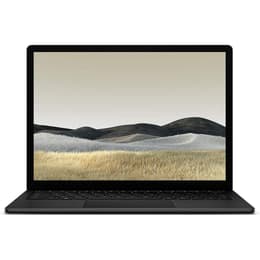
Microsoft Surface Laptop 3 13"
Starting at

Refurbished price:£215.00

Versus £598.29 new

See options
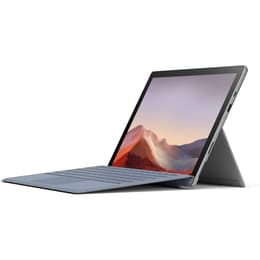
Microsoft Surface Pro 7 12"
Starting at

Refurbished price:£184.00

Versus £1,509.25 new

See options

Ratings

The Microsoft Surface Laptop 3 13-inch and the Microsoft Surface Pro 7, both released in October 2019, offer distinct approaches to portable computing within the Windows ecosystem. While the Surface Laptop 3 presents a traditional clamshell laptop experience, the Surface Pro 7 is a versatile 2-in-1 detachable tablet. These devices primarily differ in their form factor and how they cater to user interaction, with the Laptop 3 focusing on a conventional laptop design and the Pro 7 emphasizing tablet-like flexibility with an optional keyboard.

Scores

Durability

When considering the long-term usability of these devices, their release timeline and software support are key factors. Both devices launched with Windows 10 and are eligible for upgrades to Windows 11, ensuring continued access to Microsoft's latest operating system features and security updates for several years.

  • Software Longevity: The Surface Laptop 3's official end of support for firmware and driver updates was July 30, 2024, with Windows 10 support expected to conclude on October 14, 2025. The Surface Pro 7, being from the same generation, follows a similar support trajectory, meaning both will continue to receive critical Windows updates for the foreseeable future, but hardware-specific updates may cease.
  • Repairability: The Surface Laptop 3 received a repairability score of 5 out of 10 from iFixit, a significant improvement over its predecessors, noting that the SSD is easily removable. While specific repairability scores for the Surface Pro 7 are less commonly cited, Surface Pro devices generally present more challenges for user-level repairs due to their compact, tablet-first design.
  • Practical Lifespan: Both devices are built with quality materials, suggesting a durable physical construction. The practical lifespan for either will largely depend on individual usage patterns and the availability of replacement parts for professional servicing, making a quality-assured refurbished option a sustainable choice for extending their utility.

Year of Release

2019

2019

OS

Windows 11

Windows 11

Performance

Both the Surface Laptop 3 13-inch and the Surface Pro 7 are equipped with 10th-generation Intel processors, offering capable performance for everyday computing tasks.

  • Processor Capabilities: Both devices handle demanding applications and multitasking smoothly, thanks to their efficient processors and integrated graphics. The Surface Laptop 3 13-inch typically features Intel Core i5 or i7 configurations, while the Surface Pro 7 offers a range from Intel Core i3 to i7. This means that for general productivity, web browsing, and media consumption, both provide a responsive experience.
  • Memory and Storage: Both models offer various RAM configurations, commonly 8GB or 16GB, which is sufficient for most multitasking needs. Storage options range from 128GB to 1TB SSDs, providing fast boot times and quick application loading. The Surface Laptop 3's SSD is designed to be removable by a technician, offering some flexibility for data retention.
  • Battery Behavior: Microsoft claimed up to 11.5 hours of battery life for the Surface Laptop 3 and 10.5 hours for the Surface Pro 7. In real-world usage, the Surface Laptop 3 generally provides around 8-9 hours for light tasks, while the Surface Pro 7 typically offers 6-7 hours, with both seeing reduced longevity under heavier workloads.

Memory (GB)

8 GB

8 GB

Processor

Core i5 - Gen 10 (G7)

Core i5 - Gen 10 (G4)

Graphic card

Integrated Graphics

Integrated Graphics

Screen quality

Both Surface devices feature high-quality PixelSense displays with a productivity-friendly 3:2 aspect ratio, offering a clear and vibrant visual experience.

  • Display Technology and Resolution: The Surface Laptop 3 13-inch has a 13.5-inch display with a 2256 x 1504 resolution (201 PPI), while the Surface Pro 7 features a 12.3-inch display with a sharper 2736 x 1824 resolution (267 PPI). Both utilize IPS technology, providing comfortable viewing angles and good contrast.
  • Brightness and Clarity: The Surface Laptop 3's display reaches around 348-400 nits of brightness, while the Surface Pro 7 can achieve up to 408 nits. This ensures good visibility in various indoor lighting conditions, and adequate performance outdoors, though direct sunlight can still pose a challenge. Text and images appear sharp on both screens.
  • Touch and Refresh Rate: Both displays are touch-enabled and support the Surface Pen for creative and note-taking tasks. They operate at a standard 60Hz refresh rate, providing a smooth experience for general use, but not the ultra-smooth motion found on higher refresh rate displays.

Audiovisual

The camera systems on the Surface Laptop 3 13-inch and Surface Pro 7 are designed primarily for video conferencing and facial recognition, with some differences in their capabilities.

  • Front-Facing Cameras: Both devices include a front-facing camera that supports Windows Hello for secure facial recognition login. The Surface Laptop 3 features a 720p HD camera, suitable for video calls. The Surface Pro 7 steps up with a 5MP front-facing camera capable of 1080p HD video, which generally offers better clarity for virtual meetings.
  • Rear-Facing Camera: The Surface Pro 7 includes an 8MP rear-facing camera that can record 1080p HD video, which can be useful for scanning documents or quick captures in tablet mode. The Surface Laptop 3 does not feature a rear camera, aligning with its traditional laptop form factor.
  • Audio Quality: Both devices are equipped with dual far-field Studio Mics, designed to capture clear audio during calls and recordings, even from a distance. They also feature Omnisonic Speakers with Dolby Audio, providing a good audio experience for media consumption.

Miscellaneous

Beyond core performance and display, several practical elements differentiate the user experience of the Surface Laptop 3 13-inch and the Surface Pro 7.

  • Connectivity Options: Both devices offer a USB-A port, a USB-C port (supporting power delivery), a 3.5mm headphone jack, and a Surface Connect port for charging and docking. The USB-C port on both is USB 3.1 Gen 2, but neither supports Thunderbolt 3. The Surface Pro 7 additionally includes a microSDXC card reader, offering expandable storage. Both support Wi-Fi 6 (802.11ax) and Bluetooth 5.0 for modern wireless connectivity.
  • Form Factor and Handling: The Surface Laptop 3 is a traditional laptop, weighing around 1.27 kg (2.79 lbs) and featuring a sleek, all-metal or Alcantara-covered chassis. The Surface Pro 7 is a lighter 2-in-1 detachable tablet, weighing approximately 770g (1.7 lbs) without its optional Type Cover, and features an integrated kickstand for versatile positioning. This makes the Pro 7 more adaptable for use as a tablet or in confined spaces.
  • Security and Sensors: Both devices incorporate Windows Hello facial recognition for secure and convenient login. They also include ambient light sensors for automatic screen brightness adjustment.

Weight

3000 g

775 g

Screen size

13

12

User sentiment for both the Surface Laptop 3 13-inch and the Surface Pro 7 generally highlights their premium build quality and strong performance for everyday tasks. Users often praise the Surface Laptop 3 for its comfortable keyboard, elegant design, and solid battery life for typical productivity. Its traditional laptop form factor is favored by those who prefer a stable lap-typing experience. Criticisms sometimes point to its limited port selection and thicker display bezels compared to some contemporaries.

The Surface Pro 7 is frequently lauded for its versatility as a 2-in-1 device, offering the flexibility of a tablet with the power of a full Windows computer. Its sharp, vibrant display and integrated kickstand are often cited as strong points. However, common concerns include its battery life, which some users find to be shorter than expected, and the fact that essential accessories like the Type Cover and Surface Pen are sold separately.

Users prioritizing a conventional laptop experience with a comfortable keyboard and a slightly larger screen for extended typing sessions will find the Surface Laptop 3 13-inch well-suited to their needs. Its robust build and reliable performance make it a strong choice for students and professionals who primarily work at a desk or in similar settings. Conversely, users who value portability, touch interaction, and the flexibility to switch between laptop and tablet modes will likely lean towards the Surface Pro 7. Its lighter weight and integrated kickstand make it ideal for travelers, artists, or those who frequently present or take notes by hand. Both devices offer a quality computing experience, and choosing between them depends on whether a traditional laptop or a versatile 2-in-1 form factor aligns better with individual usage patterns. Exploring refurbished options for either model can provide an eco-friendly alternative to new purchases.

See all articles

Our recent comparisons