
Compare models
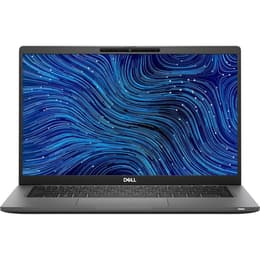
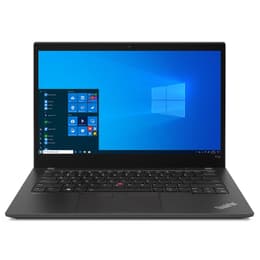
Dell Latitude 7420 14" Vs Lenovo ThinkPad T14 G2 14"
- 1-year minimum warranty
- Free delivery on all items
- Free 30-day returns
Differences at a glance
The Dell Latitude 7420 (2021) and the Lenovo ThinkPad T14 Gen 2 (2021) are 14-inch business laptops designed for professionals, students, and frequent travelers who require reliability and productivity on the go. While both machines share similar dimensions and target enterprise environments, they differ in design philosophies, input methods, and ecosystem choices. The Dell Latitude 7420 focuses on a streamlined, modern build with versatile configuration choices, whereas the Lenovo ThinkPad T14 Gen 2 emphasizes classic typing ergonomics and robust port selection. Both laptops run on standard desktop operating systems, allowing for seamless integration with professional software and daily productivity tools.
Available Models
Storage
Processor
Memory
Scores
Durability
When evaluating structural longevity and software maintenance, both laptops offer dependable support tailored to enterprise environments, though release timelines and build approaches differ slightly.
- Software Support: Both devices receive regular operating system updates and security patches from their respective developers, ensuring stable software performance and protection against digital threats over several years.
- Build Integrity: Each laptop utilizes sturdy chassis materials designed to withstand daily transit, with reinforced hinges and resilient outer shells that handle routine wear and tear effectively. Choosing a quality-assured refurbished option provides an eco-friendly alternative that extends the operational lifespan of these durable enterprise devices.
- Repairability: Both models feature accessible internal components that allow technicians to replace worn batteries or upgrade storage components, supporting long-term usability.
Year of Release
2021
2021
OS
Windows 11
Windows 11
Performance
Under everyday workloads, both laptops deliver responsive multitasking and efficient handling of office suites, web browsing, and administrative applications.
- Multitasking Handling: Both systems handle heavy browser usage, document editing, and background synchronization smoothly, keeping transitions fluid between demanding tasks.
- Storage and Memory: Configurations vary across retail channels, but both models provide fast solid-state storage options that ensure rapid system boot times and quick file transfers.
- Thermal Behavior: Internal cooling fans manage heat effectively during prolonged work sessions, maintaining consistent system speeds without noticeable throttling or sudden slowdowns.
Graphic card
Integrated Graphics
Integrated Graphics
Screen quality
Display configurations on these 14-inch notebooks prioritize clear text rendering and comfortable viewing angles for extended office tasks and document review.
- Panel Technology: Both laptops offer clear display panels with wide viewing angles, reducing glare and eye strain under typical indoor office lighting conditions.
- Resolution and Clarity: High-definition panel resolutions ensure sharp text reproduction and crisp visual details, benefiting users who spend hours reading spreadsheets or text documents.
- Surface Finish: Anti-glare coatings on the screens minimize distracting reflections from overhead lighting, making them well-suited for varied working environments such as shared offices or transit hubs.
Resolution
1920 x 1080
1920 x 1080
Screen type
LED
IPS
Audiovisual
For virtual meetings, media playback, and daily audio communication, both laptops include integrated multimedia features tailored for remote collaboration.
- Video Conferencing: Integrated webcams provide adequate image clarity for video calls, supported by software adjustments that handle varying indoor lighting conditions.
- Audio Capture: Built-in microphone arrays isolate voice input from background ambient noise, ensuring clear speech transmission during online meetings and virtual lectures.
- Speaker Output: Stereo speakers deliver balanced sound for conference calls and casual video viewing, though external headphones remain preferable for immersive music listening.
Miscellaneous
Practical daily usability is shaped by physical dimensions, connectivity ports, and input device layouts that vary between the two manufacturers.
- Connectivity Options: Both models feature a comprehensive selection of physical ports, including USB connections and video outputs, reducing reliance on external adapters. Wireless modules ensure stable connections to modern networks.
- Input Layouts: The Lenovo features a distinctive keyboard layout with deep travel and a central pointing stick, whereas the Dell focuses on a flatter, quieter typing experience with a spacious trackpad.
- Portability: Weighing similarly around the 1.4-kilogram mark, both laptops slip easily into backpacks, making them practical companions for commuters and mobile workers.
Weight
1310 g
1530 g
Screen size
14
14
What the community thinks
User communities frequently praise the Dell Latitude 7420 for its sleek form factor, comfortable trackpad, and refined aesthetic, while noting that its port selection is slightly more streamlined. Conversely, owners of the Lenovo ThinkPad T14 Gen 2 highlight its legendary keyboard tactile feedback, robust port variety, and reliable enterprise build quality, though some mention that it carries a slightly more utilitarian appearance. Users prioritizing typing comfort and extensive legacy connectivity may prefer the Lenovo model, while those leaning toward a modern profile and clean lines will find the Dell well-suited to their workflow.
Ultimately, the choice depends on individual working habits and preferences regarding input devices and physical design. Exploring a quality-assured refurbished option offers a sustainable choice that aligns electronic purchasing decisions with environmental responsibility. Both devices remain capable companions for everyday professional and academic tasks, providing reliable performance without unnecessary complexity.