Microsoft Surface Laptop 4 13" Vs Microsoft Surface Pro 7 12"

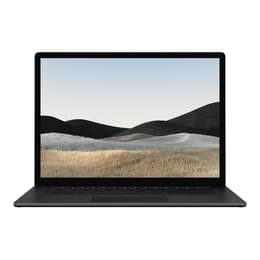
Microsoft Surface Laptop 4 13"
Starting at

Refurbished price:£290.00

Versus £705.59 new

See options
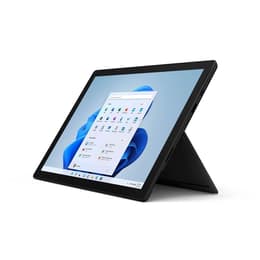
Microsoft Surface Pro 7 12"
Starting at

Refurbished price:£184.00

Versus £1,509.25 new

See options

Ratings

The Microsoft Surface Laptop 4 13 (released April 2021) and the Microsoft Surface Pro 7 (released October 2019) represent distinct approaches to portable computing within the Windows ecosystem. While both devices offer the full functionality of Windows, the Surface Laptop 4 is a traditional clamshell laptop, prioritizing a conventional typing experience, whereas the Surface Pro 7 is a 2-in-1 detachable tablet designed for versatility and pen input. These fundamental differences influence their form factor, portability, and ideal use cases.

Scores

Durability

The practical lifespan of these devices is influenced by their release dates, operating system support, and repairability. The Surface Laptop 4, being newer, generally benefits from a longer period of software support and potentially more modern internal components.

  • Release Timeline: The Surface Laptop 4 was released in April 2021, making it approximately a year and a half newer than the Surface Pro 7, which launched in October 2019. This difference in release date means the Laptop 4 will likely receive operating system updates for a longer duration.
  • OS Support: Both devices run Windows and are upgradeable to Windows 11, ensuring a consistent software experience. However, the newer release of the Surface Laptop 4 means its official support window for future Windows versions will extend further into the future.
  • Repairability: The Surface Laptop 4 offers a removable SSD, which can aid in data recovery or storage upgrades by skilled technicians. The Surface Pro 7's storage is not user-removable, though the updated Surface Pro 7+ does offer this feature. Generally, newer Surface devices have shown improved repairability, but the Pro 7's tablet design makes screen removal a more complex process for internal access.

Year of Release

2020

2019

Last Os Compatibility

Yes

Yes

OS

Windows 11

Windows 11

Performance

Performance considerations for both devices revolve around their processing capabilities, memory configurations, and battery endurance, impacting how smoothly they handle daily tasks and more demanding applications.

  • Processing Power: The Surface Laptop 4 features 11th Gen Intel Core processors or AMD Ryzen Microsoft Surface Edition processors, offering a notable performance uplift compared to the Surface Pro 7's 10th Gen Intel Core processors. This translates to snappier application loading and more efficient multitasking on the Laptop 4.
  • Multitasking and Responsiveness: The Surface Laptop 4 can be configured with up to 32GB of RAM, while the Surface Pro 7 maxes out at 16GB. For users who frequently run multiple applications simultaneously or work with large files, the higher RAM options in the Laptop 4 provide a smoother and more responsive experience.
  • Battery Behavior: The Surface Laptop 4 generally offers longer battery life, with Microsoft claiming up to 19 hours for some configurations, though real-world usage typically yields 7-12 hours. The Surface Pro 7 is rated for up to 10.5 hours of typical use, often translating to around 7 hours in practice. This difference means the Laptop 4 can often last a full workday without needing a charge for many users.

Memory (GB)

16 GB

8 GB

Processor

Core i7-1185G7

Core i5 - Gen 10 (G4)

Graphic card

Integrated Graphics

Integrated Graphics

Screen quality

Both Surface devices are known for their high-quality displays, but there are subtle differences in size, resolution, and overall viewing experience that cater to different preferences.

  • Display Technology and Clarity: Both the Surface Laptop 4 and Surface Pro 7 feature PixelSense touchscreens with a 3:2 aspect ratio, which is well-suited for productivity tasks. The Surface Laptop 4 has a 13.5-inch display with a resolution of 2256 x 1504 pixels (201 PPI), while the Surface Pro 7 has a slightly smaller 12.3-inch display with a higher resolution of 2736 x 1824 pixels (267 PPI). This results in a slightly sharper image on the Pro 7 due to its higher pixel density.
  • Brightness and Outdoor Use: The Surface Laptop 4's display can reach up to 390-427 nits of brightness, providing good visibility in various lighting conditions. The Surface Pro 7's display also offers good brightness, making both suitable for indoor and some outdoor use, though neither is designed for direct sunlight.
  • Viewing Experience: Both displays are color accurate and offer good contrast. The larger screen of the Surface Laptop 4 provides more screen real estate for multitasking, while the Pro 7's smaller, sharper display is excellent for detailed work and portability. Neither device features a high refresh rate, with both typically operating at 60Hz.

Resolution

2256 x 1504

2736 x 1824

Screen type

IPS

IPS

Audiovisual

The camera and audio capabilities of these Surface devices are designed to facilitate clear communication and media consumption, with some distinctions in their camera setups.

  • Camera System: The Surface Laptop 4 features a 720p HD front-facing camera, suitable for video calls. The Surface Pro 7, being a tablet-first design, includes a 5.0MP front-facing camera with 1080p full HD video and an 8.0MP rear-facing autofocus camera with 1080p full HD video, offering more versatility for photography and scanning documents. Both include a Windows Hello facial authentication camera for secure login.
  • Low-Light and Everyday Photography: The Surface Pro 7's higher resolution cameras generally perform better in various lighting conditions and for capturing detailed images compared to the Laptop 4's more basic front-facing camera. For video conferencing, both devices provide clear visuals.
  • Audio Quality: Both devices are equipped with dual far-field Studio Mics, which are praised by users for their ability to capture clear audio even at a distance, making them well-suited for online meetings and voice commands. The Surface Laptop 4 features Omnisonic Speakers with Dolby Atmos, while the Surface Pro 7 has 1.6W stereo speakers with Dolby Audio, both providing a good audio experience for media consumption.

Miscellaneous

Beyond core performance and display, several practical elements differentiate the Surface Laptop 4 and Surface Pro 7, influencing their connectivity, physical interaction, and overall user experience.

  • Connectivity Options: Both devices support Wi-Fi 6 and Bluetooth 5.0, ensuring fast and stable wireless connections. For wired connections, both include a USB-C port, a USB-A port, a 3.5mm headphone jack, and a Surface Connect port for charging and docking. Notably, the Surface Pro 7's USB-C port does not support Thunderbolt 3, limiting its external GPU capabilities. The Surface Pro 7 also includes a MicroSDXC card reader, which the Laptop 4 lacks.
  • Weight and Dimensions: The Surface Laptop 4 13.5-inch model weighs between 1.265 kg and 1.288 kg, with dimensions of 308 x 223 x 14.5 mm. The Surface Pro 7, without its Type Cover, is significantly lighter at around 775-790g and more compact at 292 x 201 x 8.5 mm, emphasizing its tablet portability.
  • Build Materials and Form Factor: The Surface Laptop 4 offers a traditional laptop form factor with options for Alcantara fabric or metal finishes, providing a comfortable typing experience. The Surface Pro 7 is a 2-in-1 detachable tablet with a built-in kickstand, allowing it to function as a tablet or a laptop when paired with a Type Cover (sold separately). This design makes the Pro 7 highly adaptable for on-the-go use and pen input.

Weight

1280 g

775 g

Screen size

13

12

User sentiment for both the Surface Laptop 4 and Surface Pro 7 highlights their strengths and specific use cases. The Surface Laptop 4 is frequently praised for its comfortable keyboard, premium build quality, and solid battery life, making it a reliable choice for everyday productivity and a traditional laptop experience. Users appreciate its sleek design and consistent performance for general computing tasks. Some common criticisms include its thicker bezels compared to more modern designs and a limited port selection for some users.

The Surface Pro 7 is often lauded for its versatility as a 2-in-1 device, offering the flexibility of a tablet with the power of a full Windows PC. Its portability, touch screen, and pen support are highly valued by students and professionals who require note-taking or drawing capabilities. However, some users have reported occasional software glitches and a battery life that, while adequate, may not always last a full day of heavy use. The need to purchase the Type Cover and Surface Pen separately is also a frequent point of discussion.

Users prioritizing a conventional laptop experience with a comfortable keyboard, longer battery life, and a premium feel will find the Surface Laptop 4 well-suited to their needs. It excels in environments where a stable, dedicated typing platform is essential. Conversely, users who require the flexibility of a tablet for creative work, note-taking, or presentations, along with the ability to transition to a laptop, may lean toward the Surface Pro 7. Its compact design and touch capabilities make it ideal for mobile professionals and students. For those considering either device, exploring quality-assured refurbished options can provide an eco-friendly alternative to new purchases, extending the life cycle of these capable machines.
See all articles

Our recent comparisons