
Compare models

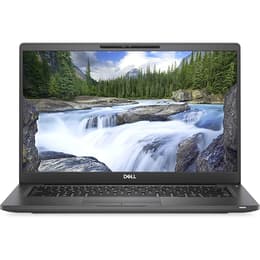
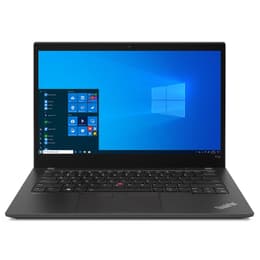
Dell Latitude 7400 14" Vs Lenovo ThinkPad T14 G2 14"

  • 1-year minimum warranty
  • Free delivery on all items
  • Free 30-day returns
Dell Latitude 7400 14"
Starting at

Refurbished price:£240.00

Versus £629.00 new

See options
Lenovo ThinkPad T14 G2 14"
Starting at

Refurbished price:£304.00

Versus £1,034.73 new

See options

Differences at a glance

The Dell Latitude 7400 (2019) and the Lenovo ThinkPad T14 Gen 2 (2021) are 14-inch professional laptops designed for productivity, business environments, and everyday computing tasks. While they share a standard screen size and a focus on portability, the Lenovo model arrives two generations later, bringing internal hardware advancements and updated connectivity standards. Both run on standard desktop operating systems like Windows, offering familiar interfaces for students, professionals, and travelers alike.

Available Models

Storage (GB)

Processor

Memory (GB)

Scores

Durability

Evaluating the lifespan and hardware longevity of these two business-oriented laptops involves considering their release dates, software support timelines, and physical build resilience.

  • Release timeline and update support: The Lenovo ThinkPad T14 Gen 2 benefits from a newer manufacturing date, ensuring extended driver and operating system compatibility compared to the earlier Dell Latitude 7400.
  • Repairability and physical resilience: Both devices feature sturdy business-class chassis designed to withstand daily transit, though the ThinkPad design traditionally offers straightforward internal component access for maintenance.
  • Expected practical lifespan: Users selecting a quality-assured refurbished option of either model can expect reliable daily performance for standard office tasks and web browsing over several years.

Year of Release

2019

2021

Last Os Compatibility

Yes

Yes

OS

Windows 11

Windows 11

Performance

Processing power, memory capacity, and battery behavior differ notably due to the generational gap between the components housed within each machine.

  • Everyday multitasking and speed: The newer processor generation in the Lenovo laptop handles demanding applications, heavy browser tabs, and background processes with greater thermal efficiency than the Dell counterpart.
  • Storage and memory configurations: Both machines support solid-state storage for rapid file access and application loading, alongside varied RAM configurations suitable for professional workloads.
  • Battery behavior: Typical use cases reveal that energy consumption varies with workload intensity, with both laptops providing adequate battery life for working on the move under moderate brightness settings.

Graphic card

Integrated Graphics

Integrated Graphics

Screen quality

The 14-inch display panels on both laptops are tailored for document editing, media consumption, and general office productivity.

  • Display technology and clarity: Both models utilize standard high-definition panels that deliver sharp text rendering and clear visuals for everyday tasks, though specific configurations vary between touch and non-touch variants.
  • Outdoor visibility and brightness: Panel luminance levels on both devices allow for comfortable indoor use, while working in direct sunlight may require locating shaded areas to maintain visibility.
  • Viewing experience: Matte screen finishes on many configurations help reduce distracting reflections, supporting comfortable viewing during extended working sessions.

Resolution

1920 x 1080

1920 x 1080

Screen type

IPS

IPS

Camera

Audiovisual

Multimedia capabilities, including integrated webcams, microphones, and audio output, cater to remote communication and daily media consumption.

  • Webcam and video calling: Both laptops feature integrated webcams suitable for video conferences, complemented by dual-array microphones that capture clear voice audio during virtual meetings.
  • Speaker output: Built-in stereo speakers provide adequate sound clarity for voice calls, podcasts, and casual video viewing without requiring external headphones.
  • Media consumption: Audio and visual integration supports a balanced multimedia experience for everyday users streaming video or listening to audio tracks.

Miscellaneous

Physical design elements, port selections, and connectivity standards dictate how easily each laptop integrates into existing peripheral setups and travel routines.

  • Connectivity and ports: The Lenovo ThinkPad T14 Gen 2 includes updated USB-C and standard USB ports alongside HDMI outputs, whereas the Dell Latitude 7400 also offers a robust selection of legacy and modern ports including Thunderbolt capabilities.
  • Physical dimensions and weight: Both 14-inch chassis maintain slim profiles and manageable weights, fitting easily into standard backpacks for commuting and travel.
  • Security and authentication: Practical additions such as fingerprint readers and secure login options feature prominently on both business machines to protect user data.

Weight

1400 g

7500 g

Screen size

14

14

What the community thinks

Common praise points for the Dell Latitude 7400 center on its solid build quality, comfortable keyboard, and sleek professional aesthetic, though some users note that its older processor architecture can feel stretched during intensive multitasking. Conversely, the Lenovo ThinkPad T14 Gen 2 receives frequent commendation for its exceptional keyboard tactile feedback and updated hardware efficiency, while a few users mention that its chassis design retains a traditional aesthetic. Choosing between the two depends largely on individual workflow priorities and hardware preferences.

Users who prioritize a classic, highly responsive keyboard layout and newer internal hardware may prefer the Lenovo ThinkPad T14 Gen 2, while users who value a sleek profile and robust everyday reliability will find the Dell Latitude 7400 well-suited to their needs. Eco-conscious buyers can find both models as sustainable, quality-assured refurbished options that extend device life cycles and reduce electronic waste. Evaluating individual tasks and daily workspace requirements will guide a balanced decision without leaning toward any single device.


Our recent comparisons