HP EliteBook 840 G8 14" Vs Microsoft Surface Pro 7 12"

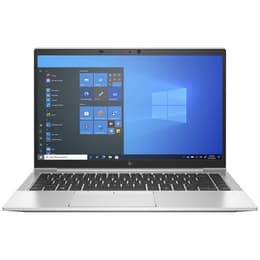
HP EliteBook 840 G8 14"
Starting at

Refurbished price:£272.00

Versus £602.25 new

See options
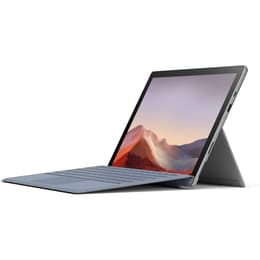
Microsoft Surface Pro 7 12"
Starting at

Refurbished price:£182.00

Versus £1,509.25 new

See options

Ratings

The HP EliteBook 840 G8 14, released in late 2020 and early 2021, is a business-oriented clamshell laptop, while the Microsoft Surface Pro 7, launched in October 2019, is a versatile 2-in-1 detachable tablet. Both devices operate on the Windows ecosystem, offering a familiar software experience, but they cater to different user preferences through their distinct form factors and hardware focuses. The EliteBook emphasizes traditional laptop productivity and upgradeability, whereas the Surface Pro 7 prioritizes portability and touch-enabled versatility.

Scores

Durability

The longevity of a device is influenced by its release timeline, operating system support, and ease of maintenance. Both the HP EliteBook 840 G8 and the Microsoft Surface Pro 7 run on Windows, with Windows 10 reaching its end of support on October 14, 2025, though both are upgradeable to Windows 11, which receives annual feature updates with varying support lifecycles. [8, 10, 25]

  • Release Timeline: The EliteBook 840 G8 was released in late 2020 and early 2021, making it a slightly newer device compared to the Surface Pro 7, which launched in October 2019. [36, 11, 3, 21] This difference means the EliteBook may receive official software updates for a slightly longer period.
  • Software Longevity: Both devices are capable of running Windows 11, extending their practical software lifespan beyond the Windows 10 end-of-life date. Windows 11 Home and Pro editions typically receive two years of support per annual feature update. [10, 25]
  • Repairability: The HP EliteBook 840 G8 generally offers easier access for component upgrades and repairs, such as RAM and SSD, contributing to a potentially longer practical lifespan through maintenance. [26, 36] In contrast, the Surface Pro 7 has soldered RAM and a non-removable SSD, making internal repairs and upgrades more challenging. [15, 27, 39]

Year of Release

2020

2019

OS

Windows 11

Windows 11

Performance

Performance in daily tasks is a key consideration, with both devices offering capabilities suited for productivity, though with different underlying hardware generations and thermal designs.

  • Processor Capabilities: The HP EliteBook 840 G8 features 11th-generation Intel processors, providing robust performance for demanding business applications and multitasking. [29, 23] The Microsoft Surface Pro 7 is equipped with 10th-generation Intel processors, which offer solid performance for everyday computing, web browsing, and moderate multitasking. [27, 30]
  • Multitasking and Responsiveness: The EliteBook, with its potential for up to 64GB of DDR4-3200 RAM, handles extensive multitasking and resource-intensive applications smoothly. [29] The Surface Pro 7, available with up to 16GB of LPDDR4x RAM, provides a responsive experience for typical productivity tasks and can manage multiple applications concurrently without significant slowdowns. [27, 33]
  • Storage Options: Both devices utilize fast NVMe SSD storage, ensuring quick boot times and rapid application loading. The EliteBook offers configurations up to 2TB, while the Surface Pro 7 goes up to 1TB. [29, 27]
  • Battery Behavior: The EliteBook 840 G8 typically delivers around 9 to 13 hours of battery life under mixed usage, often sufficient for a full workday. [1, 9, 18] The Surface Pro 7, while advertised for up to 10.5 hours, generally provides 6 to 8 hours in real-world usage, which may necessitate more frequent charging for heavy users. [14, 15, 21]

Memory (GB)

16 GB

8 GB

Processor

Core i5-1145G7

Core i5 - Gen 10 (G4)

Graphic card

Integrated Graphics

Integrated Graphics

Screen quality

The visual experience is shaped by display technology, resolution, and brightness, impacting usability in various environments and for different content types.

  • Display Technology and Resolution: The HP EliteBook 840 G8 features a 14-inch Full HD (1920 x 1080) IPS anti-glare display, offering clear visuals and good viewing angles suitable for extended work sessions. [29, 32] The Microsoft Surface Pro 7 comes with a 12.3-inch PixelSense touchscreen display with a higher resolution of 2736 x 1824 pixels and a 3:2 aspect ratio, providing a sharper image and more vertical screen real estate, which can be beneficial for document viewing. [27, 22]
  • Brightness and Outdoor Use: The EliteBook offers various display options, including panels with up to 400 nits of brightness, and a 1000-nit option with an integrated privacy screen, enhancing visibility in bright conditions and offering privacy. [29, 7] The Surface Pro 7's display is generally bright and vivid, making it suitable for indoor use, though its performance in direct sunlight may be more limited compared to the brightest EliteBook options. [15, 33]
  • Touch and Interaction: The Surface Pro 7's display is a responsive touchscreen, designed for direct interaction with a pen and touch, which is central to its 2-in-1 functionality. [21] While touchscreen variants are available for the EliteBook, its primary interaction method remains the keyboard and trackpad. [29, 32]

Audiovisual

Camera and audio capabilities are important for virtual meetings, content creation, and media consumption, with both devices offering features tailored to their intended use cases.

  • Camera System: The HP EliteBook 840 G8 typically includes an IR webcam, often with a privacy shutter, suitable for video conferencing and secure login. [16] The Microsoft Surface Pro 7 features a 5-megapixel front-facing camera for video calls and an 8-megapixel rear-facing camera with autofocus for capturing documents or photos. [22]
  • Video Recording Quality: Both devices are capable of recording 1080p video, providing clear visuals for standard video conferencing and casual recording. [22]
  • Audio Experience: The EliteBook 840 G8 benefits from audio tuned by Bang & Olufsen, featuring dual stereo speakers and a three multi-array microphone system, designed for clear sound output and voice capture in professional settings. [41, 7] The Surface Pro 7 offers Dolby Audio Premium sound through its dual stereo speakers and dual far-field studio microphones, aiming for clear audio for media consumption and effective voice pickup during calls. [21]

Miscellaneous

Beyond core performance, practical elements like connectivity, port selection, and physical design contribute significantly to the overall user experience and device utility.

  • Connectivity Options: Both devices support modern wireless standards, including Wi-Fi 6 (802.11ax) and Bluetooth 5, ensuring fast and reliable wireless connections. The EliteBook 840 G8 also offers optional 5G and 4G LTE mobile broadband connectivity for users requiring constant internet access on the go. [29, 11, 22]
  • Port Types: The HP EliteBook 840 G8 provides a comprehensive selection of ports, including two Thunderbolt 4 (USB4 Type-C) ports, two USB 3.2 Gen 1 Type-A ports, an HDMI output, and a headphone/microphone combo jack. [29, 36] The Microsoft Surface Pro 7 includes one USB-A port, one USB-C port (not Thunderbolt), a 3.5mm audio jack, a microSD card reader, and a Surface Connect port for charging and accessories. [27, 30]
  • Physical Design and Handling: The EliteBook 840 G8 is a traditional laptop, weighing around 1.32 kg (non-touch) to 1.46 kg (touch), with a sturdy aluminum chassis. [4, 29, 42] The Surface Pro 7, as a detachable 2-in-1, weighs approximately 775g without its optional Type Cover, making it significantly lighter as a tablet. With the Type Cover, its weight is comparable to a lightweight laptop. [20, 21] Its integrated kickstand allows for flexible positioning. [27]

Weight

2500 g

775 g

Screen size

14

12

The HP EliteBook 840 G8 and Microsoft Surface Pro 7 cater to distinct user needs, each with its own set of strengths and considerations. Users often praise the EliteBook 840 G8 for its robust build quality, comfortable keyboard, and comprehensive port selection, making it a reliable choice for sustained productivity. [17, 42] Some users, however, note that its battery life, while generally good, might not always be class-leading compared to some alternatives. [16, 17]

The Surface Pro 7 is frequently lauded for its exceptional portability, responsive touchscreen, and versatile 2-in-1 design, which allows it to function as both a tablet and a laptop. [12, 13, 33] Common criticisms include its relatively larger display bezels, which can make the design appear somewhat dated, and a battery life that, for some, falls short of expectations for a full day of heavy use. [14, 15, 20]

Users prioritizing a traditional laptop experience with strong performance, extensive connectivity, and easier upgradeability for a longer lifespan may find the HP EliteBook 840 G8 well-suited to their needs. Its robust design and business-centric features align with professional and student use cases requiring a dependable workhorse. Conversely, individuals who value extreme portability, touch-first interaction, and the flexibility of a tablet that can transform into a laptop will likely lean towards the Microsoft Surface Pro 7. It excels for tasks involving digital inking, presentations, and on-the-go content consumption.

For those considering either device, exploring quality-assured refurbished options can provide an eco-friendly alternative, extending the life cycle of these capable machines.
See all articles

Our recent comparisons