Apple Watches

Updated on 24 August 2026
24 August 2026
18 mins read

Haziq
Tech Expert for Back Market UK, Ireland & Australia
Choosing the best iPad for students is a matter of horses for courses. Some coursework requires devices capable of running high-end graphic design software. Others place more emphasis on notetaking and research. You'll also want to get the best value for money, and many students look for a budget iPad to leave room for other uni expenses and entertainment; you know what they say about all work and no play. And your budget can be maximised by buying a refurbished iPad for students from Back Market. Our experts have picked out the best iPad for university students in various categories for you.

In this article, we assess the best iPad in 2026 for students. We consider the sweet spot of power, price, longevity and portability. We assess what each iPad is best for, why buying refurbished just makes sense and discuss the features and benefits of each iPad model.
Which iPad is best for students? The iPad Air M3 is the versatile all-rounder, while the iPad Pro M4 is the heavyweight contender. The iPad A16 is designed for budget-conscious students, with the iPad Air M1 offering the best overall value for money. Med students should get the ultra-compact iPad Mini A17.
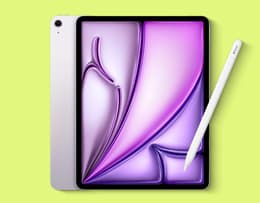
✨ The iPad Air M4 delivers the best balance of power, portability and Apple Pencil Pro support, for notetaking and high university workloads.
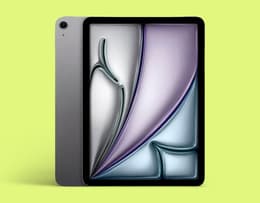
✨The Apple iPad Air M3 is just the ticket for general student coursework and to enjoy online entertainment in your downtime.

✨The iPad A16 is the favourite choice for students on a budget. It's light and affordable, and one of the best iPads for notetaking and sketching.
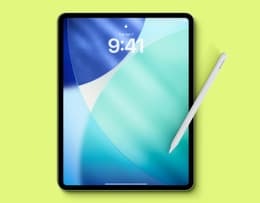
✨The iPad Pro M4 has tons of power to run the most demanding software for specialised degrees like graphic design and STEM.
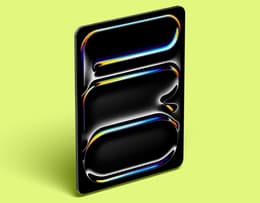
✨ The iPad Pro M5 is for students who need maximum performance. Ultra Retina XDR display, M5 chip, and Apple Pencil Pro make it exceptional for heavy STEM and design work.

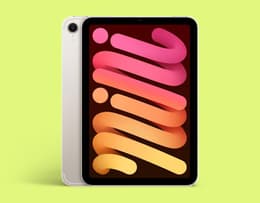
✨The iPad mini A17 is an extremely compact iPad designed for quick and efficient notetaking during practical sessions.
Before we get into this guide, you might be wondering whether an iPad is actually enough for your course or if you actually need a laptop.
For many students, an iPad with the addition of a keyboard and cloud storage is often about right for their studies. This is especially true for degrees that don’t require a high level of computing power. It may depend on your degree. If your course only demands handwritten notes and essays, an iPad is suitable; however, if you will rely on heavy desktop apps and have a high creative workload, a MacBook is more flexible.
But it doesn’t have to be an either-or scenario. iPads often work best as lecture companions, rather than laptop replacements. Most students use an iPad and a laptop together in their studies. An iPad is a great tool for interactive notetaking and annotating, while many students use a MacBook for coursework. Read more about how both pieces of tech can support your studies in our guide about whether an iPad can replace a laptop.
Back Market is one of the leading marketplaces for refurbished electronics. Thousands of devices pass through our hands, and our experts know the details of them all. This allows us to make accurate, trustworthy recommendations. We understand people, too. We know how to identify the most suitable phones, laptops and tablets for specific purposes and users. This is deep-level knowledge. We delve into the ins and outs of iPads, examining their specifications, comparing them with each other and advising our customers on the best choices.
All our devices undergo complete restoration and must pass stiff performance tests before being sold. This gives us even more information to work with when we create lists like these. You can fully trust what you read. We provide full transparency and unbiased reviews – we don't recommend devices that we wouldn't buy ourselves.
We also keep a close eye on which devices are the most popular with our buyers. We can track this in real time, which helps us keep our opinions fresh and up to date.
Typically, Apple Education is the first price students check when looking to buy an iPad in the UK. Others consider the UNiDAYS iPad discount. You can get a student discount in the UK through the Apple Education store; it is one of the best ways for students to save money on an iPad in the UK. By taking advantage of this discount, you can save up to 10% on the price of the latest iPad, including the iPad Pro and iPad Mini.
Great news, right? But did you know you can save up to 50% on a refurbished iPad on Back Market? And with our 100-point inspection process, you’ll know that your tech will be reliable and perform as you’dexpect a new iPad to perform.
Operating system: iPadOS 18
Colours: Blue / Purple / Starlight / Space Grey
Casing: Aluminium frame and back, scratch-resistant glass front
Dimensions: 9.74 x 7.02 x 0.24 in (11-inch) / 11.05 x 8.46 x 0.24 in (13-inch)
Weight: 460g (11-inch) / 616g (13-inch)
Screen size: 11-inch / 13-inch
Screen resolution: 2360 x 1640 pixels at 264ppi (11-inch) / 2048 x 2732 pixels at 264ppi (13-inch)
Display: Liquid Retina
Chip: Apple M3
CPU: Octa-core
RAM: 8 GB
Storage: 128 GB / 256 GB / 512 GB / 1 TB
Sound: Landscape stereo speakers
Main camera: 12MP
Video capture: 4K
Battery life: Up to 10 hours of surfing the web on Wi‐Fi or watching video
Connectivity: Wi-Fi 6E
Apple Pencil support: Yes
See our iPad Air M3 review to see if this is the iPad for your studies.
What we like: | What we don't like: |
|---|---|
Crisp, fast performance | No external storage card slot |
Vivid display | Liquid Retina display not as good as OLED |
Powerful chipset | Base memory storage is quite low |
Sleek, lightweight build | |
Good battery life |
"Still the best iPad for most people, the iPad Air M3 offers an incredibly powerful solution in a very compact form."
-T3
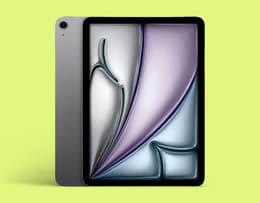
The iPad Air M3 is a capable all-round student tablet.
✨ For general coursework, the iPad Air M3 does the job with capacity to spare.
The iPad Air M3 offers the ideal balance of great performance for most student coursework activities and lightweight portability. It's a reliable companion that you can use for taking lecture notes, FaceTimingwith fellow students to collaborate on projects and general everyday use. While the base model is a bit low on storage capacity, you can get one with more space, up to 1 TB. Importantly, it supports Apple Pencil Pro and Apple Pencil via a USB-C connection. It's also a great tablet for streaming music and movies and has a decent front camera. Apple Intelligence completes the package, making this the best iPad for students in general.
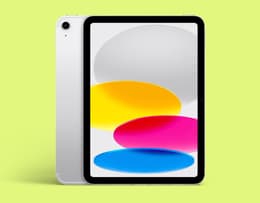
The latest iPad A16 is a smart budget buy.
Operating system: iPadOS 18
Colours: Silver / Blue / Yellow / Pink
Casing: Aluminium frame and back, scratch-resistant glass front
Dimensions: 9.79 x 7.07 x 0.28 in
Weight: 481 grams
Screen size: 11-inch
Screen resolution: 2360 x 1640 pixels at 264ppi
Display: Liquid Retina
Chip: Apple A16
CPU: 5-core
RAM: 6 GB
Storage: 128 GB / 256 GB / 512 GB
Sound: Landscape stereo speakers
Main camera: 12MP
Video capture: 4K
Battery life: Up to 10 hours of surfing the web on Wi‐Fi or watching video
Connectivity: Wi-Fi 6E
Apple Pencil support: Yes
What we like: | What we don't like: |
|---|---|
Affordable price | Lacks the sharpness of an OLED display |
Handles everyday student tasks with ease | No anti-reflection coating for outdoor use |
Decent battery life | Storage limited to 512 GB |
Video CenterStage feature for online classes | No Apple Intelligence |
Lightweight, sturdy build quality |
|
"…we think that most people will love it just as we did. That tablet looks and feels fresh, seems quite powerful, and promises a lot of cool features." - GSMArena
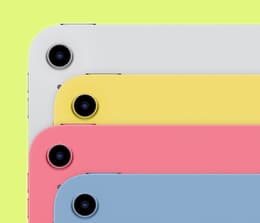
✨ The iPad A16 gives you advanced Apple tech at a budget price.
The big benefit of the iPad A16 is its comparatively low price. It offers the chance to get a bucketload of the latest Apple technology that fits into a student budget. In that sense, it’s the best iPad for university students. It doesn't have Apple's fastest chip, but it's still totally capable of handling many of the daily tasks of student life, like notetaking, recording lectures and collaborating with others online. It has premium build quality for its price: the aluminium casing is both robust and good-looking. There's enough storage for tons of documents, plus video tutorials and other study materials.
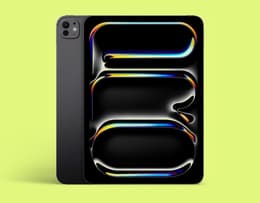
If you want power on tap, choose the iPad Pro M4.
Operating system: iPadOS 18
Colours: Silver / Space Black
Casing: Aluminium frame and back, scratch-resistant glass front
Dimensions: 9.83 x 6.99 x 0.21 in
Weight: (11-inch) 446 grams / (13-inch) 582 grams
Screen size: 11-inch / 13-inch
Screen resolution: (11-inch) 2420 x 1668 pixels at 264ppi / (13-inch) 2752 x 2064 pixels at 264ppi
Display: Ultra Retina XDR with Tandem OLED
Chip: Apple M4
CPU: 9-core or 10-core
RAM: 8 GB / 16 GB
Storage: 256 GB / 512 GB / 1 TB / 2 TB
Main camera: 12MP
Video capture: 4K
Battery life: Up to 10 hours of surfing the web on Wi‐Fi or watching video
Connectivity: Wi-Fi 6E
Apple Pencil support: Yes
What we like: | What we don't like: |
|---|---|
Very powerful – can run resource-intensive apps | Camera quality isn't better than previous models |
Extremely slim and lightweight | Could be a bit pricey |
Huge storage capacity | Accessories are costly |
Wonderful OLED screen |
|
Crisp, clear sound |
|
"The tandem-OLED screen in the iPad Pro M4 is simply on another level. It's the best iPad display ever…"
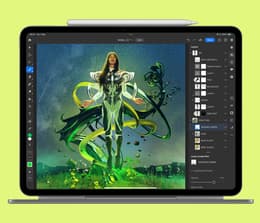
✨ Choose the powerful iPad Pro M4 for demanding design or STEM studies.
We won't make any bones about it. The iPad Pro M4 would be overkill for most students. You usually wouldn't want to buy a more expensive high-end tablet with seemingly unlimited power just for notetaking and basic coursework. As we said above, the iPad Air M3 can do all of this and more. But there are some degrees that require laptop-like performance from a tablet. Graphic design software is especially demanding, and the so-called STEM (science, technology, engineering, mathematics) degrees also demand a higher-spec device. The iPad Pro M4 is the best iPad for university students in these fields. Its powerful chip prevents software lag and handles multi-tasking without breaking a sweat.
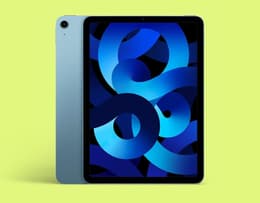
The iPad Air M1 mixes performance with affordability.
Operating system: iPadOS 15.4 (upgradable to iPadOS 26)
Colours: Starlight / Purple / Pink / Blue / Space Grey
Casing: Aluminium frame and back, scratch-resistant glass front
Dimensions: 9.75 x 7.03 x 0.24 in
Weight: 462 grams
Screen size: 10.9-inch
Screen resolution: 1640 x 2360 pixels at 264ppi
Display: Liquid Retina
Chip: Apple M1
CPU: Octa-core
RAM: 8 GB
Storage: 64 GB / 256 GB
Sound: Landscape stereo speakers
Main camera: 12MP
Video capture: 4K
Battery life: Up to 10 hours of surfing the web on Wi‐Fi or watching video
Connectivity: Wi-Fi 6
Apple Pencil support: Yes
What we like: | What we don't like: |
|---|---|
Excellent build quality | Liquid Retina screen could be better |
Versatile capabilities | Base model has limited storage capacity |
Good performance for most student tasks | Front camera placement awkward for video calls |
Slim and lightweight for portability |
|
Affordability |
|
"The iPad Air 2022 has unbridled utility, as the sheer range of tasks it can accomplish well is impressive."
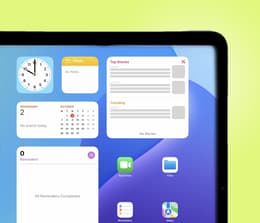
✨ You couldn't ask for better value for money in a student iPad
The iPad Air M1 strikes just the right balance between performance and affordability. It's more powerful than the budget iPad A16, without pricing itself out of range of your pocket. This makes it our top pick as a tablet that offers the best value for money for features vs price. It excels at multi-tasking and is light enough to be very comfortable carrying between lectures. It has all the features you could want in an Apple tablet, including Apple Intelligence, Siri and FaceTime. The front camera was upgraded over the previous generation for clearer and sharper video calling.
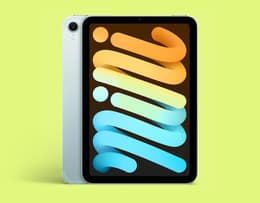
The iPad Mini A17 is ultra-compact.
Operating system: iPadOS 18
Colours: Blue / Space Grey / Starlight / Purple
Casing: Aluminium frame and back, scratch-resistant glass front
Dimensions: 7.69 x 5.31 x 0.25 in
Weight: 297 grams
Screen size: 8.3-inch
Screen resolution: 1488 x 2266 pixels at 327ppi
Display: Liquid Retina
Chip: Apple A17 Pro
CPU: Hexa-core
RAM: 8 GB
Storage: 128 GB / 256 GB / 512 GB
Sound: Landscape stereo speakers
Main camera: 12MP
Video capture: 4K
Battery life: Up to 10 hours of surfing the web on Wi‐Fi or watching video
Connectivity: Wi-Fi 6E
Apple Pencil support: Yes
What we like: | What we don't like: |
|---|---|
Ultra-compact and light | No external SD card slot |
Very sharp display for its size | No headphone jack |
Extremely portable | Limited multi-tasking capabilities |
Supports Apple Pencil for quick note taking |
|
Enough battery life for the whole day |
|
"The processor gives the tablet a huge push forward in performance while allowing it to run Apple Intelligence and support the advanced Apple Pencil Pro."
- PCMag
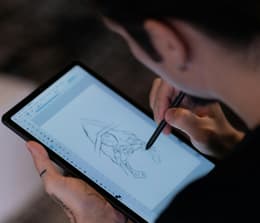
✨ The iPad Mini A17 is the ideal tool for a fast-paced, practical learning environment.
It might strike you as strange that we're including a tablet specifically for med students when choosing our best iPad for students, but anyone studying in these fields will instantly appreciate its utility. We'vechosen this one very deliberately. It's the smallest iPad you can get, which gives it an edge when medical students start doing rotations as part of their coursework. These fast-paced, information-packed sessions require lots of notetaking. Not only that, but students are also assessing patients and creating treatment plans on the fly. The iPad Mini A17 is the perfect device for this. It's a full-blown tablet that'slighter and more comfortable to carry around and work with than the larger ones. It also has all the power you need to run medical apps for after-hours study.
Feature | iPad Air M3 (2025) | iPad A16 (2025) | iPad Pro M4 | iPad Air M1 | iPad Mini A17 |
|---|---|---|---|---|---|
Screen size | 11-inch / 13-inch | 11-inch | 11-inch / 13-inch | 10.9-inch | 8.3-inch |
Display | Liquid Retina | Liquid Retina | Ultra Retina XDR with Tandem OLED | Liquid Retina | Liquid Retina |
Screen resolution | 2360 x 1640 (11") / 2048 x 2732 (13") at 264ppi | 2360 x 1640 pixels at 264ppi | 2752 x 2064 pixels at 264ppi | 1640 x 2360 pixels at 264ppi | 1488 x 2266 pixels at 327ppi |
Casing material | Aluminium | Aluminium | Aluminium | Aluminium | Aluminium |
Storage | 128 GB / 256 GB / 512 GB / 1 TB | 128 GB / 256 GB / 512 GB | 256 GB / 512 GB / 1 TB / 2 TB | 64 GB / 256 GB | 128 GB / 256 GB / 512 GB |
Battery life | Up to 10 hours active use | Up to 10 hours active use | Up to 10 hours active use | Up to 10 hours active use | Up to 10 hours active use |
Chipset | Apple M3 | Apple A16 | Apple M4 | Apple M1 | Apple A17 Pro |
Operating system | iPadOS 18 | iPadOS 18 | iPadOS 18 | iPadOS 15.4 | iPadOS 18 |
Apple Pencil support | Yes | Yes | Yes | Yes | Yes |
Main camera | 12MP | 12MP | 12MP | 12MP | 12MP |
Landscape stereo speakers | Landscape stereo speakers | 4-speaker | Landscape stereo speakers | Landscape stereo speakers | |
Weight | 460g (11") / 616g (13") | 481 grams | 582 grams | 462 grams | 297 grams |
Price New | £799 | £599 | £1099 | £599 | £649 |
Back Market Price | £570 | £310 | £744 | £305 | £425 |
*Prices listed from July 2026 and subject to change.
Course | iPad recommendation | Why it makes sense |
|---|---|---|
Biomedical science | iPad Air M4 | Fast enough for large PDFs, lab notes and compatible with Apple Pencil Pro |
Chemistry / Physics | iPad Air M4 (13‑inch) | Bigger screen for equations, diagrams and dense textbooks |
Maths | iPad Air M4 (11‑inch) | Lightweight, precise pencil support, great for handwritten problem solving |
Engineering | iPad Air M4 (13‑inch) | More screen real estate and enough power for CAD viewers, simulationsand multi-app workflows |
Computer science | iPad Air M4 | Coding is better on a MacBook, but if you want an iPad choose the Air M4 for documentation, diagrams and notetaking |
Apple Intelligence is Apple’s on-device AI system built into iPadOS. It rewrites, summarises, generates content across apps, understands personal context like files and messages, and keeps data secure and local. It also integrates with Siri and apps system-wide giving students smarter writing tools, better organisation, and intuitive control.
So, which current iPad models include Apple Intelligence?
Model | Apple Intelligence |
|---|---|
iPad Air M3/M4 | ✅ |
✅ | |
iPad Mini A17 Pro | ✅ |
iPad Air M1 | ✅ |
iPad A16 | ❌ |
64 GB is no longer viable for uni. Apps are larger, PDFs are heavier, and lecture recordings eat up space fast. 128 GB is the accepted minimum; it works well when paired with iCloud or OneDrive as overflow, especially on the budget-friendly iPad A16, where storage choice meaningfully affects price.
Students who download a lot of lectures, store offline textbooks or use creative and STEM apps should choose 256 GB, which offers more breathing room and avoids constant storage management. For most degrees, the choice is simple: 128 GB if you’re cloud-first; 256 GB if you’re not.
You can lower the price of buying an iPad from Back Market using our trade-in programme. We've made it simple and hassle-free. All you need to do is complete a short form to give us the details of your device, and you'll immediately receive an offer from one of our validated third-party refurbishers. If you like what you see, just ship it off to us for free. You'll be paid within 5 working days.
✨ At Back Market, you get the right combo of top quality and low prices.
Here's a top tip that could save you a fair wad of cash: buying a refurbished iPad gives you all the performance of a new one at a much lower price. You can get discounts of up to 50%. That kind of saving can go a long way when you're a student, especially if it's your first year living in your own digs. All our iPads have been totally restored. Worn parts have been replaced, and they've all had a nice deep-clean. They're then put through a barrage of tests to make sure that they perform up to the same standards as the original new benchmarks.
It's not too good to be true; you really will get a top-class iPad that can still last for years. We back this up with a 1-year commercial warranty to give you a safety net. We also offer an optional Back Market protection plan, which includes coverage for screen cracks, accidental drops and water damage. With this plan, you get two free repairs if necessary.
There are many great iPad apps that can help make student life easier, from those that help with organisation to those that can assist you in remembering where to be, those that help you take notes and many more. These are three top picks to get you started:
Grammarly: AI Writing Keyboard – Delivers real-time feedback on all your writing and provides AI assistance directly into your iPad without needing to copy and paste.
Notability – The most popular notetaking app for Apple, so you can take notes and annotate files easily.
Goodnotes - Write notes and use AI to capture notes, while you’re focusing.
To determine which iPad is best for students based on commonly cited priorities, our experts employed a comprehensive research methodology using the following criteria:
Affordability: We analysed each iPad’s current price on Back Market and explored value for money based on its specs, comparing them to other sites and other comparable tablet options.
Resolution: We examined the screen and camera resolutions of multiple models to determine which offered the highest resolution for the best price.
Storage: We researched the processor, storage capacity and specs of each available iPad, taking into account the minimum and maximum storage capacities for each model.
Battery life and charging: We investigated the maximum and average battery life of each model recommended, including research into factors such as screen brightness, background processing and Wi-Fi connectivity.
Screen size: We looked at average screen sizes across different iPad models and comparable models from other brands, both on Back Market and on other selling sites.
By analysing iPad comparisons, official product information and industry benchmarks, we have compiled a comprehensive assessment of the strengths and weaknesses of each iPad model, enabling you to make an informed decision when researching the best iPad for students.
Don’t forget iPad accessories for students. You can’t get the most out of an iPad without charging cables, Apple Pencils, keyboards and keyboard cases. Many students forget to factor these accessories into the total cost for their uni tech needs. Buying refurbished iPad accessories, just like a refurbished iPad, can save you significant sums.
You’ll find cases for specific models like the iPad 11” (2024), wireless mice, Apple Pencils and QWERTY keyboards. You’ll also find USB hubs in our laptop accessories, which can solve the age-old problem of limited USB ports on Apple tech. And if you're still weighing up an iPad against a laptop for your course, our guide to the best MacBook for students can help you decide.
So, we’ve reached the end of our student iPad analysis. We think a summary would be helpful after all this information!
The best all-round student iPad is the iPad Air M3, fast, lightweight and Apple Pencil Pro ready, it’s ideal for everyday productivity. The iPad A16 (2025) is best budget choice for students who need to save their pennies, 128GB storage is the minimum, while 256GB is worth it if you store lectures or textbooks offline. For science, engineering, and design students, the iPad Pro M4 delivers the power and display quality needed for complex diagrams, simulations and creative work. The best value for money remains the iPad Air M1, with excellent notetaking and reading capabilities. Medical students benefit from the iPad Mini A17, which is portable for hospital environments and reference.
Don’t forget buying refurbished on Back Market beats Apple Education pricing, giving you top tier devices at significantly lower cost, with the benefit of 1-year commercial warranty protection.
When not fighting the good fight for environmental sustainability, Haziq loves making reviews of everything and anything tech-related.