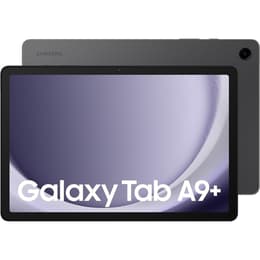
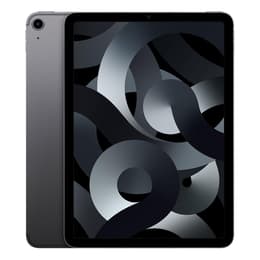

Galaxy Tab A9+ (11.0", 2023) Vs iPad Air 5 (2022, M1 series)

Galaxy Tab A9+ (11.0", 2023)
Starting at

Refurbished price:£144.00

Versus £309.90 new

See options
iPad Air 5 (2022, M1 series)
Starting at

Refurbished price:£275.00

Versus £669.00 new

See options

Ratings

The Samsung Galaxy Tab A9+ (released in October 2023) and the Apple iPad Air (5th generation), often referred to as the iPad Air M1 (released in March 2022), are two distinct tablet offerings. While both provide a portable computing experience, they cater to different ecosystems and user expectations. The Tab A9+ operates on Android, emphasizing media consumption and everyday tasks, whereas the iPad Air runs on iPadOS, known for its robust performance and creative capabilities. A key differentiator lies in their core processing power and display technologies.

Scores

Durability

Evaluating the long-term usability of tablets involves considering their release timeline, software support, and physical resilience.

  • Release Timeline: The Galaxy Tab A9+ was released in October 2023, making it a newer device compared to the iPad Air M1, which launched in March 2022. This difference in release dates can influence the duration of future software support. [2, 7]
  • Software Longevity: The iPad Air M1, running iPadOS, typically receives major operating system updates for an extended period, often 5-7 years from its release. The Galaxy Tab A9+, an Android tablet, generally receives fewer major OS updates, with Samsung's policy for A-series tablets being less defined than for its flagship S-series, which now receive up to seven years of updates. [7, 17, 33]
  • Repairability: While specific repairability scores can vary, both devices are designed with modern tablet construction, meaning repairs often require specialized tools and expertise. The physical build of both tablets is generally considered sturdy for their respective categories. [3, 10, 23, 39]

Year of Release

2023

2022

Compatible with latest Update

Yes

Yes

OS

Android

iPadOS

Performance

Performance is a critical aspect for tablets, influencing how smoothly applications run and how effectively users can multitask.

  • Processing Power: The iPad Air M1 is equipped with a powerful processor that delivers significant performance, enabling smooth handling of demanding applications, 4K video editing, and graphics-intensive games. [7, 24, 39, 40] The Galaxy Tab A9+ features a mid-range processor that capably manages everyday tasks such as web browsing, video streaming, and light multitasking. [1, 5, 10, 13, 16, 21, 34]
  • Multitasking and Responsiveness: The iPad Air M1 offers a highly responsive experience, allowing users to switch between multiple applications and manage complex workflows without noticeable slowdowns. [7, 24] The Galaxy Tab A9+ provides a generally smooth experience for typical usage, though it may exhibit minor stutters when loading very heavy applications or during intensive gaming sessions. [1, 13, 16]
  • Storage and Memory: The iPad Air M1 comes with 8GB of RAM and storage options of 64GB or 256GB, without expandable storage. [7, 9, 15, 23, 28] The Galaxy Tab A9+ is available with 4GB or 8GB of RAM and 64GB or 128GB of internal storage, with the added benefit of a microSD card slot for storage expansion up to 1TB. [2, 5, 12, 14, 18, 19, 26]

Memory (GB)

4 GB

8 GB

Screen quality

The display is a primary interface for tablets, and differences in technology and specifications can significantly impact the visual experience.

  • Display Technology and Clarity: The iPad Air M1 features a 10.9-inch Liquid Retina IPS LCD display with a resolution of 2360 x 1640 pixels, offering sharp visuals and accurate color reproduction. [7, 9, 11, 15, 23, 24, 25, 29] The Galaxy Tab A9+ has an 11-inch TFT LCD display with a resolution of 1920 x 1200 pixels, providing clear visuals for media consumption. [2, 3, 4, 6, 12, 14, 16, 18, 19, 26]
  • Brightness and Color: The iPad Air M1's display offers 500 nits of brightness, P3 wide color support, and True Tone technology, contributing to vibrant colors and good visibility in various lighting conditions. [7, 11, 15, 24, 25, 29] The Galaxy Tab A9+ display, while offering noticeable color uplift compared to older models, is not AMOLED-level and can appear washed out in direct sunlight. [1, 3, 10, 13]
  • Refresh Rate and Smoothness: The Galaxy Tab A9+ features a 90Hz refresh rate, which contributes to smoother scrolling and animations. [2, 3, 4, 12, 14, 16, 19, 26] The iPad Air M1 maintains a standard 60Hz refresh rate. [40]

Resolution

1200 x 1920

2360 x 1640

Screen type

TFT LCD

Liquid Retina display

Pixel density

210ppp

264ppp

Audiovisual

While tablets are not typically primary photography devices, their camera systems are important for video calls and casual captures.

  • Rear Camera Capabilities: The iPad Air M1 is equipped with a 12MP Wide rear camera that supports 4K video recording up to 60fps, capable of capturing quality pictures. [7, 9, 15, 23, 29] The Galaxy Tab A9+ includes an 8MP rear camera, which performs adequately in well-lit conditions and is suitable for scanning documents, with video recording up to 1080p at 30fps. [3, 12, 13, 14, 16, 20, 30, 35]
  • Front Camera and Video Calls: For video conferencing, the iPad Air M1 features a 12MP Ultra Wide front camera with Center Stage, which automatically adjusts to keep the user in frame. [7, 15, 23, 24, 25, 29] The Galaxy Tab A9+ has a 5MP front camera that is decent for video calls in good lighting. [3, 12, 13, 14, 16, 20, 30, 35]
  • Audio Experience: Both tablets offer stereo speakers, with the iPad Air M1 featuring landscape stereo speakers for an immersive media experience. [7, 9, 25, 29] The Galaxy Tab A9+ boasts quad speakers with Dolby Atmos support, providing reasonably loud audio with some depth. [1, 5, 14, 16, 19]

Miscellaneous

Beyond core performance, several practical features contribute to the overall user experience and device utility.

  • Connectivity and Ports: The iPad Air M1 supports Wi-Fi 6 and Bluetooth 5.0, with an optional 5G cellular variant, and includes a USB 3.1 Gen 2 Type-C port for fast data transfers and accessory compatibility. [7, 9, 23, 24, 25] The Galaxy Tab A9+ supports Wi-Fi 5 and Bluetooth 5.1, also offering a 5G variant and a USB-C port, alongside a 3.5mm headphone jack. [6, 10, 16, 18, 20]
  • Biometric Security: The iPad Air M1 integrates Touch ID into its power button for secure and convenient authentication. [7, 9, 24, 29] The Galaxy Tab A9+ relies on face recognition for unlocking, lacking a fingerprint sensor. [3, 10, 16]
  • Design and Handling: The iPad Air M1 has a thin and light design, weighing approximately 460g and measuring 6.1mm thick. [9, 23, 28] The Galaxy Tab A9+ is slightly heavier at around 480g (Wi-Fi model) and 6.9mm thick, featuring a sturdy plastic back. [2, 3, 6, 10, 12, 16, 18]

Weight

1 g

461 g

Screen size (in)

11.0

10.9

Network

Wi-Fi + 4G

Wi-Fi

Carrier compatibility

Unlocked

Without SIM Port

User feedback for the Galaxy Tab A9+ often highlights its large screen, 90Hz refresh rate, and expandable storage as positive attributes for media consumption and light productivity. Users appreciate its smooth performance for everyday tasks and the inclusion of a headphone jack. Criticisms sometimes point to the display's performance in bright sunlight and the absence of a fingerprint sensor. [1, 3, 10, 13, 16, 19, 21, 34, 35]

The iPad Air M1 is frequently praised for its exceptional performance, vibrant Liquid Retina display, and the versatility offered by iPadOS, especially for creative and demanding tasks. Its support for the Apple Pencil (2nd Gen) and Center Stage feature for video calls are also well-regarded. Some users have noted that battery life can be shorter than expected with heavy use or high brightness settings. [23, 24, 37, 38, 39, 40]

Users prioritizing a tablet for general media consumption, web browsing, and light productivity, who also value expandable storage and a headphone jack, may find the Galaxy Tab A9+ well-suited to their needs. Those seeking a powerful device for creative work, demanding applications, and a highly optimized software ecosystem, with a focus on long-term software support, might lean towards the iPad Air M1. Both devices are available as quality-assured refurbished options, providing an eco-friendly alternative for consumers.

See all articles

Our recent comparisons