Galaxy Tab A9+ (11.0", 2023) Vs iPad 8 (2020, A12 series)

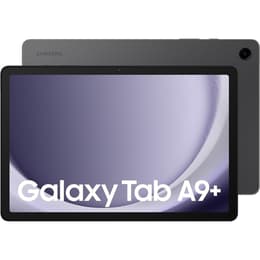
Galaxy Tab A9+ (11.0", 2023)
Starting at

Refurbished price:£144.00

Versus £309.90 new

See options
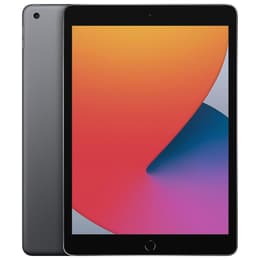
iPad 8 (2020, A12 series)
Starting at

Refurbished price:£90.00

Versus £329.00 new

See options

Ratings

The Samsung Galaxy Tab A9 Plus, released in October 2023, and the Apple iPad 8th Generation, launched in September 2020, are both tablets designed for general use. While the Galaxy Tab A9 Plus runs on Android with Samsung's One UI, the iPad operates on Apple's iPadOS. The primary distinctions between these two devices lie in their display technology, processing power, and ecosystem integration, catering to different user preferences and needs.

Scores

Durability

When considering the long-term usability of these tablets, their release timelines and software support are key factors.

  • Release Timeline: The Galaxy Tab A9 Plus is a more recent device, released in October 2023, making it three years newer than the iPad 8th Generation, which debuted in September 2020 [1, 3, 9, 12]. This difference in age inherently provides the Galaxy Tab A9 Plus with a longer potential lifespan for receiving current software and security updates.
  • Software Longevity: The iPad 8th Generation launched with iPadOS 14 and is capable of updating to iPadOS 17.x, with Apple typically providing major software updates for at least five to seven years from a device's release [2, 3, 15, 30, 32]. The Galaxy Tab A9 Plus, starting with Android 13 and One UI 5.1, is expected to receive at least two to three major Android updates and five years of security updates, with some sources suggesting up to four years of OS upgrades [6, 8, 10, 12, 20, 36]. This indicates that the iPad may offer a longer period of major OS updates, while the Galaxy Tab A9 Plus will still receive security patches for a considerable duration.
  • Repairability: The Galaxy Tab A9 Plus has a moderate repairability score, with accessible battery and cables, though screen removal can be a delicate process due to adhesive use [38]. Information on the iPad 8th Generation's specific repairability score is less readily available, but Apple devices generally require specialized tools and expertise for repairs.

Year of Release

2023

2020

Compatible with latest Update

Yes

Yes

OS

Android

iPadOS

Performance

The performance of a tablet dictates its responsiveness and capability for various tasks, from casual browsing to more demanding applications.

  • Processing Capabilities: The iPad 8th Generation is powered by a processor that delivers a significant performance improvement over its predecessor, making it capable of handling routine web browsing, simple sketching, photo-editing, and productivity applications smoothly [1, 17, 18, 26, 27, 29]. The Galaxy Tab A9 Plus features a processor that capably manages everyday tasks, media streaming, and light gaming, particularly with its higher RAM configurations [16, 20, 28]. However, it may experience slowdowns with graphically intensive games at their highest settings [5, 16].
  • Multitasking and Responsiveness: The iPad 8th Generation offers a fluid user experience for daily operations, with apps loading quickly and smooth transitions between tasks [18, 29]. The Galaxy Tab A9 Plus also provides a smooth experience for web browsing, social media, and light multitasking, with animations running smoothly, though not exceptionally fast [13, 16, 20]. The availability of an 8GB RAM variant on the Galaxy Tab A9 Plus can enhance its multitasking capabilities [6, 16, 28].
  • Storage Options: The iPad 8th Generation comes with 32GB or 128GB of internal storage, without an option for expansion [1, 3, 4, 18]. The Galaxy Tab A9 Plus offers 64GB or 128GB internal storage, with the added flexibility of expanding storage up to 1TB via a microSD card, which is beneficial for users with large media libraries or numerous applications [9, 12, 28, 34, 39].

Memory (GB)

4 GB

3 GB

Screen quality

The display is a central component of any tablet, influencing the visual experience for media consumption, productivity, and general interaction.

  • Display Technology and Resolution: The iPad 8th Generation features a 10.2-inch Retina IPS LCD with a resolution of 2160 x 1620 pixels, offering clear and sharp visuals [1, 2, 3, 11]. The Galaxy Tab A9 Plus has a larger 11.0-inch TFT LCD with a resolution of 1920 x 1200 pixels [5, 9, 12, 14, 20, 34, 39]. While the iPad's display offers a higher pixel density, the Galaxy Tab A9 Plus provides a larger viewing area.
  • Refresh Rate and Smoothness: The Galaxy Tab A9 Plus boasts a 90Hz refresh rate, which contributes to smoother scrolling and more fluid animations compared to the iPad 8th Generation's standard 60Hz refresh rate [5, 7, 16, 20, 23, 39]. This can make a noticeable difference in the perceived responsiveness of the interface and in fast-paced content.
  • Brightness and Viewing Experience: The iPad 8th Generation's display offers good brightness levels, making it suitable for various indoor lighting conditions [17, 27]. The Galaxy Tab A9 Plus's display is generally easy to see indoors, but direct sunlight can cause it to appear washed out, and some users might find the brightness could be higher for outdoor use [5, 16, 23].

Resolution

1200 x 1920

2160 x 1620

Screen type

TFT LCD

Retina display

Pixel density

210ppp

264ppp

Audiovisual

While tablets are not typically primary photography devices, their cameras are important for video calls, document scanning, and casual photo capture.

  • Camera System Capabilities: Both tablets feature an 8MP rear camera. The iPad 8th Generation has an 8MP main camera with an f/2.4 aperture, while the Galaxy Tab A9 Plus also has an 8MP main camera with autofocus [1, 2, 4, 5, 20, 34]. For front-facing cameras, the Galaxy Tab A9 Plus is equipped with a 5MP sensor, offering a clearer image for video calls compared to the iPad 8th Generation's 1.2MP front camera [5, 20, 21, 34].
  • Photography Performance: The rear camera on the iPad 8th Generation performs adequately in well-lit conditions but struggles in low light, producing noisy images [1, 25]. Similarly, the Galaxy Tab A9 Plus's rear camera is suitable for scanning documents and casual photography in good lighting, but its low-light performance is mediocre with noticeable noise [5, 7, 20]. Neither tablet is designed for high-end photography.
  • Video Recording and Audio: Both devices support 1080p HD video recording at 30 frames per second [4, 17, 21, 27, 34]. The Galaxy Tab A9 Plus features four speakers with Dolby Atmos support, providing an immersive sound experience for media consumption [7, 28]. The iPad 8th Generation has two speakers located on the bottom [29].

Miscellaneous

Beyond core specifications, several practical elements contribute to the overall user experience and device utility.

  • Connectivity Options: Both tablets support dual-band Wi-Fi (802.11ac) and offer cellular variants for on-the-go connectivity [2, 3, 11, 12, 14, 29]. The Galaxy Tab A9 Plus also includes 5G connectivity in its cellular model, offering potentially faster mobile data speeds where available [9, 12]. Both feature Bluetooth, with the Galaxy Tab A9 Plus supporting Bluetooth 5.1 and the iPad 8th Generation supporting Bluetooth 4.2 [2, 3, 11, 12, 14].
  • Port Types and Accessories: The Galaxy Tab A9 Plus uses a USB-C port for charging and data transfer, a modern and widely adopted standard [5, 12, 14, 16, 23]. It also retains a 3.5mm headphone jack [6, 16]. The iPad 8th Generation uses Apple's proprietary Lightning port [2, 3, 17, 29]. The iPad supports the first-generation Apple Pencil and Smart Keyboard, enhancing its utility for note-taking and typing [1, 17, 27, 29]. The Galaxy Tab A9 Plus does not support an S-Pen stylus [5, 16, 20].
  • Security and Design: The iPad 8th Generation features a physical Home button with integrated Touch ID for secure fingerprint authentication [17, 27, 29]. The Galaxy Tab A9 Plus relies on face recognition via its front-facing camera for biometric security, which is generally considered less secure than a fingerprint scanner [5, 16]. In terms of physical design, the Galaxy Tab A9 Plus has a slim build with a metal back, while the iPad 8th Generation features a glass front and aluminum back and frame [3, 13, 23].

Weight

1 g

490 g

Screen size (in)

11.0

10.2

Network

Wi-Fi + 4G

Wi-Fi

Carrier compatibility

Unlocked

Without SIM Port

The Samsung Galaxy Tab A9 Plus and the Apple iPad 8th Generation cater to distinct user needs, each with its own set of strengths and considerations. Users often praise the Galaxy Tab A9 Plus for its large 11-inch display with a 90Hz refresh rate, which provides a smooth visual experience for media consumption and general browsing [7, 16, 20]. Its expandable storage via microSD card is also a frequently highlighted advantage, offering flexibility for users with extensive digital content [28, 34]. Some users appreciate its multi-window capabilities and Samsung DeX support for a more desktop-like experience [16, 41]. Criticisms sometimes point to its display struggling in direct sunlight and the front-facing camera's quality for video calls not being exceptional [5, 7, 23].

The iPad 8th Generation is often lauded for its robust performance, thanks to its capable processor, which ensures smooth operation across a wide range of applications, including light gaming and productivity tasks [1, 18, 26]. Its long-term software support from Apple is a significant draw for users seeking extended device longevity [15, 32]. However, common concerns include its dated design with thicker bezels, the lower resolution of its front-facing camera for modern video conferencing, and the lack of expandable storage [1, 25, 29].

Users prioritizing a larger, smoother display for media consumption and the flexibility of expandable storage may find the Galaxy Tab A9 Plus well-suited to their needs. Its Android ecosystem and multitasking features could appeal to those accustomed to more open system customization [41]. Conversely, users who value consistent performance, a long software update cycle, and integration within the Apple ecosystem, especially if they already own other Apple devices, may lean toward the iPad 8th Generation. Its support for the Apple Pencil and Smart Keyboard also makes it a strong contender for students or professionals requiring precise input and typing capabilities.

For those considering either of these devices, exploring quality-assured refurbished options can provide an eco-friendly alternative, offering a sustainable choice without compromising on functionality.

See all articles

Our recent comparisons