Compare models
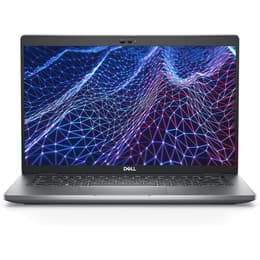
Dell Latitude 5430 14" Vs Microsoft Surface Laptop 4 13"
- 1-year minimum warranty
- Free delivery on all items
- Free 30-day returns
Differences at a glance
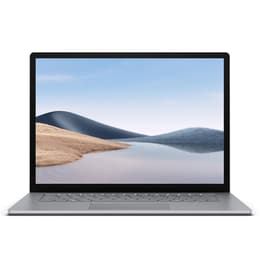
The Dell Latitude 5430 (2022) and the Microsoft Surface Laptop 4 13-inch (2021) are reliable productivity machines designed for everyday office tasks, academic projects, and mobile workflows. While the Dell Latitude 5430 leans into enterprise modularity and robust physical connectivity, the Microsoft Surface Laptop 4 prioritizes an ultra-slim aluminum or fabric-wrapped form factor with a touch-enabled screen. Both computers operate within the Windows ecosystem, ensuring consistent software compatibility and straightforward navigation for all users.
Available Models
Storage (GB)
Processor
Memory (GB)
Scores
Durability
When comparing practical longevity and structural endurance, both laptops handle daily travel well, though they approach long-term maintenance and software support through different structural designs.
- Release Timeline and Updates: The Dell Latitude 5430 debuted in 2022, holding a slight advantage in overall hardware age over the 2021 Surface Laptop 4. Both models receive regular operating system security patches and feature updates from Microsoft.Repairability and Upgrades: The Dell Latitude 5430 features a modular build layout that allows technicians to replace internal components like storage drives and memory modules with relative ease. The Surface Laptop 4 utilizes a sealed, slim casing that limits user-level modifications and complicates component repairs.Expected Lifespan: Both machines provide stable operational lifespans spanning several years, though users who value straightforward component servicing and hardware flexibility will find the Dell model easier to maintain over time.
Year of Release
2022
2021
OS
Windows 11
Windows 11
Performance
Both laptops deliver snappy daily responsiveness for web browsing, document editing, and multi-window multitasking, utilizing efficient internal processors that balance speed with energy conservation.
- Multitasking and Responsiveness: Office applications, browser tabs, and video conferencing software open quickly and run concurrently without noticeable stutter on both devices. Configurations with higher memory allowances handle heavy workloads and large data sets more smoothly.Battery Behavior: Battery endurance varies based on daily demands, with both laptops comfortably lasting through standard work or study sessions. Users streaming continuous video or executing processor-heavy tasks will experience faster battery depletion and require an earlier recharge.Storage Options: Both systems utilize fast solid-state storage architecture, ensuring rapid file transfers and quick system boot times, with multiple capacity tiers available depending on individual archiving needs.
Graphic card
Integrated Graphics
Integrated Graphics
Screen quality
Display characteristics differ notably in aspect ratio and touch capability, affecting how documents, media, and web pages appear during daily use.
- Display Technology and Resolution: The Microsoft Surface Laptop 4 features a high-resolution PixelSense touchscreen with a 3:2 aspect ratio, providing extra vertical workspace for reading documents and viewing spreadsheets. The Dell Latitude 5430 offers traditional 16:9 widescreen panel options with anti-glare coatings designed to minimize reflections under harsh overhead office lighting.Brightness and Outdoor Legibility: Maximum brightness levels on both screens support comfortable indoor visibility, though outdoor use under direct sunlight requires finding shaded areas to maintain clear visibility.Visual Clarity: Text rendering is sharp and distinct across both devices, making them well-suited for extended reading and writing tasks without causing excessive visual fatigue.
Resolution
1920 x 1080
2256 x 1504
Screen type
IPS
LED
Audiovisual
Media consumption, video calling, and audio recording capabilities provide reliable performance for remote collaboration and daily entertainment.
- Camera Systems: Both laptops feature integrated webcameras situated above the display, suitable for daily video meetings, online classes, and virtual check-ins with adequate room lighting.Audio and Speaker Output: Built-in speakers deliver clear dialogue for voice calls and casual media streaming, though external headphones or speakers provide deeper bass and richer sound profiles for immersive music listening.Microphone Performance: Dual microphone arrays capture voice input clearly during virtual gatherings, filtering out minor background hums to keep communication intelligible.
Miscellaneous
Physical design, port selections, and handling characteristics determine how easily each laptop integrates into mobile or stationary work environments.
- Port Selection: The Dell Latitude 5430 provides a comprehensive array of physical connections, including standard USB ports, a dedicated video output, and a network jack, reducing the need for external adapters. The Surface Laptop 4 keeps a minimalist profile with a single universal connector and a traditional headphone jack.Build Materials and Weight: The Surface Laptop 4 emphasizes sleek portability with a lightweight metallic chassis, while the Latitude 5430 uses sturdy composite materials designed to withstand frequent travel and demanding daily handling.Security Features: Both models incorporate hardware-based security chips and biometric sign-in options, such as facial recognition on the Microsoft device and optional fingerprint reading on the Dell system.
Weight
1360 g
1288 g
Screen size
14
13
What the community thinks
Choosing between these two portable computers depends heavily on individual workflow preferences and daily hardware requirements. Users who prioritize physical port variety, straightforward component maintenance, and traditional widescreen displays will find the Dell Latitude 5430 a practical fit for their routine. Conversely, users who value a lightweight build, a tall touch-enabled screen for document editing, and a clean minimalist aesthetic often lean toward the Microsoft Surface Laptop 4.
Opting for a quality-assured refurbished option serves as an eco-friendly alternative that extends the operational lifespan of these capable machines while reducing electronic waste. Both devices deliver reliable performance for students, remote professionals, and travelers seeking dependable daily computing tools without unnecessary complexity.