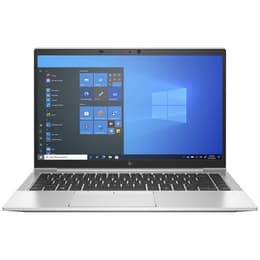
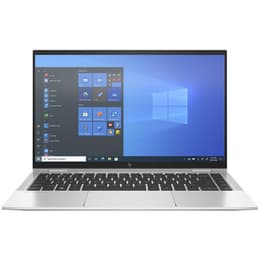

HP EliteBook 840 G8 14" Vs HP EliteBook X360 1040 G8 14"

HP EliteBook 840 G8 14"
Starting at

Refurbished price:£272.00

Versus £602.25 new

See options
HP EliteBook X360 1040 G8 14"
Starting at

Refurbished price:£405.00

Versus £1,184.02 new

See options

Ratings

The HP EliteBook 840 G8 14 and the HP EliteBook x360 1040 G8 14 are business-oriented laptops, both released in 2021. While they share a foundation of robust security features and powerful internal components, their primary distinction lies in their form factor: the 840 G8 offers a traditional clamshell laptop experience, whereas the x360 1040 G8 provides the versatility of a 2-in-1 convertible device. Both models operate on the Windows platform, powered by 11th Generation Intel Core processors, catering to professionals seeking reliable performance and advanced features.

Scores

Durability

Both the HP EliteBook 840 G8 14 and the HP EliteBook x360 1040 G8 14 were introduced in 2021, meaning they benefit from a similar timeline for software updates and security patches from HP and Microsoft. HP's EliteBook series is generally known for its business-rugged construction, designed to withstand the demands of daily professional use.

  • Software Longevity: As 2021 models, both devices are expected to receive operating system and security updates for several years, ensuring continued functionality and protection.
  • Repairability and Upgradability: The EliteBook 840 G8 generally offers more flexibility for internal upgrades, particularly with its RAM, which can be expanded up to 64GB across two slots. In contrast, the EliteBook x360 1040 G8 typically features soldered RAM, limiting upgrades to a maximum of 32GB.
  • Build Quality: Both laptops feature durable aluminum chassis, contributing to their overall practical lifespan. The EliteBook x360 1040 G8 further enhances its screen durability with Corning Gorilla Glass 5, offering additional protection against scratches and impacts.

Year of Release

2020

2020

OS

Windows 11

Windows 11

Performance

Both EliteBook models are equipped with 11th Generation Intel Core processors and integrated Intel Iris Xe Graphics, providing a solid foundation for business applications and multitasking. The choice between them in terms of performance often comes down to specific configuration options and how those align with user needs.

  • Processing Power: Both devices handle demanding business applications, web browsing with multiple tabs, and video conferencing smoothly. Users can expect quick application loading and responsive system performance for everyday professional tasks.
  • Multitasking Capability: The EliteBook 840 G8 offers greater potential for memory expansion, supporting up to 64GB of RAM, which can be beneficial for users who frequently run numerous applications simultaneously or work with large datasets. The EliteBook x360 1040 G8, with its maximum of 32GB of soldered RAM, is still capable for most multitasking scenarios but offers less headroom for future memory-intensive tasks.
  • Storage Solutions: Both laptops utilize fast PCIe NVMe SSDs, ensuring rapid boot times and quick access to files and applications, contributing to an efficient workflow.

Memory (GB)

16 GB

32 GB

Processor

Core i5-1145G7

Core i7-1185G7

Graphic card

Integrated Graphics

Integrated Graphics

Screen quality

The display experience on these two EliteBook models is similar in core specifications but diverges significantly in functionality, catering to different interaction preferences.

  • Display Technology and Resolution: Both laptops feature 14-inch Full HD (1920 x 1080) IPS displays, offering clear visuals and good viewing angles suitable for productivity and media consumption.
  • Brightness and Privacy: Both models offer display options with brightness levels up to 400 nits, providing adequate visibility in various indoor lighting conditions. Certain configurations of the 840 G8 can reach up to 1000 nits with the HP Sure View Reflect integrated privacy screen, which is also an option on the x360 1040 G8, helping to protect sensitive information from prying eyes.
  • Interactive Experience: The EliteBook x360 1040 G8 stands out with its touch-enabled display and 360-degree hinge, allowing it to transform into tablet, tent, or stand modes. This flexibility is ideal for interactive tasks, presentations, or digital note-taking, often complemented by pen support. While the 840 G8 can be configured with a touch display, it retains its traditional laptop form factor.

Audiovisual

For communication and multimedia, both EliteBook models provide a consistent and high-quality audio-visual experience, essential for today's hybrid work environments.

  • Camera System: Both the HP EliteBook 840 G8 14 and the EliteBook x360 1040 G8 14 are equipped with a 720p HD IR privacy camera. This camera is suitable for video calls and supports facial recognition for secure logins, with a physical shutter for enhanced privacy.
  • Audio Quality: Audio on both devices is enhanced by Bang & Olufsen, featuring dual stereo speakers that deliver clear sound for video conferences and media playback. The inclusion of multi-array microphones helps in capturing clear audio while minimizing background noise during calls.
  • Video Recording: The 720p camera provides adequate quality for standard video recording needs in a business context, focusing on clarity for communication rather than advanced cinematic features.

Miscellaneous

Beyond their core computing capabilities, both EliteBook models offer a suite of practical features designed to enhance the user experience in a professional setting.

  • Connectivity Options: Both laptops support modern wireless standards, including Wi-Fi 6, for fast and reliable internet access. They also offer optional 4G LTE or 5G connectivity, providing internet access on the go without relying on Wi-Fi hotspots.
  • Port Selection: A comprehensive selection of ports is available on both devices, including Thunderbolt 4 (USB-C) for high-speed data transfer and external display support, multiple USB-A ports for legacy peripherals, an HDMI port for external monitors, and a headphone/microphone combo jack.
  • Design and Security: Both EliteBooks are crafted with aluminum chassis, contributing to their premium feel and durability. They are lightweight and thin, with the x360 1040 G8 being marginally thinner. Security features are robust across both, including fingerprint readers, IR cameras for facial recognition, and HP's comprehensive security suite like Sure Sense and Wolf Security, designed to protect against various threats.

Weight

2500 g

1310 g

Screen size

14

14

The HP EliteBook 840 G8 14 and the HP EliteBook x360 1040 G8 14 are both strong contenders in the business laptop segment, each excelling in different areas based on user priorities. Users frequently praise the EliteBook 840 G8 for its robust, traditional laptop design and its potential for RAM upgrades, making it a reliable workhorse for sustained productivity. Common feedback highlights its comfortable keyboard and overall solid performance for everyday business tasks.

On the other hand, the EliteBook x360 1040 G8 receives acclaim for its exceptional versatility as a 2-in-1 convertible. Users appreciate its touch-enabled display, pen support, and the ability to adapt to various working styles, from traditional laptop use to tablet mode for presentations or creative work. Its premium build and comprehensive security features are also frequently noted as significant advantages.

For users prioritizing a dependable, traditional laptop experience with the flexibility for future memory upgrades and a focus on core productivity in a clamshell form factor, the HP EliteBook 840 G8 14 is well-suited. Professionals who spend most of their time typing and require a sturdy, no-frills machine will find this model aligns with their needs. Conversely, the HP EliteBook x360 1040 G8 14 is an excellent choice for individuals who require adaptability in their device, frequently engage in interactive tasks, or need the convenience of a tablet alongside a laptop. This includes professionals who travel often, give presentations, or utilize digital inking for notes and creative work.

Both models offer a compelling package for business users, and considering a quality-assured refurbished option for either can provide an eco-friendly alternative to purchasing new.

See all articles

Our recent comparisons