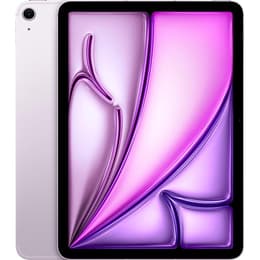

Galaxy Tab S9 FE+ (12.4", 2023) Vs iPad Air 7 (2025, M3 series)

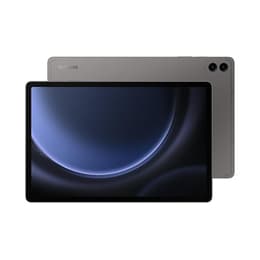
Galaxy Tab S9 FE+ (12.4", 2023)
Starting at

Refurbished price:£337.00

Versus £799.00 new

See options
iPad Air 7 (2025, M3 series)
Starting at

Refurbished price:£456.00

Versus £599.00 new

See options

Ratings

The Samsung Galaxy Tab S9 FE+ (2023) and the Apple iPad Air (M3, 2025) are both prominent tablets designed for a range of tasks, from productivity to entertainment. While the Galaxy Tab S9 FE+ runs on Android, offering a versatile and open ecosystem, the iPad Air operates on iPadOS, known for its streamlined experience and strong app optimization. Key differences lie in their underlying processing power, display technology, and integrated stylus support.

Scores

Durability

When considering the long-term usability of these tablets, their release timelines and software support policies are important factors.

  • Software Longevity: The Galaxy Tab S9 FE+, released in October 2023, is expected to receive four major Android OS updates and five years of security patches, extending its software support until approximately Android 17. The iPad Air (M3, 2025), released in March 2025, typically benefits from Apple's longer software support, often receiving iPadOS updates for five to seven years or more, with security updates continuing even longer.
  • Physical Durability: The Galaxy Tab S9 FE+ features an aluminum build and boasts an IP68 rating for dust and water resistance, offering a degree of protection against environmental elements. The iPad Air (M3) also utilizes an aluminum unibody design, providing a robust feel, though it does not carry an official IP water resistance rating.
  • Repairability: Both devices are designed with modern tablet construction, which can present challenges for user-initiated repairs. Professional repair services are generally recommended for both models.

Year of Release

2023

2025

Compatible with latest Update

Yes

Yes

OS

Android

iPadOS

Performance

The performance of a tablet dictates its responsiveness and capability to handle various applications and tasks.

  • Processing Power: The Galaxy Tab S9 FE+ is equipped with a processor that capably handles everyday tasks, web browsing, and moderate multitasking. Users can expect smooth performance for most applications and casual gaming. The iPad Air (M3) features a significantly more powerful processor, enabling exceptionally fluid multitasking, demanding creative applications, and high-fidelity gaming with advanced graphics rendering capabilities.
  • Multitasking and Responsiveness: The iPad Air's processor allows for more seamless transitions between applications and can manage a greater number of intensive tasks simultaneously without noticeable slowdowns. The Galaxy Tab S9 FE+ provides a solid experience for typical tablet usage, though it may exhibit occasional stutters when heavily loaded with multiple demanding apps.
  • Storage Options: Both tablets offer various internal storage configurations, allowing users to choose based on their needs for apps, media, and documents. The iPad Air (M3) offers storage options up to 1TB, while the Galaxy Tab S9 FE+ is available with up to 256GB of internal storage, expandable via a microSD card.

Memory (GB)

8 GB

8 GB

Screen quality

The display is a primary interaction point, and both tablets offer distinct visual experiences.

  • Display Technology and Size: The Galaxy Tab S9 FE+ features a 12.4-inch IPS LCD display, providing a large canvas for content consumption and productivity. The iPad Air (M3) is available in two sizes: an 11-inch and a 13-inch Liquid Retina IPS LCD display, offering users a choice between a more portable or expansive viewing area.
  • Resolution and Clarity: Both tablets offer high-resolution displays, ensuring sharp text and clear images for reading, browsing, and media. The Galaxy Tab S9 FE+ has a resolution of 2560 x 1600 pixels. The 11-inch iPad Air (M3) has a 2360 x 1640 resolution, and the 13-inch model features a 2732 x 2048 resolution.
  • Refresh Rate and Brightness: The Galaxy Tab S9 FE+ offers a 90Hz refresh rate, contributing to smoother scrolling and animations. The iPad Air (M3) maintains a standard 60Hz refresh rate. Both displays provide ample brightness for indoor use, with the iPad Air's Liquid Retina display generally offering strong outdoor visibility.

Resolution

1600 x 2560

2360 x 1640

Screen type

IPS LCD

Liquid Retina display

Pixel density

250ppp

264ppp

Audiovisual

Tablet cameras are useful for video calls, document scanning, and casual photography, and both devices include capable systems.

  • Rear Camera System: The Galaxy Tab S9 FE+ includes an 8-megapixel main rear camera and an 8-megapixel ultrawide camera, suitable for capturing everyday moments and scanning documents. The iPad Air (M3) features a 12-megapixel wide rear camera, capable of capturing detailed photos and 4K video.
  • Front Camera for Video Calls: For video conferencing, the Galaxy Tab S9 FE+ is equipped with a 12-megapixel front camera. The iPad Air (M3) also has a 12-megapixel front-facing ultra-wide camera, which is positioned on the longer edge, making it well-suited for landscape video calls.
  • Video Recording: The Galaxy Tab S9 FE+ can record video at up to 4K resolution at 30 frames per second. The iPad Air (M3) also supports 4K video recording, offering smooth and stable footage.

Miscellaneous

Beyond core specifications, several practical features contribute to the overall user experience.

  • Connectivity: Both tablets support modern wireless standards. The Galaxy Tab S9 FE+ includes Wi-Fi 6 and Bluetooth 5.3, with an optional 5G variant. The iPad Air (M3) steps up to Wi-Fi 6E and Bluetooth 5.3, also offering optional 5G connectivity for cellular models.
  • Ports and Accessories: The Galaxy Tab S9 FE+ features a USB-C 2.0 port for charging and data transfer and includes the S Pen stylus in the box. The iPad Air (M3) utilizes a USB-C port with faster data transfer speeds and supports the Apple Pencil Pro and Magic Keyboard, which are sold separately.
  • Biometric Security: The Galaxy Tab S9 FE+ uses a fingerprint sensor for secure unlocking. The iPad Air (M3) integrates Touch ID into its power button for biometric authentication.
  • Design and Handling: The Galaxy Tab S9 FE+ weighs 628g (Wi-Fi model) and measures 6.5mm thick. The 11-inch iPad Air (M3) weighs 461g, while the 13-inch model weighs 617g, both with a thickness of 6.1mm. These differences can impact portability and comfort during extended use.

Weight

627 g

460 g

Screen size (in)

12.4

11

Network

Wi-Fi

Wi-Fi

Carrier compatibility

Unlocked

Without SIM Port

The Samsung Galaxy Tab S9 FE+ and the Apple iPad Air (M3, 2025) cater to different user preferences and priorities. Users often praise the Galaxy Tab S9 FE+ for its inclusive S Pen, larger display size in its category, and robust build with water resistance. Some users note that its performance, while solid for daily tasks, may not match the fluidity of higher-end tablets for very demanding applications. The iPad Air (M3) is frequently lauded for its exceptional processing power, the extensive app ecosystem optimized for iPadOS, and its premium accessory support. Potential considerations for some users might include the separate purchase required for its stylus and keyboard accessories.

Users prioritizing a large display, integrated stylus, and a more open Android ecosystem for media consumption and general productivity may find the Galaxy Tab S9 FE+ to be a suitable choice. Conversely, individuals who require top-tier performance for creative work, advanced gaming, or a highly optimized software experience with a wide array of professional-grade applications will likely lean towards the iPad Air (M3). Both devices offer reliable performance within their respective ecosystems, and choosing between them often comes down to personal preference for operating system and specific use cases. For those considering either device, exploring quality-assured refurbished options can provide an eco-friendly alternative.


See all articles

Our recent comparisons