
Compare models

Lenovo ThinkPad T14 G2 14" Vs Microsoft Surface Pro 9 13"

  • 1-year minimum warranty
  • Free delivery on all items
  • Free 30-day returns
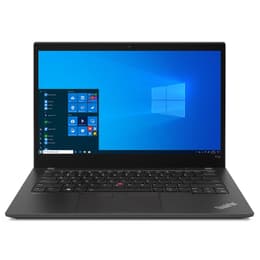
Lenovo ThinkPad T14 G2 14"
Starting at

Refurbished price:£364.00

Versus £799.00 new

See options
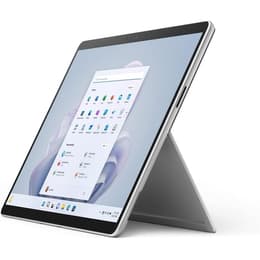
Microsoft Surface Pro 9 13"
Starting at

Refurbished price:£1,039.00

Versus £2,100.00 new

See options

Differences at a glance

The Lenovo ThinkPad T14 Gen 2 (2021) and the Microsoft Surface Pro 9 (2022) represent two distinct approaches to portable computing, balancing traditional laptop ergonomics with versatile tablet design. While the ThinkPad offers a classic clamshell layout focused on robust typing and connectivity, the Surface Pro provides a modular hybrid experience with a detachable keyboard. Both run on Windows operating systems, but their physical form factors cater to entirely different working habits and mobility needs.

Available Models

Storage

Processor

Memory

Scores

Durability

When examining longevity and hardware support, both devices offer solid build quality designed for extended use, though their repair and upgrade paths differ significantly.

  • Software and Support Timeline: Both models receive regular Windows operating system updates and security patches, with the slightly newer Surface Pro maintaining support slightly further into the decade.
  • Repairability and Upgrades: The ThinkPad features a modular internal layout with a replaceable battery and upgradeable components, whereas the Surface Pro uses a sealed chassis that makes physical repairs and component swaps more challenging.
  • Expected Lifespan: Choosing a quality-assured refurbished option for either device extends their operational life cycle while reducing electronic waste, making both sustainable choices for long-term daily computing.

Year of Release

2021

2022

Last Os Compatibility

Yes

Yes

OS

Windows 11

Windows 11

Performance

Underneath their different exteriors, both machines handle everyday multitasking, office productivity, and web browsing efficiently, though their thermal design impacts sustained high workloads.

  • Storage and Memory: Both configurations offer flexible solid-state storage sizes and sufficient memory allocations to run multiple productivity applications simultaneously without noticeable lag.
  • Everyday Speed and Responsiveness: Applications launch quickly and multitasking remains smooth during standard office tasks, web research, and media playback on both systems.
  • Power Management: Battery behavior varies based on workflow intensity, with the traditional laptop design accommodating a larger battery cell for steady endurance during mobile work sessions.

Graphic card

Integrated Graphics

Integrated Graphics

Screen quality

The visual experience differs notably due to the contrasting screen proportions and panel technologies built into each device.

  • Display Technology: The ThinkPad utilizes a standard 14-inch widescreen panel suited for side-by-side window multitasking, while the Surface Pro features a taller 13-inch touch-enabled screen optimized for vertical document reading and handwritten notes.
  • Clarity and Resolution: Both screens provide sharp text rendering and accurate color reproduction, making them comfortable for extended reading, writing, and spreadsheet management.
  • Brightness and Outdoor Visibility: Adequate panel brightness levels allow for comfortable viewing in brightly lit indoor environments, though direct outdoor sunlight requires shade management on both screens.

Resolution

1920 x 1080

2880 x 1920

Screen type

IPS

LCD

Camera

Audiovisual

Media consumption and communication capabilities are tailored to remote collaboration and everyday multimedia use.

  • Webcam and Video Calls: Both models are equipped with clear front-facing camera systems and reliable microphone arrays that isolate voice sound effectively during virtual meetings and online classes.
  • Speaker Output: Integrated stereo speakers deliver clear dialogue for video conferences and casual media streaming, though external headphones are recommended for immersive listening.
  • Photography Features: While rear-facing documentation cameras are absent on the traditional laptop, the Surface Pro includes a secondary rear camera useful for quick document scanning in tablet mode.

Miscellaneous

Physical design elements and connectivity ports define how each device integrates into various workspace setups and travel routines.

  • Connectivity Options: The ThinkPad includes a comprehensive array of built-in ports such as standard USB, USB-C, and HDMI connections, whereas the Surface Pro relies primarily on USB-C ports and requires external adapters for legacy accessories.
  • Portability and Handling: The Surface Pro offers an ultra-lightweight tablet body that travels easily in small bags, while the ThinkPad provides a sturdy, traditional laptop chassis with an integrated mechanical keyboard.
  • Security Features: Both devices support secure biometric authentication options, including facial recognition and fingerprint scanning, to protect user data.

Weight

1530 g

880 g

Screen size

14

13

What the community thinks

Users navigating the choice between the Lenovo ThinkPad T14 Gen 2 and the Microsoft Surface Pro 9 will find that their decision largely depends on physical form factor preferences and daily workflow styles. Users prioritizing a traditional lap-friendly typing experience, extensive built-in ports, and straightforward hardware upkeep will find the ThinkPad well-suited to their needs. Conversely, users who value a lightweight detachable tablet design, touchscreen versatility, and optimized vertical viewing for digital note-taking may lean toward the Surface Pro.

Community discussions frequently highlight the ThinkPad for its reliable keyboard comfort and port selection, while the Surface Pro receives consistent praise for its screen clarity and portability. Opting for a quality-assured refurbished device provides an eco-friendly alternative that supports sustainability goals without compromising on system reliability. Ultimately, evaluating how you intend to use the device—whether at a fixed desk or on the move—will clarify which model aligns best with your daily routine.


Our recent comparisons