
Compare models
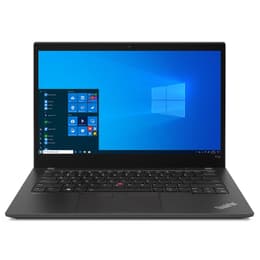
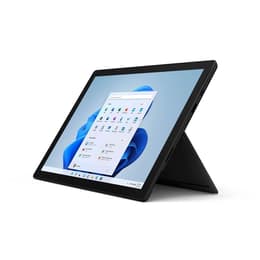
Lenovo ThinkPad T14 G2 14" Vs Microsoft Surface Pro 7 12"
- 1-year minimum warranty
- Free delivery on all items
- Free 30-day returns
Differences at a glance
The Lenovo ThinkPad T14 G2 (2021) and the Microsoft Surface Pro 7 (2019) represent two distinct approaches to portable computing, catering to different styles of work and mobility. The Lenovo ThinkPad T14 G2 is a traditional 14-inch clamshell laptop built for productivity and robust connectivity, while the Microsoft Surface Pro 7 is a versatile 12-inch detachable tablet that transforms into a laptop with an optional keyboard cover. While both run on Windows and handle everyday tasks effectively, they diverge significantly in form factor, input methods, and hardware flexibility.
Choosing between these devices depends largely on whether a conventional typing experience and comprehensive port selection take priority, or if a lightweight, flexible tablet design is more suitable for daily routines.
Available Models
Storage (GB)
Processor
Memory (GB)
Scores
Durability
When evaluating structural longevity and software support, both devices handle standard office workloads well, though their physical designs age differently over extended periods of daily use.
- Software longevity: Both devices support current Windows operating systems and receive regular security updates, ensuring several more years of reliable operation for everyday professional tasks.
- Repairability and build: The traditional laptop chassis of the Lenovo model allows for straightforward component replacement and upgrades, whereas the sealed tablet design of the Microsoft device presents more challenges for internal maintenance.
- Expected lifespan: Opting for a quality-assured refurbished option provides a sustainable choice that extends the active life cycle of these reliable productivity machines while minimizing electronic waste.
Year of Release
2021
2019
Last Os Compatibility
Yes
Yes
OS
Windows 11
Windows 11
Performance
System responsiveness and battery behavior vary due to internal cooling designs, processor generations, and overall hardware configurations tailored to their distinct form factors.
- Multitasking and storage: Both models handle web browsing, document editing, and video streaming smoothly, though the traditional laptop design offers better thermal dissipation during prolonged heavy workloads.
- Battery behavior: The larger footprint of the 14-inch device accommodates a higher-capacity battery that typically sustains a full workday of mobile tasks, while the compact tablet model requires more frequent charging during intensive use.
- System responsiveness: Solid-state storage ensures rapid boot times and quick application loading on both devices, maintaining fluid navigation across multitasking scenarios.
Graphic card
Integrated Graphics
Integrated Graphics
Screen quality
Display characteristics shape the visual experience, balancing screen dimensions, resolution clarity, and panel brightness across different working environments.
- Display technology: The Lenovo features a standard matte or glossy 14-inch panel designed to reduce glare under fluorescent office lighting, while the Microsoft device utilizes a glossy, high-resolution touch screen with a 3:2 aspect ratio optimized for document viewing.
- Brightness and outdoor visibility: Both screens provide adequate luminance for indoor office spaces, though bright outdoor environments or direct sunlight require higher backlight settings on both models.
- Viewing experience: The larger diagonal workspace on the laptop suits split-screen multitasking, whereas the compact tablet screen offers enhanced touch and stylus interactivity for note-taking and sketching.
Resolution
1920 x 1080
2736 x 1824
Screen type
IPS
IPS
Audiovisual
Media consumption, audio output, and video conferencing capabilities reflect the distinct hardware layouts of a standard laptop versus a media-focused tablet.
- Audio output: Built-in speakers on both models deliver clear voice reproduction for virtual meetings, though neither provides deep bass for immersive music playback without external headphones or speakers.
- Camera systems: The Microsoft device includes higher-resolution front and rear cameras suited for scanning documents and casual photography, whereas the Lenovo relies on a standard webcam focused on video conferencing.
- Microphone performance: Integrated array microphones on both machines capture voice audio clearly during online calls, filtering out ambient room noise effectively.
Miscellaneous
Physical dimensions, weight distribution, and port availability define how each device integrates into mobile workspaces and travel routines.
- Port selection: The traditional laptop provides a comprehensive array of physical connections including standard USB ports, HDMI, and network jacks, while the tablet relies primarily on a compact port layout requiring adapters for legacy accessories.
- Weight and handling: The 14-inch laptop offers a sturdy, balanced base for lap use, whereas the 12-inch tablet body provides an ultra-lightweight profile that benefits frequent travelers and standing presenters.
- Input devices: The Lenovo features a renowned mechanical keyboard with deep travel and a physical trackpoint, while the Microsoft relies on a detachable fabric keyboard cover that prioritizes thinness.
Weight
7500 g
775 g
Screen size
14
12
What the community thinks
User discussions across online communities frequently highlight the Lenovo ThinkPad T14 G2 for its dependable mechanical keyboard, extensive port variety, and sturdy build quality that suits desk-bound productivity. Conversely, owners of the Microsoft Surface Pro 7 often praise its exceptional portability, vibrant touch display, and flexible tablet mode that adapts easily to reading or creative sketching. Common criticisms for the laptop focus on its heavier footprint during travel, while tablet users frequently note the challenges of using a flexible keyboard on unstable surfaces like laps.
Users prioritizing traditional typing comfort, robust physical connectivity, and a larger screen workspace will find the Lenovo well-suited to their daily routines. Meanwhile, users prioritizing maximum portability, touch-screen interaction, and a lightweight travel profile may lean toward the Microsoft device. Considering an eco-friendly alternative like a quality-assured refurbished option provides a sustainable choice for acquiring either of these capable productivity tools without compromising on reliability.