Dell Latitude 5300 13" Vs Microsoft Surface Pro 7 12"

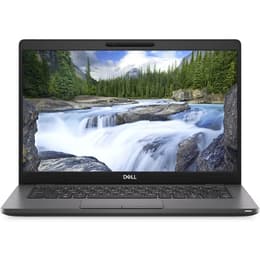
Dell Latitude 5300 13"
Starting at

Refurbished price:£149.00

Versus £1,489.00 new

See options
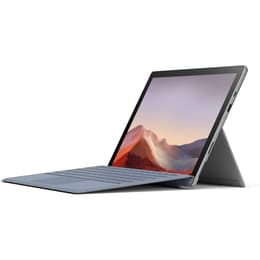
Microsoft Surface Pro 7 12"
Starting at

Refurbished price:£180.00

Versus £1,509.25 new

See options

Ratings

The Dell Latitude 5300, released in 2019, is a traditional business-oriented laptop, designed for productivity in a compact form factor. In contrast, the Microsoft Surface Pro 7, also launched in late 2019, offers a versatile 2-in-1 experience, functioning as both a tablet and a laptop with its detachable keyboard. While both devices run on the Windows operating system, their fundamental designs cater to different user preferences, with the Latitude prioritizing a conventional laptop experience and the Surface Pro emphasizing portability and touch-based interaction.

Scores

Durability

When considering the long-term usability of these devices, their release timelines and design philosophies play a significant role.

  • Release Timeline and OS Support: Both devices were released in 2019, meaning they have received several years of software updates. The Dell Latitude 5300, as a business-focused laptop, typically benefits from extended driver and firmware support from Dell, often spanning 5-7 years from its release. The Surface Pro 7, also running Windows, receives consistent OS updates from Microsoft.
  • Repairability and Practical Lifespan: The Dell Latitude 5300 is designed with repairability in mind, featuring user-accessible components like RAM and SSD, and a bottom panel that can be removed for maintenance [6, 15, 34, 35]. This design choice can contribute to a longer practical lifespan through easier upgrades and repairs. The Microsoft Surface Pro 7, however, received a low repairability score from iFixit due to its glued and soldered components, making repairs and upgrades challenging [5]. This difference means that while both devices can last several years, maintaining and extending the life of the Latitude 5300 may be more straightforward.
  • Software Longevity: Both devices are capable of running current Windows versions, ensuring access to modern applications and security features. The Dell Latitude's upgradable components can help it keep pace with increasing software demands for a longer period.

Year of Release

2019

2019

Last Os Compatibility

Yes

Yes

OS

Windows 11

Windows 11

Performance

The performance of both the Dell Latitude 5300 and the Microsoft Surface Pro 7 is influenced by their internal configurations and design choices.

  • Processor Capabilities: The Dell Latitude 5300 is equipped with 8th generation Intel Core processors, providing a solid foundation for everyday office applications, web browsing, and multitasking [6, 15]. The Microsoft Surface Pro 7 features 10th generation Intel Core processors, which offer improved performance and graphics capabilities, particularly in higher-end configurations [1, 3, 4, 7]. For demanding applications or more intensive tasks, the Surface Pro 7's newer generation processors may offer a more responsive experience.
  • Memory and Storage: The Latitude 5300 supports up to 32GB of DDR4 RAM across two user-accessible slots, allowing for significant multitasking and future upgrades [6, 15]. It also offers M.2 PCIe NVMe SSD storage options up to 1TB [15]. The Surface Pro 7 comes with up to 16GB of LPDDR4x RAM, which is typically soldered and not user-upgradable, and SSD storage up to 1TB [1, 5, 13]. The ability to upgrade RAM in the Latitude 5300 provides flexibility for users whose needs may evolve.
  • Battery Behavior: User experiences with the Dell Latitude 5300 indicate that its battery life is generally good for business use, though some users note it may not meet the highest expectations for extended periods away from power [16]. The Surface Pro 7 is rated for up to 10.5 hours of typical usage, but some users report that heavy use can lead to more frequent charging [1, 3, 22, 26].

Memory (GB)

8 GB

8 GB

Processor

Core i5 - Gen 8 (U)

Core i5 - Gen 10 (G4)

Graphic card

Integrated Graphics

Integrated Graphics

Screen quality

The visual experience on these devices differs due to their display technologies and form factors.

  • Display Technology and Resolution: The Dell Latitude 5300 typically features a 13.3-inch Full HD (1920 x 1080) IPS anti-glare display, providing clear visuals and good viewing angles suitable for productivity tasks [6, 15, 28]. Some configurations also offer touch capabilities [14]. The Microsoft Surface Pro 7 boasts a 12.3-inch PixelSense display with a higher resolution of 2736 x 1824 pixels and a 3:2 aspect ratio [3, 32]. This higher resolution and aspect ratio can be beneficial for document work and creative tasks, offering more vertical screen real estate.
  • Brightness and Clarity: The Latitude 5300's display often reaches 300 nits of brightness, which is adequate for indoor use and some outdoor conditions [15, 28]. The Surface Pro 7's PixelSense display is known for its vibrant colors and sharp text, offering a premium visual experience [3, 7]. Both displays provide good clarity for typical viewing.
  • Refresh Rate and Viewing Experience: Both devices generally feature standard refresh rates, suitable for general computing and media consumption. The Surface Pro 7's smaller size and higher resolution contribute to a very sharp image, while the Latitude 5300 offers a slightly larger screen for a more traditional laptop viewing experience.

Resolution

1920 x 1080

2736 x 1824

Screen type

IPS

IPS

Audiovisual

For communication and media consumption, both devices offer integrated audio and visual components, though with different strengths.

  • Camera System Capabilities: The Dell Latitude 5300 includes an integrated webcam, which is functional for video conferencing and basic photography [16, 18]. The Microsoft Surface Pro 7 features both a front-facing 5MP camera and a rear-facing 8MP camera, providing more versatility for video calls and occasional photo capture [32]. The Surface Pro 7's cameras are generally considered to offer better image quality for its class.
  • Video Recording Quality: Both devices are capable of standard video recording for casual use. The Surface Pro 7's higher-resolution cameras may offer slightly more detailed video capture.
  • Microphone and Speaker Output: The Latitude 5300 provides standard microphone and speaker quality suitable for business calls and general audio playback. The Surface Pro 7 is noted for its clear audio with Dolby Audio Premium, enhancing the experience for video calls and media consumption [3]. Its microphones are also considered to be of good quality [10].

Miscellaneous

Beyond core performance and display, several practical elements differentiate these two devices in daily use.

  • Connectivity Options: The Dell Latitude 5300 offers a comprehensive range of ports, including USB 3.1 Gen 2 Type-C (with Power Delivery and DisplayPort, and optional Thunderbolt 3), two USB 3.1 Gen 1 Type-A ports, HDMI 1.4b, and a Gigabit Ethernet (RJ45) port, making it highly adaptable to various peripherals and network environments [9, 15, 18]. It also supports Wi-Fi 5 (802.11ac) with optional Wi-Fi 6 and 4G LTE [15]. The Microsoft Surface Pro 7 includes a USB-C port, a USB-A port, a Surface Connect port, and a microSD card reader, along with Wi-Fi 6 and Bluetooth connectivity [1, 3, 4]. The absence of built-in HDMI or Ethernet on the Surface Pro 7 means adapters or docks are often necessary for certain connections.
  • Portability and Build: The Latitude 5300 is a traditional laptop, starting at approximately 1.24 kg (2.73 lbs) [14, 15]. It features a sturdy plastic case with a high-quality finish, designed for business durability [6]. The Surface Pro 7 is significantly lighter at 775g (1.70 lbs) without its Type Cover, offering superior portability as a tablet [3, 32]. Its magnesium-alloy design provides a premium feel [7].
  • Security and Input: Both devices support Windows Hello for secure login, with the Latitude 5300 offering an optional fingerprint sensor and the Surface Pro 7 utilizing facial recognition [4, 16]. The Surface Pro 7's 2-in-1 design allows for pen input and touch interaction directly on the screen, which is a key differentiator for creative or note-taking users [3, 10, 26].

Weight

1370 g

775 g

Screen size

13

12

The Dell Latitude 5300 and Microsoft Surface Pro 7, both released in 2019, cater to distinct user needs, reflecting their core design philosophies. The Latitude 5300 is often praised by users for its robust build, comprehensive port selection, and the flexibility of upgradable components, making it a reliable workhorse for traditional office and business environments [15, 31]. Some users, however, have noted that its battery life might not always meet expectations for prolonged unplugged use, and older refurbished units can sometimes exhibit overheating issues [16, 23].

Conversely, the Microsoft Surface Pro 7 is frequently lauded for its exceptional portability, versatile 2-in-1 form factor, and high-resolution touch display, which is ideal for creative tasks, note-taking, and on-the-go productivity [13, 21, 26]. Criticisms from users often point to its challenging repairability, with components being difficult to access or replace, and some reports of inconsistent battery performance for heavy users [2, 5, 22].

Users prioritizing a traditional laptop experience with strong connectivity, internal upgradeability, and a focus on business-grade durability may find the Dell Latitude 5300 well-suited to their needs. Its array of physical ports and repair-friendly design offer practical advantages for long-term use and integration into existing setups. On the other hand, individuals who value extreme portability, a high-quality touch screen with pen support, and the flexibility of a tablet that can transform into a laptop will likely lean towards the Microsoft Surface Pro 7. This device excels for those who frequently switch between typing and touch-based interactions, such as students or mobile professionals. Both devices represent solid choices within their respective categories, and considering a quality-assured refurbished option for either model can be an eco-friendly alternative to purchasing new.


See all articles

Our recent comparisons