
Compare models
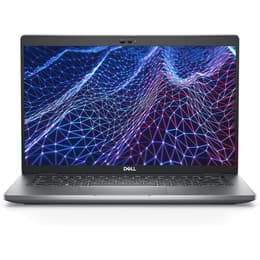
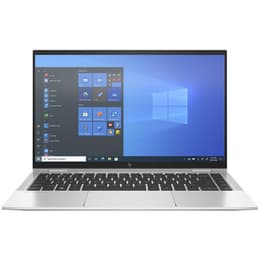
Dell Latitude 5430 14" Vs HP EliteBook X360 1040 G8 14"
- 1-year minimum warranty
- Free delivery on all items
- Free 30-day returns
Differences at a glance
The Dell Latitude 5430 (2022) and the HP EliteBook x360 1040 G8 (2021) are 14-inch laptops designed for professional users, remote workers, and students who require reliable daily performance. While both machines offer robust build quality and enterprise-grade security features, they differ fundamentally in their core design concepts and flexibility. The Dell Latitude 5430 focuses on modular practicality and standard laptop functionality, whereas the HP EliteBook x360 prioritizes a versatile convertible structure with a 360-degree hinge. Both devices run on the Windows operating system, providing a familiar interface and broad software compatibility for everyday productivity tasks.
Available Models
Storage (GB)
Processor
Memory (GB)
Scores
Durability
Evaluating the long-term usability of these two machines involves looking at their release timeline, software support, and hardware durability under regular daily conditions.
- Software support and updates: Both laptops receive regular operating system updates and security patches from Microsoft, with the newer Dell Latitude 5430 extending support slightly further into the future due to its more recent release year.
- Repairability and physical maintenance: The Dell Latitude 5430 features a modular design that allows for straightforward component replacements, while the HP EliteBook x360 relies on a slim, integrated chassis that makes internal servicing more complex for technicians.
- Expected practical lifespan: Both models are built to endure several years of daily commuting and intensive office work, provided users maintain the internal components and battery health appropriately over time.
Year of Release
2022
2020
Last Os Compatibility
Yes
Yes
OS
Windows 11
Windows 11
Performance
Performance capabilities dictate how smoothly each laptop handles multitasking, heavy applications, and everyday administrative software workloads.
- Processor speed and responsiveness: Both devices handle standard web browsing, office suites, and video conferencing smoothly, though the Dell Latitude 5430 benefits from a generationally newer processor that manages demanding background tasks with slightly higher efficiency.
- Storage and memory configurations: Both laptops offer flexible solid-state drive storage options alongside generous memory allocations, ensuring quick file transfers and seamless switching between multiple active applications.
- Battery behavior and endurance: Users working away from a desk will find that both laptops generally sustain a standard workday of mixed tasks, though intensive processing or maximum screen brightness will require more frequent visits to a power outlet.
Graphic card
Integrated Graphics
Integrated Graphics
Screen quality
Display characteristics significantly impact daily visual comfort, media consumption, and working outdoors or in brightly lit environments.
- Display technology and clarity: Both laptops feature clear 14-inch screens with sharp resolutions that render text and spreadsheets with high precision, making them well-suited for extended reading and document editing.
- Brightness and outdoor visibility: The HP EliteBook x360 often includes higher peak brightness options that reduce glare under harsh office lights or near windows, whereas the Dell Latitude 5430 provides consistent indoor visibility suited for standard workspace environments.
- Form factor versatility: The HP EliteBook x360 incorporates touch screen capabilities and a flexible hinge that folds into tablet or tent modes, while the Dell Latitude 5430 maintains a traditional, rigid laptop clamshell structure.
Resolution
1920 x 1080
1920 x 1080
Screen type
IPS
IPS
Camera
Audiovisual
Audio-visual components dictate the quality of virtual meetings, media playback, and multimedia creation experiences during daily use.
- Webcam and video quality: Both models include integrated webcameras suitable for daily video calls, with built-in software tools designed to balance exposure and maintain clear image quality in varying indoor lighting conditions.
- Microphone and voice clarity: The dual-microphone arrays on both laptops effectively capture speech while reducing background room noise, ensuring clear communication during remote meetings or virtual lectures.
- Speaker output and media consumption: Built-in stereo speakers on both devices provide adequate audio clarity for conference calls and casual video streaming, though users seeking deep bass for music will benefit from external headphones or speakers.
Miscellaneous
Practical physical characteristics, connectivity options, and port selections influence how easily each laptop integrates into existing peripheral setups.
- Port selection and connectivity: The Dell Latitude 5430 offers a wide array of physical ports including standard USB connections and HDMI outputs, whereas the HP EliteBook x360 relies heavily on compact USB-C ports that often require external adapters for legacy accessories.
- Physical dimensions and weight: The HP EliteBook x360 utilizes a thin and lightweight metal chassis designed for frequent travelers, while the Dell Latitude 5430 is slightly thicker to accommodate its extensive physical port selection and modular internal layout.
- Security and authentication: Both devices provide enterprise-level security features such as fingerprint readers and infrared cameras for facial recognition, allowing secure access through standard operating system login protocols.
Weight
1360 g
1310 g
Screen size
14
14
What the community thinks
Community discussions and user feedback highlight distinct practical advantages for each machine. Users frequently praise the Dell Latitude 5430 for its dependable port variety, sturdy construction, and straightforward maintenance, making it a reliable workhorse for standard office environments. On the other hand, owners of the HP EliteBook x360 frequently highlight its sleek aesthetic, flexible folding hinge, and bright display as key assets for mobile professionals who value presentation versatility. Common criticisms for the Dell model focus on its slightly heavier and thicker frame, while users of the HP model occasionally note the reliance on adapters for older wired accessories.
Users who prioritize traditional port connectivity, modular serviceability, and a classic laptop layout will find the Dell Latitude 5430 well-suited to their requirements. Conversely, users who prefer a convertible touch screen, a lightweight travel profile, and flexible viewing angles may lean toward the HP EliteBook x360. For those exploring sustainable purchasing decisions, choosing a quality-assured refurbished option provides a practical way to acquire either of these reliable professional laptops while minimizing environmental impact.