
Galaxy Tab S8 Ultra (14.6", 2022) Vs iPad Air 5 (2022, M1 series)

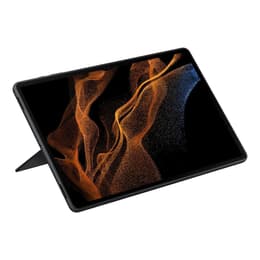
Galaxy Tab S8 Ultra (14.6", 2022)
Starting at

Refurbished price:£423.00

Versus £1,249.00 new

See options
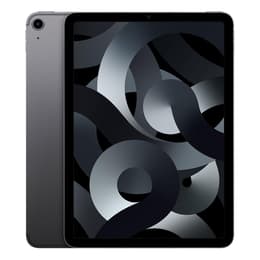
iPad Air 5 (2022, M1 series)
Starting at

Refurbished price:£274.00

Versus £669.00 new

See options

Ratings

The Samsung Galaxy Tab S8 Ultra and the Apple iPad Air (M1 Series) are both tablets released in 2022, offering distinct experiences within their respective operating systems. While the Galaxy Tab S8 Ultra runs on Android, the iPad Air operates on iPadOS. These devices cater to different user preferences, primarily differing in screen size and ecosystem integration.

Scores

Durability

When considering the long-term usability of these tablets, several factors come into play, including software support and physical resilience.

  • Software Longevity: The Galaxy Tab S8 Ultra launched with Android 12 and is expected to receive major OS updates up to Android 16 (One UI 8.0), with security updates continuing until 2027. The iPad Air (M1 Series), released with iPadOS 15.4, typically benefits from Apple's extended software support, often receiving major iPadOS updates for 5-7 years, with security updates potentially lasting longer.
  • Repairability: The iPad Air (M1 Series) has received a low repairability score of 2 out of 10 from iFixit, indicating challenges in repair due to extensive use of adhesive and difficult battery removal. The Galaxy Tab S8 Ultra has a mixed repairability assessment, with some sources giving it a 5.5 out of 10, noting the display can be particularly challenging to replace.
  • Physical Durability: Despite its thin profile, the Galaxy Tab S8 Ultra has demonstrated surprising physical durability in bend tests, attributed to its Armor Aluminum construction. The iPad Air features an enclosure made from recycled aluminum.

Year of Release

2022

2022

Compatible with latest Update

Yes

Yes

OS

Android

iPadOS

Performance

Both tablets offer robust performance for a variety of tasks, though their underlying architectures differ.

  • Storage and Memory: The Galaxy Tab S8 Ultra provides more flexible storage options, starting from 128GB and going up to 512GB, with the added benefit of microSDXC card expansion for additional storage. It also offers multiple RAM configurations, including 8GB, 12GB, and 16GB. The iPad Air (M1 Series) is available with 64GB or 256GB of internal storage and comes with 8GB of RAM.
  • Everyday Responsiveness: Both devices handle demanding applications, multitasking, and graphic-intensive games smoothly, providing a fluid user experience. The processing power in both tablets ensures quick app loading and efficient switching between tasks.
  • Battery Performance: The Galaxy Tab S8 Ultra is equipped with a larger 11,200 mAh battery, which generally translates to extended usage times, even under heavy loads. The iPad Air (M1 Series) features a 7,606 mAh battery, typically offering a full day of use for most users.

Memory (GB)

8 GB

8 GB

Screen quality

The visual experience on these tablets is a key differentiator, largely due to their display technologies and sizes.

  • Display Technology: The Galaxy Tab S8 Ultra features a Super AMOLED display with a 120Hz refresh rate and HDR10+ support, delivering deep blacks and vibrant colors. The iPad Air (M1 Series) utilizes a 10.9-inch Liquid Retina IPS LCD display, which offers wide color (P3) and True Tone technology.
  • Resolution and Clarity: The Galaxy Tab S8 Ultra boasts a 14.6-inch screen with a resolution of 1848 x 2960 pixels, resulting in a pixel density of approximately 240 ppi. The iPad Air (M1 Series) has a 10.9-inch display with a resolution of 2360 x 1640 pixels, providing a pixel density of 264 ppi.
  • Brightness and Smoothness: The Galaxy Tab S8 Ultra offers good maximum brightness for various lighting conditions and a 120Hz refresh rate for smoother scrolling and animations. The iPad Air (M1 Series) provides 500 nits of brightness and a standard 60Hz refresh rate.
  • Screen Size: The Galaxy Tab S8 Ultra's expansive 14.6-inch display is well-suited for media consumption, creative work, and multitasking with multiple windows. The iPad Air's 10.9-inch screen offers a more compact and portable viewing experience.

Resolution

1848 x 2960

2360 x 1640

Screen type

Super AMOLED

Liquid Retina display

Pixel density

240ppp

264ppp

Audiovisual

While tablets are not typically primary photography devices, both models offer capable camera systems for video calls and casual use.

  • Camera System: The Galaxy Tab S8 Ultra includes a dual rear camera setup with a 13 MP wide lens and a 6 MP ultrawide lens, alongside dual 12 MP front cameras (wide and ultrawide). The iPad Air (M1 Series) features a single 12 MP wide rear camera and a 12 MP ultrawide front camera with Center Stage, which keeps the subject in frame during video calls.
  • Video Recording: The Galaxy Tab S8 Ultra supports 4K video recording at 60 frames per second on both its front and rear cameras. The iPad Air (M1 Series) can record 4K video at 60 frames per second with its rear camera, while the front camera records at 1080p at 60 frames per second.
  • Audio Experience: The Galaxy Tab S8 Ultra is equipped with four stereo speakers that deliver clear audio with notable bass, enhancing the media consumption experience. It also features multiple microphones for improved audio recording. The iPad Air (M1 Series) provides stereo speakers for media playback.

Miscellaneous

Beyond core performance and display, several practical features contribute to the overall user experience of these tablets.

  • Connectivity: The Galaxy Tab S8 Ultra supports Wi-Fi 6E and Bluetooth 5.2, with optional 5G connectivity for cellular models. The iPad Air (M1 Series) includes Wi-Fi 6 and Bluetooth 5.0, also offering optional 5G in cellular configurations.
  • Ports and Biometrics: Both tablets feature a USB Type-C port for charging and data transfer, with the iPad Air's port supporting faster USB 3.2 Gen 2 speeds. Neither device includes a traditional headphone jack. For security, the Galaxy Tab S8 Ultra uses an under-display optical fingerprint sensor, while the iPad Air (M1 Series) integrates Touch ID into its top button.
  • Design and Handling: The Galaxy Tab S8 Ultra is a larger device, weighing 726g and measuring 326.4 x 208.6 x 5.5 mm, making it notably thin for its size. The iPad Air (M1 Series) is more compact and lighter at 460g, with dimensions of 247.6 x 178.5 x 6.1 mm. Both feature an aluminum frame and back.
  • Stylus Integration: The Galaxy Tab S8 Ultra comes with the S Pen included, offering low latency for writing and drawing. The iPad Air (M1 Series) supports the Apple Pencil 2nd Generation, which is sold separately.

Weight

726 g

461 g

Screen size (in)

14.6

10.9

Network

Wi-Fi + 5G

Wi-Fi

Carrier compatibility

Unlocked

Without SIM Port

User feedback for the Galaxy Tab S8 Ultra often highlights its impressive, large Super AMOLED display as a major advantage for media consumption and multitasking, with many appreciating the included S Pen and the versatility of Samsung DeX mode for a desktop-like experience. Some users find its substantial size can be unwieldy for prolonged handheld use or portability. The iPad Air (M1 Series) is frequently praised for its powerful performance, attributed to its advanced processor, making it highly capable for general use, creative tasks, and gaming. Common criticisms include its 60Hz display, which some users find less fluid compared to higher refresh rate screens, and the base model's 64GB storage, which can be limiting for extensive app libraries or media.

Users prioritizing a large, vibrant display for immersive media, extensive multitasking, and a built-in stylus for productivity might find the Galaxy Tab S8 Ultra well-suited to their needs. Conversely, individuals seeking a more compact, highly performant tablet with strong ecosystem integration and a wide array of optimized applications may lean toward the iPad Air (M1 Series). Both devices offer robust capabilities, and choosing between them often comes down to preferred operating system and specific use cases. For those considering these powerful tablets, exploring quality-assured refurbished options can be an eco-friendly alternative.
See all articles

Our recent comparisons