MacBooks

Updated on 17 September 2026
17 September 2026
21 mins read

Haziq
Tech Expert for Back Market UK, Ireland & Australia
If you want the short answer: the Lenovo Legion 5 15IRX10 is our overall pick for most gamers, and the Lenovo LOQ 15IRX10 is the smartest buy if you're working with a tighter budget. Below, we've sorted every model by use case, so you can skip straight to what actually fits your situation, rather than wading through spec sheets.


The Lenovo Legion 5 15IRX10 is the best all-round gaming laptop in 2026, the Lenovo LOQ 15IRX10 is the smartest accessible pick, and the Acer Nitro V15 is worth comparing carefully before you commit. If you're not sure how much VRAM you need, 8GB is the current comfortable minimum, with the Alienware's 16GB giving you the most headroom. Buying refurbished from Back Market gets you a higher GPU tier for the same money, with a commercial warranty attached.
As one of the world's leading marketplaces for refurbished tech, we sell gaming laptops across every major brand and GPU tier, and we can see which configurations UK buyers actually choose, which ones get returned, and which ones earn five-star reviews months later. This list isn't built from spec sheets alone. It's shaped by real sales data, verified buyer feedback, and hands-on time with the machines themselves.
Every refurbished gaming laptop we sell is professionally tested and graded, comes with a minimum 1-year commercial warranty, and 30 days to change your mind. We'll flag GPU tier, VRAM, and battery condition clearly, because with gaming laptops specifically, those are the details that actually matter.
Best overall (most people): Lenovo Legion 5 15IRX10 — the safest recommendation on this list. Strong GPU, sharp display, no major compromises.
Best value / most accessible: Lenovo LOQ 15IRX10 — a current-generation GPU at the most approachable price point on this list.
Best for students / hybrid use: HP Victus 15-fb3003sa — light enough to carry around, capable enough for gaming and coursework alike.
Best “buy up” move: Gigabyte Aorus 5 SE4-73EE213SH — an older laptop with a genuinely higher-tier GPU than several newer, cheaper options here.
Best for video editing and gaming: HP OMEN Gaming 16-ap0300na — 24GB of RAM and strong CPU do the heavy lifting for editing.
Best for 1440p gaming: ASUS ROG Strix G615LP — a laptop with a 2560×1600 display and a 240Hz refresh rate.
Best splurge: Dell Alienware 18 Area-51 — the strongest spec sheet on this list by a wide margin, for buyers where budget isn't the constraint.
The one to think twice about: Acer Nitro V15 ANV15-51 — the weakest GPU and VRAM in this lineup, worth comparing carefully against the LOQ or Victus first.
Legion 5 15IRX10 | LOQ 15IRX10 | Victus 15-fb3003sa | Aorus 5 | OMEN 16-ap0300na | Strix G615LP | Alienware 18 Area-51 | Nitro V15 | |
GPU | RTX 5060 | RTX 5050 | RTX 4050 | RTX 3070 | RTX 5060 | RTX 5070 | RTX 5080 | RTX 3050 |
VRAM | 8GB | 8GB | 6GB | 8GB | 8GB | 8GB | 16GB | 6GB |
CPU | i7-13650HX | i5-13450HX | Ryzen 7 7445HS | i7-12700H | Ryzen 9 8940HX | Core Ultra 9 275HX | Core Ultra 9 275HX | i5-13420H |
RAM | 16GB | 16GB | 16GB | 16GB | 24GB | 32GB | 32GB | 16GB |
Storage | 1TB | 1TB | 512GB | 512GB | 1TB | 1TB | 2TB | 512GB |
Display | 15.1” OLED or 15.3” IPS | 15.6" FHD 144Hz | 15.6" FHD | 15.6" FHD | 16" 1920×1200 (WUXGA) | 16" FHD+ 240Hz | 18" 2560×1600 300Hz | 15.6" FHD 144Hz |
Weight | 2.1kg | 2.4kg | 2.29kg | 2.5kg | 2.4kg | 2.365g | 4.2kg | 2.7kg |
Release year | 2023 | 2024 | 2023 | 2022 | 2024 | 2025 | 2025 | 2023 |
Price new | From £2500 | From £1800 | From £1999 | From £1280 | From £2400 | From £3030 | From £5500 | From £1999 |
Price refurbished (BM)* | - | Approx £1550 | Approx £1110 | - | Approx £1670 | - | Approx £3840 | Approx £1160 |
*Prices set by sellers and taken at time of publication; these are subject to change.
Under £2,000
Gigabyte Aorus 5 SE4-73EE213SH — £1,280
Lenovo LOQ 15IRX10 — £1,800
HP Victus 15-fb3003sa — £1,999
Acer Nitro V15 ANV15-51 — £1,999
£2,000–£2,499
HP OMEN 16-ap0300na — £2,400
£2,500–£2,999
Lenovo Legion 5 15IRX10 — £2,500
£3,000+
ASUS ROG Strix G615LP — £3,030
Dell Alienware 18 Area-51 — £5,500
✨ The Lenovo Legion 5 15IRX10 is the one recommendation on this list you're unlikely to regret.
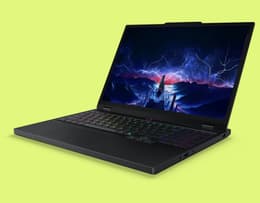
The safest all-round recommendation for most gamers.
The Lenovo Legion 5 15IRX10 is the kind of gaming laptop that gets most of the important decisions right. Its RTX 5060 is paired with a 13th Gen Intel Core i7-13650HX, giving it plenty of power for current AAA games at high settings as well as heavier everyday workloads.
The 2560×1600 display is another major strength. It is sharper than the Full HD panels found on many of the other laptops here, while the taller 16:10 aspect ratio gives you a little more vertical space for work, browsing and creative tasks.
At 2.1kg, it is also the lightest laptop in this comparison, which makes it easier to carry than most gaming models. It may not have the highest-end GPU on the list, but its combination of performance, display quality and relatively low weight makes it one of the easiest options to recommend to most buyers.
GPU: NVIDIA GeForce RTX 5060 (8GB)
CPU: Intel Core i7-13650HX
RAM: 16GB
Storage: 1TB SSD
Display: 15.1” OLED or 15.3” IPS
Weight: 2.1kg
Pros | Cons |
Sharp 2560×1600 display, above the usual FHD standard here | No stated high refresh rate figure in the spec sheet, worth confirming |
Lightest laptop on this list at 2.1kg | Sits above entry-level pricing |
Strong all-round GPU/CPU pairing with no major weak point |
✨ If you want a genuinely current GPU without stretching your budget, the Lenovo LOQ 15IRX10 is the one to check first.

A current-generation GPU at the most approachable price point on this list.
The Lenovo LOQ 15IRX10 focuses on delivering current-generation gaming performance at a more accessible price point. Its RTX 5050 comes with 8GB of GDDR7 memory and support for NVIDIA’s latest DLSS technologies, paired with an Intel Core i5-13450HX that has plenty of power for modern games as well as everyday work and study. The combination makes it a well-balanced option if you’re looking for a gaming laptop without stretching to a higher-end model.
The 15.6-inch Full HD display runs at 144Hz for smoother gameplay in faster-paced titles, while the generous 1TB SSD gives you room for a sizeable game library without needing to upgrade storage straight away. Compared with standard cheap laptops in a similar price range, the LOQ offers dedicated gaming hardware that should remain capable for much longer if gaming is one of your priorities.
GPU: NVIDIA GeForce RTX 5050 (8GB GDDR7)
CPU: Intel Core i5-13450HX (10 cores)
RAM: 24GB DDR5
Storage: 1TB SSD
Display: 15.6-inch Full HD, 144Hz
Weight: 2.4kg
Pros | Cons |
Current-generation RTX 50-series GPU at an accessible price | RAM spec is inconsistent between listing fields, confirm before publishing |
Generous 1TB storage for this price bracket | Lower GPU tier than the Legion 5 or Strix |
144Hz display keeps competitive titles fluid |
✨ For anyone who needs one laptop to do gaming and everything else, the HP Victus 15-fb3003sa earns its place without extra bulk.
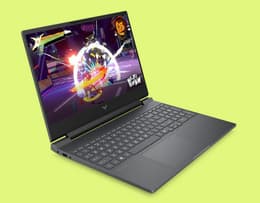
Light enough to carry around, capable enough for gaming and coursework alike.
The HP Victus 15-fb3003sa is a genuinely strong pick if you're after a gaming laptop for students that doesn't sacrifice everyday usability for performance. At 2.29kg, it is one of the lighter options in this comparison, while the black and grey finish makes it easier to use in lectures, shared workspaces or the office without looking overly flashy.
Its RTX 4050, Ryzen 7 7445HS processor and 16GB of RAM give it enough power for esports titles, modern games and demanding coursework, including creative applications and multitasking. The Full HD IPS display is well suited to both gaming and everyday use, while Ethernet and a broad selection of ports add flexibility for studying at home or on campus. If you're weighing this up against Back Market's best laptops for students picks, the Victus is the gaming-capable option worth cross-shopping.
It does not offer the same gaming headroom as the Legion or Strix, and the 512GB SSD may fill up quickly if you install several large games. Even so, it is one of the strongest all-round choices here for students who need one laptop for coursework, entertainment and gaming.
GPU: NVIDIA GeForce RTX 4050 (6GB)
CPU: AMD Ryzen 7 7445HS
RAM: 16GB
Storage: 512GB SSD
Display: 15.6-inch Full HD, IPS
Weight: 2.29kg
Pros | Cons |
Lighter and more understated than most gaming laptops | 512GB storage is tighter than several others on this list |
Capable RTX 4050 for current esports and AAA titles | Less GPU headroom than the Legion or Strix |
Full connectivity including Ethernet |
✨ Don't rule Gigabyte Aorus 5 SE4-73EE213SH out for its age; its GPU tier beats machines released years after it.
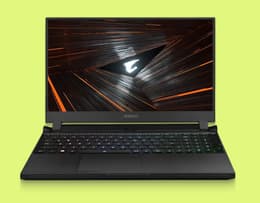
An older laptop with a genuinely higher-tier GPU than several newer, cheaper options here.
The Gigabyte Aorus 5 is a strong option for buyers willing to consider an older laptop with a higher-tier GPU. Its RTX 3070 sits above the RTX 3050 and RTX 4050 in its original product positioning, although real-world performance still depends on factors such as power limits, cooling and the game being played. It is a useful reminder that release year alone does not tell you how capable a gaming laptop will be.
The 14-core Intel Core i7-12700H remains well suited to modern games, everyday multitasking and more demanding workloads, while 16GB of RAM and a 512GB SSD provide a solid starting specification. It lacks some of the newest features found on the 2025 models, but its combination of CPU and GPU capability makes it an appealing choice when priced competitively.
GPU: NVIDIA GeForce RTX 3070 (8GB)
CPU: Intel Core i7-12700H (14 cores)
RAM: 16GB
Storage: 512GB SSD
Display: 15.6-inch Full HD
Weight: 2.5kg
Pros | Cons |
RTX 3070 outperforms several newer, lower-tier GPUs on this list | Older release year (2022) than most alternatives here |
Strong 14-core CPU still holds up for everyday and gaming use | Storage capped at 512GB |
Genuine GPU value if priced right | Fewer modern connectivity features (e.g. Thunderbolt 5) than 2025 models |
✨ The HP OMEN Gaming 16-ap0300na’s 24GB of RAM and strong CPU do the heavy lifting for editing, without asking you to pay for display specs you don't need.
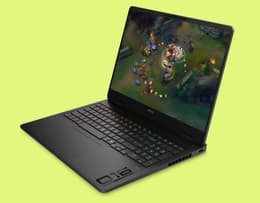
Strong all-round performance for editing and gaming, 16 inches.
The OMEN 16-ap0300na is one of the strongest all-round performers on this list for anyone who wants to edit and game on the same machine, not switch between two. 24GB of RAM is genuinely generous, more than several other laptops here offer as standard, and it shows: timelines with multiple tracks, background renders, and a dozen browser tabs open alongside your editor all run smoothly rather than fighting each other for memory.
The Ryzen 9 8940HX is a genuinely capable chip for this kind of work, chewing through encoding and exports quickly. While the RTX 5060 pulls double duty, accelerating GPU-based rendering in editors that support it, then switching effortlessly into pushing solid frame rates once you close the timeline and open a game instead. That's the real strength of this machine: it doesn't feel like a compromise in either direction.
GPU: NVIDIA GeForce RTX 5060
CPU: AMD Ryzen 9 8940HX
RAM: 24GB
Storage: 1TB SSD
Display: 16-inch, 1920×1200 WUXGA
Weight: 2.4kg
Pros | Cons |
24GB RAM handles editing timelines and multitasking well | Heavier than the Legion or Victus |
Strong Ryzen 9 CPU handles demanding workloads easily | No Ethernet port listed |
RTX 5060 accelerates GPU-based rendering and gaming alike |
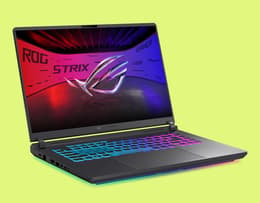
A sharp, fast display built to handle 1440p and beyond without compromise.
If 1440p is your target resolution, the Strix G615LP doesn't just meet it, it exceeds it. The ROG Nebula Display is a 2560×1600 WQXGA panel, which gives you more usable screen real estate than standard 1440p while still rendering 1440p content natively and cleanly. Pair that with a 240Hz refresh rate, and you get a display that handles both visual clarity and competitive-speed gaming in the same panel, rather than trading one for the other.
Driving that combination takes real GPU power, and the RTX 5070 paired with Intel's Core Ultra 9 275HX is built for exactly that. At 1440p and above, this pairing keeps frame rates comfortably high without forcing you to drop settings, the same trade-off that lower-tier GPUs on this list can't avoid.
The result is a laptop that doesn't ask you to pick between resolution and refresh rate at 1440p, it gives you both.
GPU: NVIDIA GeForce RTX 5070 (8GB)
CPU: Intel Core Ultra 9 275HX
RAM: 32GB
Storage: 1TB SSD
Display: 16-inch, ROG Nebula Display, 2560×1600 WQXGA, 240Hz
Weight: 2.65kg
Pros | Cons |
WQXGA display exceeds standard 1440p while staying sharp | Noticeably bulkier than the Legion or Victus at 2.65kg |
240Hz refresh rate keeps competitive play fast at high resolution | Premium display and GPU combination push it toward the higher end of this list on price |
RTX 5070 has the headroom to sustain high frame rates at 1440p and above |
✨ The Dell Alienware 18 Area-51 is for buyers who've already decided they want the best, refurbished just makes it less painful to pay for.

The strongest spec sheet on this list by a wide margin, for buyers where budget isn't the constraint.
At the very top of this list sits the Alienware Area-51, built for buyers who want as few compromises as possible. Its RTX 5080 comes with 16GB of VRAM and is paired with an Intel Core Ultra 9 275HX, 32GB of RAM and a 2TB SSD, giving it serious headroom for demanding games, creative workloads and heavy multitasking.
The 18-inch, 300Hz display is both the largest and fastest on this list, although the size and weight make this much more of a desktop replacement than something you will want to carry around every day. It is also far more powerful than most people realistically need, but that is exactly who it is for.
Buying refurbished makes this level of hardware more attainable than purchasing a comparable machine new, although it is still a significant investment. For buyers who know they want the highest listed GPU tier, a large display and plenty of performance headroom for the years ahead, the Area-51 is the standout choice here.
GPU: NVIDIA GeForce RTX 5080 (16GB)
CPU: Intel Core Ultra 9 275HX
RAM: 32GB
Storage: 2TB SSD
Display: 18-inch, 2560×1600, 300Hz
Weight: 4.34kg
Pros | Cons |
Strongest GPU and most VRAM available in this lineup | Significant investment even refurbished |
Large, extremely fast 300Hz display | Heaviest and least portable option on this list at 4.34kg |
2TB storage as standard |
✨ Check the price against a LOQ or Victus before committing to the Acer Nitro V15 ANV15-51.
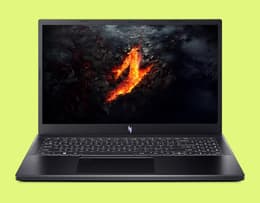
The weakest GPU and VRAM in this lineup, worth comparing carefully first.
The Acer Nitro V15 is one of the more accessible ways into PC gaming, and its 144Hz display gives faster-paced games a smoother feel than a standard 60Hz panel. It also has enough performance for esports titles and many modern games, particularly when settings are adjusted to suit the hardware.
The main limitation is its RTX 3050, which comes with 6GB of VRAM, one of the lowest amounts on this list. The LOQ and Victus both offer 8GB, so the gap is real but modest, mainly showing up at higher texture settings or in newer, more demanding titles rather than across the board.
The Nitro V15 makes the most sense when it is clearly the cheapest option available. At the right price, it is a genuinely capable entry-level gaming laptop, and the VRAM difference alone isn't a reason to rule it out. But if the LOQ or Victus is available for similar money, either would still be the stronger long-term choice.
GPU: NVIDIA GeForce RTX 3050 (6GB)
CPU: Intel Core i5-13420H (8 cores)
RAM: 16GB DDR5
Storage: 512GB SSD
Display: 15.6-inch Full HD, 144Hz
Weight: 2.11kg
Reasons to buy / Pros & Cons
Pros | Cons |
144Hz display is a genuine plus at this level | Only 6GB VRAM, one of the tightest on this list |
DDR5 memory and modern connectivity | Slightly behind the LOQ and Victus for newer, more demanding titles |
Can be a fair pick if genuinely the cheapest available |
✨ If you only remember one thing from this section: prioritise GPU and VRAM first, everything else is easier to work around later.
Every gaming laptop decision comes down to the same handful of trade-offs. Here's how to work through them in the order that actually matters.
Your GPU tier decides more about your gaming experience than any other spec, and VRAM decides how well that GPU ages. As a rough guide for 2026, based on the range in this list:
6GB VRAM (e.g. RTX 3050): workable for esports titles and older games at 1080p, but the tightest option here and the first to show its age.
6GB VRAM (e.g. RTX 4050): a step up from entry-level, comfortable for 1080p gaming in most current titles, though it'll show its limits sooner than the 8GB+ options on this list if you push settings higher.
8GB VRAM (e.g. 5050, 5060, 5070, 3070): a comfortable middle ground that should handle most current titles well for a few years, this covers the majority of laptops on this list.
16GB VRAM (e.g. RTX 5080): genuine future-proofing, especially if you're gaming at higher resolutions or want ray tracing headroom.
If you want a genuinely portable gaming laptop, the Legion 5 (2.1kg) and Victus (2.29kg) are the two worth prioritising. Lighter machines like these generally run hotter under sustained load than bulkier ones like the Alienware, so if you play for long sessions, factor cooling into your decision, not just chip tier. Battery life on gaming laptops is a compromise everywhere, plan to keep yours plugged in for anything demanding.
RAM is easy to underrate because it doesn't show up in benchmark charts the way GPU tier does, but running out of it mid-session is one of the most common causes of stuttering and slowdown, even on a laptop with a strong GPU.
16GB is the comfortable baseline in 2026, and it's genuinely enough for gaming alongside normal background use like Discord, browsing, or music streaming. Where it starts to feel tight is multitasking harder than that: recording or streaming your gameplay, running a second monitor with different apps open, or jumping into video editing or other creative software between sessions.
32GB, as seen on the Strix G615LP and Alienware 18 Area-51 on this list, is worth stepping up to if any of that sounds like you, or if you'd simply rather not think about RAM again for the next few years. It's also one of the easier specs to plan around: unlike GPU tier, which is usually fixed once you buy, RAM is sometimes upgradeable after the fact on laptops with accessible SO-DIMM slots, so it's worth checking whether a model allows that before assuming you're locked in at purchase.
✨ For gaming specifically, GPU tier matters far more than CPU brand; if the GPU and RAM are right, either chipmaker will serve you well.
Both chipmakers are represented across this list, and it's worth knowing what actually changes between them rather than picking a side out of habit.
Intel (Legion 5, LOQ, Aorus 5, Nitro V15, Strix, Alienware) dominates this lineup, and for good reason: Intel's HX-series chips have been the default choice for gaming laptops for years, with strong single-core performance that many game engines still lean on. The newer Core Ultra 9 275HX in the Strix and Alienware adds on-chip AI acceleration and improved efficiency over the older HX chips, though for pure gaming that matters less than raw clock speed and core count.
AMD (Victus, OMEN) brings genuinely competitive performance in this lineup, and in some respects has the edge. The Ryzen 9 8940HX in the OMEN is a strong multi-core performer, which is exactly why that laptop does well for editing and multitasking alongside gaming; AMD's recent HX-series chips have generally been strong at exactly that kind of mixed workload. AMD chips have also tended to run a little cooler and more power-efficiently than their Intel HX-series counterparts at similar performance levels, which can translate into slightly better battery life or quieter fans under everyday use.
What decides your gaming experience: for pure frame rates in most titles, the GPU is doing the vast majority of the work, not the CPU. Where CPU brand starts to matter more is in CPU-bound games (strategy titles, simulation-heavy games, some competitive shooters at very high frame rates) and in multitasking-heavy use like streaming while gaming, editing while gaming, or running background applications. If that's you, lean toward the higher core-count option regardless of brand, which on this list points to the Ryzen 9 8940HX (OMEN) or Core Ultra 9 275HX (Strix, Alienware).
For everyone else, don't let AMD vs Intel be the deciding factor. Match the GPU tier and RAM to your budget first; brand is a distant third consideration.
✨ Refurbished isn't the cheap fallback here, it's the smartest way to buy a better GPU tier than your budget would otherwise allow.
Short answer: yes, and it's arguably a better fit for gaming laptops than almost any other tech category. The maths is simple: refurbished lets you buy a higher GPU tier for the same money you'd spend on a weaker new machine. This is especially true if you're after a gaming laptop for students, where budget usually has to stretch further than a typical gaming purchase. For more on how the two compare generally, see our new vs refurbished guide.
The trust bar is higher here than for phones or standard laptops, and that's fair. Performance wear matters more on a gaming machine. Before buying refurbished, check for three things specifically: clear condition grading (not just “used”), disclosed battery health, and a genuine commercial warranty, at least 12 months. At Back Market, every gaming laptop we sell is professionally tested against all three before it's listed.
The one thing refurbished won't fix is GPU generation, you're still buying a specific generation of silicon, just at a much better price. For most buyers, that trade-off is an easy yes. If you specifically need the newest GPU generation on release day, refurbished isn't the route for you yet.
If your current machine is genuinely holding you back today, waiting rarely pays off; you lose months of use for a saving that may not materialise. But if you're comfortable with your current setup for a bit longer, timing can work in your favour. Prices on the previous GPU generation typically drop once a new generation launches, and that's exactly when refurbished stock on the outgoing generation becomes the best value it will ever be, a useful window if you're shopping for a gaming laptop for students on a fixed budget.
Our honest take: don't wait for a hypothetical future price drop on a laptop you haven't seen yet. Do keep an eye on refurbished listings in the months after a new GPU generation launches, that's a genuinely reliable window for better deals on proven hardware.
✨ The right gaming laptop is the one with enough GPU and VRAM for what you actually play, not the one with the flashiest spec sheet.
A few quick rules of thumb, if you're still torn:
Set your GPU/VRAM floor first. Decide the minimum tier you're comfortable with before you look at brands or chassis design.
Don't buy for today's games alone. Buy enough headroom for what's coming in the next 2-3 years, not just what you're playing right now.
Check battery health on refurbished listings. It's a better trust signal than the condition grade alone.
Watch for deals around GPU generation launches. Outgoing-generation refurbished stock gets its best pricing in that window.
If timing your purchase around a sale matters to you, check our best laptop deals page before you buy.
The best gaming laptop for you comes down to two questions: what's your hard budget ceiling, and what GPU tier do you actually need? The Lenovo Legion 5 15IRX10 remains our top overall pick for most buyers in 2026, and the Lenovo LOQ 15IRX10 is the smartest way in if you're working with a tighter budget.
Whichever model you choose, buying refurbished from Back Market gets you a genuinely higher GPU tier for your money, tested and warrantied, rather than settling for a weaker new machine at the same price.
When not fighting the good fight for environmental sustainability, Haziq loves making reviews of everything and anything tech-related.