MacBooks

Updated on 2 September 2026
2 September 2026
20 mins read

Haziq
Tech Expert for Back Market UK, Ireland & Australia
With so many options now available, choosing the best MacBook for students in 2026 can seem bewildering. Do you go for one of the latest models, or will an older but still dependable option be all you need? Of course, this depends on what you're studying and what you need for your coursework. But why chase the latest MacBook when last year’s model still handles 100 tabs and saves a laptop from landfill? For us, the best MacBook for students in 2026 is the MacBook Air M5, because it delivers the strongest mix of performance, battery life, portability, and long-term value. For budget conscious students, a refurbished MacBook M1/M2 Air or Pro is the best alternative. Here's a quick guide on how to find a refurbished MacBook for students that fits your requirements, while spending only as much as you need.


✨ Once marketed as Apple’s cheapest MacBook, the Neo is now less appealing after recent RAM-driven price increases.
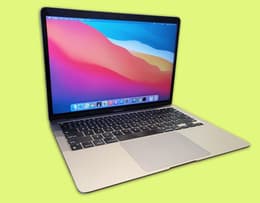
✨The MacBook Air M1 remains the best value MacBook for students, offering strong performance and long battery life.
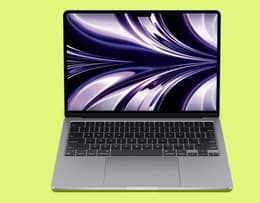
✨Ideal for STEM, engineering, coding, and creative workloads, the Pro M2 gives pro-level performance.
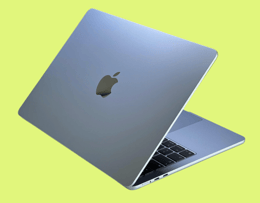
✨The MacBook Air M5 balances performance, battery life and portability for student workloads.
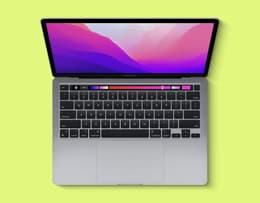
✨The Pro M2 is fast enough for all degrees, lightweight and far cheaper than Apple’s current lineup.
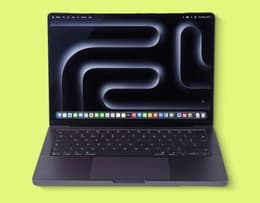
✨The best all-round value student MacBook, the Pro M5 balances performance, battery life and portability for student life.
Students are often budget-conscious shoppers. That's why refurbished MacBooks for students are in such demand. You can save up to 50% on the original retail price at Back Market, on the best MacBooks in 2026. For us, the MacBook Air M5 is our overall winner thanks to its performance, battery life, and portability. If you want to save money, the MacBook Air M1 delivers the best value, while the MacBook Air M2 suits those needing a dependable, pro-level laptop, especially those studying STEM, engineering and creative subjects. Keep reading to find the best refurbished MacBook for your degree.
At Back Market, we go the extra mile to ensure refurbished tech performs as you’d expect. We combine years of industry testing experience, performance data, and real user feedback to create a transparent process for refurbished MacBooks. Every device goes through a rigorous 100‑point inspection, covering battery health, ports, sensors, cameras, and cosmetic condition. Only MacBooks with at least 80% battery capacity and like‑new functionality make it through.
Our professional sellers follow strict refurbishment standards, from IMEI verification to component compatibility checks, ensuring each device is reliable, secure, and ready for long‑term use. Our guide is backed by a 12‑month warranty and a 30‑day return window, giving you confidence that every MacBook meets high benchmarks for performance, value, sustainability, and device reliability.
As a student, you're likely on a limited budget that needs to cover your course materials, transport, rent (if you live in your own place), and the list goes on. So, you need to get the right laptop for as little as possible.
Does refurbished mean you're compromising on quality and performance? Not at all. In fact, our refurbished laptops come from trusted sellers and have been fully restored by verified refurbishers. Then they're exhaustively tested to ensure they perform up to the original benchmark specs.
Additionally, by changing our tech habits, we can help limit our environmental impact. By buying a refurbished laptop, you'll prevent one more item of electronic waste, contributing to transforming our disposable consumer culture into a more sustainable circular one based on recycling.
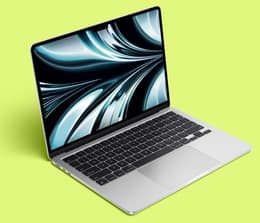
The 2017–2019 MacBook Airs are the ideal budget laptops for students.
Course / workload | MacBook | Why |
|---|---|---|
Essays, notes, research | MacBook Neo and MacBook Air M2 | Lightweight, long battery life, and fast enough for writing, browsing, referencing, and multitasking without paying for unnecessary power. |
Creative, media, design | MacBook Air M4 / M5 or MacBook Pro | Stronger GPU performance, better colour-accurate displays, and enough power for editing, illustration, and creative apps. |
Engineering, coding | MacBook Air M4 16 GB+ | More RAM and CPU headroom for compilers, simulations, multitasking, and heavier STEM software. |
Architecture, video editing | MacBook Pro | Pro-level performance, sustained thermals, and the power needed for rendering, 3D modelling, and high-resolution video work. |
Apple’s recent RAM shortage has pushed MacBook prices up across the entire 2026 catalogue, including the MacBook Neo, previously the cheapest MacBook. Higher base prices and more expensive RAM upgrades, mean the NEO is now poor value compared to refurbished models, especially when students can get a MacBook Pro M1 or M2 for hundreds less while still getting stronger performance, better battery life and more storage flexibility.
Refurbished devices from Back Market also come with a 1-year commercial warranty, making them a more affordable choice for students.
Model | Back Market price | Price of new | RAM | Battery | Best for |
|---|---|---|---|---|---|
from £605 | £699.00 | 8 GB | Up to 16 hrs video / 11 hrs web | Entry‑level students, everyday tasks, tight budgets | |
£126 | £1,199.00 | 8 GB or 16 GB unified memory | Up to 18 hrs video / 15 hrs web | Safer step-up pick, all-rounder for everyday coursework, silent fanless design | |
£126 | £1,249.00 | 8 GB (configurable to 16 / 24 GB) | Up to 18 hrs video / 15 hrs web | Students needing great battery life, silent operation, strong value | |
£126 | £999.00 | 16 GB (base; configurable to 24 / 32 GB) | Up to 18 hrs video / 15 hrs web | Modern performance, Apple Intelligence workflows, long‑term student use | |
£126 | £1,299.00 | 16 GB base (configurable to 24/32 GB) | Up to 18 hrs video / 15 hrs web | Overall winner 🏆 Most futureproof Air, Wi-Fi 7, dual external display, best pick for a 4–5 year degree | |
£172 | £1,499.00 | 8 GB or 16 GB unified memory | Up to 20 hrs video / 17 hrs web | Resource-heavy apps (video editing, 3D modelling), architecture and design coursework | |
£172 | £1,349.00 | 8 GB (configurable to 16GB/24GB) | Up to 20 hrs video / 17 hrs web | Resource-heavy apps at a step up from M1. Video editing, 3D modelling and sustained heavy-duty tasks | |
£172 | £1,599.00 | 16 GB / 24 GB | Up to 24 hrs video / 17 hrs web | Heavy creative workloads, pro apps, multi‑monitor setups, AI‑accelerated tasks |
✨Many consider the MacBook Neo to be the best budget laptop for students, especially when buying a refurbished laptop.
It’s powered by Apple’s A18 Pro chip, which brings the same snappy responsiveness you see in Apple’s latest iPhones – apps open instantly and multitasking feels effortless. It might be Apple’s most affordable laptop, but it still carries the company’s signature build quality, lightweight aluminium, and a bright 13-inch Liquid Retina display that renders lectures, notes, and media with crisp, true-to-life colours. For students who need a reliable all-rounder, the Neo delivers modern performance without the premium price tag.
Battery life is excellent for a machine in this bracket, easily stretching through a full day of lectures, library sessions, and late-night study without begging for a charger. And because the A18 Pro is efficient, the Neo stays quiet and cool. Apple Intelligence support also means built-in writing tools, smart-note summaries, and AI features that genuinely help with coursework. It’s a laptop that performs far more capably than the price tag might suggest, and it suits students who want a dependable Mac without stepping into the Pro price range.
Operating system: macOS Tahoe
Colours: Silver, Blush, Citrus, Indigo
Casing: Aluminium enclosure
Dimensions: Height 1.27 cm, Width 29.75 cm, Depth 20.64 cm
Weight: 1.22–1.23 kg
Screen size: 13.0‑inch Liquid Retina display
Screen resolution: 2408 × 1506 (219 ppi)
Display: IPS LED‑backlit panel, 500 nits' brightness, sRGB colour, support for 1 billion colours, 60 Hz refresh rate
Chip: Apple A18 Pro chip
CPU: 6‑core CPU (2 performance cores + 4 efficiency cores)
RAM: 8 GB unified LPDDR5X memory (not upgradeable)
Storage: 256 GB or 512 GB SSD
Sound: Dual‑speaker system with Spatial Audio + Dolby Atmos; dual‑mic array with beamforming
Main camera: 1080p FaceTime HD camera
Video capture: 1080p HD video recording
Battery life: Up to 16 hours video streaming; up to 11 hours wireless web; 36.5 Wh lithium‑ion battery
Connectivity: Wi‑Fi 6E
Pros | Cons |
|---|---|
Powerful and fast A18 chip | Not designed for heavy creative workloads |
Very good battery life | No ProMotion for colour accurate work |
Bright 13‑inch Liquid Retina | No 1 TB option for heavy media users |
Affordable 256 GB / 512 GB storage |
✨ For students who want the security of a longer-lasting laptop, the MacBook Air M1/M2 is the safer step-up pick, especially now that it's more affordable than ever.
It was the first MacBook to contain Apple's game-changing M1 chip. Even today, its performance surpasses that of more modern laptops. It was a seminal machine, and its advanced features will still stand you in good stead as a student all-rounder.
It has fantastic battery life, and because it doesn't need a fan for cooling, it operates silently. Still faster than many 2024 releases and quieter than your lecture whispering neighbour. It supports many thousands of apps and runs them flawlessly. The screen renders true-to-life colours, which also makes the machine very suitable for editing photos and videos. In TechRadar's bench testing, the MacBook Air M1 is about 9x faster than the previous Air models, and its memory works twice as fast. It also has all-day battery life, unless you're using it for heavy performance tasks.
Operating system: macOS Tahoe
Colours: Silver, Space Grey, Gold
Casing: Aluminium unibody enclosure
Dimensions: Height 0.41–1.56 cm, Width 30.41 cm, Depth 21.24 cm
Weight: 1.29 kg
Screen size: 13.3‑inch Retina display
Screen resolution: 2560 × 1600 (227 ppi)
Display: IPS LED‑backlit panel, P3 wide colour, True Tone, 400 nits' brightness
Chip: Apple M1 chip
CPU: 8‑core CPU (4 performance cores + 4 efficiency cores)
RAM: 8 GB or 16 GB unified memory
Storage: 256 GB, 512 GB, 1 TB, or 2 TB SSD
Sound: Stereo speakers with Dolby Atmos support; three‑mic array with directional beamforming
Main camera: 720p FaceTime HD camera with M1 ISP enhancements
Video capture: 720p video recording; improved noise reduction and dynamic range via M1 ISP
Battery life: Up to 15 hours wireless web; up to 18 hours Apple TV video playback
Connectivity: Wi‑Fi 6
Pros | Cons |
|---|---|
Powerful and fast M1 chip | No design update on previous models |
Very good battery life | Fanless design can sometimes overheat |
Operates silently | Pricier than budget models |
Very comfortable keyboard | |
Sleek, lightweight, and portable |
"I recently bought a MacBook Air from Back Market, and I couldn’t be happier! The laptop arrived in excellent condition, just as described, and it has been working flawlessly."
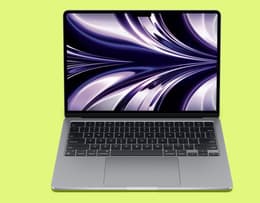
The MacBook Pro M1 and M2 are a triumph of quality and design.
Operating system: macOS Tahoe
Colours: Silver, Starlight, Space Grey, Midnight
Casing: Aluminium unibody enclosure
Dimensions: Height 1.13 cm, Width 30.41 cm, Depth 21.5 cm
Weight: 1.24 kg
Screen size: 13.6‑inch Liquid Retina display
Screen resolution: 2560 × 1664 (224 ppi)
Display: LED‑backlit IPS panel, 500 nits' brightness, Wide colour (P3), True Tone, support for 1 billion colours
Chip: Apple M2 chip
CPU: 8‑core CPU (4 performance cores + 4 efficiency cores)
RAM: 8 GB unified memory (configurable to 16 GB or 24 GB)
Storage: 256 GB, 512 GB, 1 TB, or 2 TB SSD
Sound: Four‑speaker sound system, wide stereo, Spatial Audio support; three‑mic array with directional beamforming
Main camera: 1080p FaceTime HD camera with advanced ISP
Video capture: 1080p video; hardware‑accelerated H.264, HEVC, ProRes, ProRes RAW
Battery life: Up to 18 hours Apple TV playback; up to 15 hours wireless web; 52.6 Wh battery
Connectivity: Wi‑Fi 6
Pros | Cons |
|---|---|
Powerful and fast M2 chip | Limited ports |
Excellent battery life | 8 GB RAM can feel tight |
Operates silently | Fanless means performance can dip under sustained load |
Sleek, lightweight, and portable | |
Bright Liquid Retina display |
“I ordered this MacBook in ‘Good’ condition and was pleasantly surprised when it arrived looking brand new. The laptop was exceptionally clean, with no signs of wear, and everything worked perfectly. Battery health was 96%, which is great, performance was excellent, and the screen and keyboard were in fantastic condition. Overall, it exceeded my expectations for a used device. I would definitely recommend this seller to anyone looking for a quality refurbished MacBook.” - Gabriella B.
✨The MacBook Air M4 pushes performance and efficiency further.
The M4 has a stronger battery than the M2, better AI support, and smoother multitasking. It’s worth the higher price tag if you're often using your laptop for multiple heavy jobs simultaneously. The M4 chip brings a real jump in responsiveness, so apps open instantly, multitasking feels smoother, and Apple Intelligence features run more fluidly than on older Air models. The battery life is strong, Apple quotes up to 18 hours, and real-world mixed use usually lands in the all-day range unless you’re doing heavy creative work.
The Air M4 is ideal for students who want a laptop that feels modern, can handle multitasking, and stays fast for several years.
Operating system: macOS Tahoe
Colours: Sky Blue, Silver, Starlight, Midnight
Casing: Aluminium unibody enclosure
Dimensions: Height 1.13 cm, Width 30.41 cm, Depth 21.5 cm
Weight: 1.24 kg
Screen size: 13.6‑inch Liquid Retina display
Screen resolution: 2560 × 1664 (224 ppi)
Display: LED‑backlit IPS panel, 500 nits' brightness, Wide colour (P3), True Tone, 1 billion colours, 60 Hz
Chip: Apple M4 chip (3nm)
CPU: 10‑core CPU (4P + 6E)
RAM: 16 GB unified memory (configurable to 24 GB or 32 GB)
Storage: 256 GB, 512 GB, 1 TB, or 2 TB SSD
Sound: Four‑speaker audio system with Spatial Audio; three‑mic array with beamforming
Main camera: 12MP Center Stage camera with Desk View; 1080p video recording
Video capture: 1080p HD video; hardware‑accelerated H.264, HEVC, ProRes, ProRes RAW, AV1 decode
Battery life: Up to 18 hours video streaming; up to 15 hours wireless web; 53.8 Wh battery
Connectivity: Wi‑Fi 6E
Pros | Cons |
|---|---|
All-day battery life | 60 Hz display, no ProMotion |
Bright, sharp Liquid Retina display | Only two USB‑C / Thunderbolt 4 ports |
Silent fanless operation | No Wi-Fi 7 |
“I ordered a MacBook Air in Excellent condition. The device was spotless; it looked like it had never been used. The item came in the original box (which had been opened). The battery health was 100%, and the number of battery cycles was 7.” - Anokh V.
✨The MacBook Pro M1, M2, and MacBook Air M5 are a triumph of quality and design with powerful chips for creative work and built-in AI tools.
The MacBook Pro M1 uses that same powerfully capable chip as the MacBook Air M1, but the Pro is in a different class when it comes to performance for running resource-heavy applications like video editing suites and 3D modelling software. This type of laptop is ideal for people studying in these areas, including architecture. Even though it was released in 2020, it remains a superior machine, thanks to the many tech upgrades it's received in the interim.
As you would expect, the MacBook Pro M2 ups the game even more. It's quite the beast, starting with its virtually indestructible aluminium chassis under everyday circumstances. The M2 chip's ferocious power can easily handle heavy-duty tasks. It also has an extremely vivid screen, ideal for graphics work and 3D modelling. If you're studying in these areas, you'll appreciate these specs: a 13.3-inch Retina display at 2560 x 1600 resolution, 500 nits brightness, and Apple's advanced image signal processor for computational video. If serious power is important to you, this is undoubtedly the best MacBook for students in 2026.
The MacBook Air M5 is the fastest, most futureproof of the Air models. Built for Apple Intelligence, and available in 13-inch and 15-inch displays, it’s the premium model in the Air lineup. It’s the Air laptop that will perform the best over a 4- or 5-year student degree. Ultra-portable, it’s powered by the M5 chip and has a major AI performance jump over the M4. The biggest upgrades with the M5 are Wi-Fi 7, dual external display support, and stronger AI acceleration.
Instagram influencers, TikTok creators, and YouTube pundits see no need to get the latest smartphones or laptops to produce their content. Why would they when M1 and M2 MacBooks have plenty of power and all the right software – not to mention more than enough battery life? These machines can handle everything from podcast recording to precise video editing with voiceovers. Apple chips ensure quick rendering, so you can go from recording your next viral video to publishing it in no time. And if you just want to show off an exotic meal or a glorious sunset, you can share it faster than most people can complete a lap of Le Mans in Gran Turismo.
Operating system: macOS Tahoe
Colours: Silver, Space Grey
Casing: Aluminium unibody enclosure
Dimensions: Height 1.56 cm, Width 30.41 cm, Depth 21.24 cm
Weight: 1.4 kg
Screen size: 13.3-inch Retina display
Screen resolution: 2560 × 1600 (227 ppi)
Display: IPS LED-backlit panel, P3 wide colour, True Tone, 500 nits brightness
Chip: Apple M1 chip
CPU: 8-core CPU (4 performance cores + 4 efficiency cores)
GPU: 8-core GPU
RAM: 8 GB unified memory (configurable to 16 GB)
Storage: 256 GB, 512 GB, 1 TB, or 2 TB SSD
Sound: Stereo speakers with Dolby Atmos support; studio-quality three-mic array with directional beamforming
Main camera: 720p FaceTime HD camera
Battery life: Up to 17 hours wireless web; up to 20 hours Apple TV app movie playback; 58.2 Wh battery
Connectivity: Wi-Fi 6
Operating system: macOS Tahoe
Colours: Silver, Space Grey
Casing: Aluminium unibody enclosure
Dimensions: Height 0.61 in (1.56 cm), Width 11.97 in (30.41 cm), Depth 8.36 in (21.24 cm)
Weight: 1.4 kg
Screen size: 13.3-inch Retina display
Screen resolution: 2560 × 1600 (227 ppi)
Display: IPS LED-backlit panel, P3 wide colour, True Tone, 500 nits brightness
Chip: Apple M2 chip
CPU: 8-core CPU (4 performance cores + 4 efficiency cores)
GPU: 10-core GPU
RAM: 8 GB unified memory (configurable to 16 GB or 24 GB)
Storage: 256 GB, 512 GB, 1 TB, or 2 TB SSD
Sound: Stereo speakers with Dolby Atmos support; studio-quality three-mic array with directional beamforming
Main camera: 720p FaceTime HD camera with advanced image signal processor
Battery life: Up to 17 hours wireless web; up to 20 hours Apple TV app movie playback; 58.2 Wh battery
Connectivity: Wi-Fi 6
MacBook Pro M1 | |
|---|---|
Pros | Cons |
Great performance on demanding tasks | No design upgrade from the previous MacBook Pro |
Exceptional battery life | Still doesn't have enough ports (come on, Apple!) |
Ultra-high definition for HD video editing up to 4K or CAD modelling | Relies on integrated graphics, so might struggle with the most intensive tasks |
Premium design and compact build |
Pros | Cons |
Surprisingly thin and light | The display could be better |
A screen that makes lecture slides feel like IMAX | Limited ports |
Long battery life | You might want more power |
Keyboard and trackpad feel great |
"I recently bought a MacBook Pro from Back Market at an amazing price. The laptop arrived much earlier than expected and in immaculate condition."
Operating system: macOS Tahoe
Colours: Sky Blue, Silver, Starlight, Midnight
Casing: Aluminium enclosure
Dimensions: Height 1.13 cm, Width 30.41 cm, Depth 21.5 cm
Weight: 1.23 kg
Screen size: 13.6‑inch Liquid Retina display
Screen resolution: 2560 × 1664 (224 ppi)
Display: LED‑backlit IPS panel, 500 nits' brightness, Wide colour (P3), True Tone, 1 billion colours, 60 Hz
Chip: Apple M5 chip
CPU: 10‑core CPU (4 super cores + 6 efficiency cores)
RAM: 16 GB unified memory (base), configurable to 24 GB or 32 GB
Storage: 512 GB SSD (base), configurable to 1 TB, 2 TB, or 4 TB
Sound: Four‑speaker sound system with Spatial Audio; three‑mic array with directional beamforming
Main camera: 12MP Center Stage camera with Desk View; 1080p HD video recording
Video capture: Hardware‑accelerated H.264, HEVC, ProRes, ProRes RAW, AV1 decode; HDR formats including Dolby Vision, HDR10+, HLG
Battery life: Up to 18 hours video streaming; up to 15 hours wireless web; 53.8 Wh battery
Connectivity: Apple N1 wireless chip; Wi‑Fi 7 (802.11be)
Pros | Cons |
|---|---|
M5 chip is 10-20% faster than the M4 chip | Same design as the M2, M4 |
4x accelerated AI processing for Apple Intelligence tasks | The display could be better |
Long battery life | Only 2 USB-C ports |
“Received within two days, exactly as described; I’m very happy with my purchase “ - Marie C.
Many students are aware that Apple offers a student discount, but most students don’t know that the savings available on a new MacBook pale in comparison to the savings possible when buying a refurbished MacBook.
Apple Education Store offers a reduction on MacBooks, for example £100 off MacBook Neo and MacBook Air and up to £200 off MacBook Pro; this is a real saving on a new laptop for students with a limited budget. However, at Back Market, a refurbished MacBook can be yours for up to 50% less than the original price. With the opportunity to save up to half off a MacBook, buying refurbished offers the best value for students in 2026.
We also offer a wide variety of MacBook accessories and peripherals. These include chargers and charging cables, both MagSafe and USB. You'll find those crucial Thunderbolt adapters, too. We have separate MacBook keyboards if you don't like the feel of the onboard one. It's also better for your posture to separate the keyboard and the monitor in a desktop style. Having the laptop screen level with your eye height and the keyboard at your natural arm level helps prevent long-term problems.
You'll be thrilled to know that we sell USB hubs. That's no exaggeration. The lack of ports has probably been the number one complaint among Mac users for at least 20 years now. A USB hub solves all those familiar problems, like having to unplug a hard drive to insert a flash drive just because you're also using the only other port. While on the subject, you can get external storage drives on Back Market, too.
We've given you the lowdown on the best MacBook for students in 2026, but we've saved the best news for last. With Back Market, there's no need to save up and wait for the next Back to School tech sale. You can get an extra £20 off anything through our student discount plan. That's on top of our already low refurbished prices, with up to 50% off MacBooks.
Plus, we have our own flash sales and promotions on the best laptop for students UK throughout the year.
So, whether you’ve chosen between MacBook Neo vs MacBook Air, take the sensible, affordable choice by buying a refurbished MacBook for students. You'll be doing your wallet a big favour and helping the planet. Every refurbished MacBook keeps ~350g of e-waste out of landfill – that’s like skipping 700 plastic straws.
When not fighting the good fight for environmental sustainability, Haziq loves making reviews of everything and anything tech-related.