
Compare models
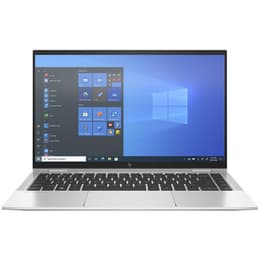
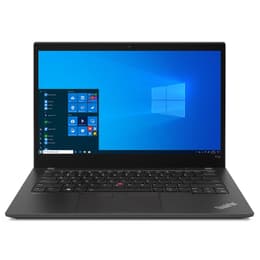
HP EliteBook X360 1040 G8 14" Vs Lenovo ThinkPad T14 G2 14"
- 1-year minimum warranty
- Free delivery on all items
- Free 30-day returns
Differences at a glance
The HP EliteBook x360 1040 G8 (2021) and the Lenovo ThinkPad T14 Gen 2 (2021) represent two distinct approaches to the 14-inch business laptop category. While both machines target professionals seeking reliability, security, and productivity features, they differ fundamentally in design philosophy, with the HP model offering a convertible 360-degree hinge and polished chassis, whereas the Lenovo focuses on traditional clamshell ergonomics and robust enterprise connectivity. Both laptops run on standard desktop operating systems, but their hardware integration and physical form factors cater to slightly different daily workflows.
Available Models
Storage
Processor
Memory
Scores
Durability
When evaluating structural longevity and software support, both the HP EliteBook x360 1040 G8 and the Lenovo ThinkPad T14 Gen 2 offer durable builds designed for long-term professional deployment. Here are the key durability and support factors:
- Software and Security Updates: Both devices receive regular operating system upgrades and firmware security patches from their respective manufacturers, ensuring compatibility with modern software environments.
- Build Integrity: The HP utilizes a CNC-machined aluminum chassis built to withstand frequent travel, while the Lenovo features a reinforced composite body engineered to meet military-grade durability standards for impact and vibration resistance.
- Repairability and Lifecycle: The Lenovo provides straightforward internal access for component maintenance, whereas the thin convertible design of the HP prioritizes sleekness over modular serviceability, affecting long-term repair accessibility.
Year of Release
2020
2021
Last Os Compatibility
Yes
Yes
OS
Windows 11
Windows 11
Performance
Performance capabilities across both laptops handle demanding office environments, extensive web browsing, and multitasking efficiently. Here is how their core operational traits compare:
- Multitasking and Responsiveness: Both configurations handle heavy spreadsheet management, multiple browser tabs, and background communication tools smoothly without noticeable lag during standard daily operations.
- Storage and Memory: Both models offer scalable solid-state drive storage options paired with high-speed memory architectures, ensuring rapid application loading and file transfer speeds.
- Battery Behavior: The Lenovo typically sustains a full workday of mixed office tasks on a single charge, while the HP's higher-resolution display configurations may require an interim recharge during heavy utilization periods.
Graphic card
Integrated Graphics
Integrated Graphics
Screen quality
Display configurations define how each device handles visual presentation, text clarity, and media consumption during daily use. Here are the primary visual characteristics:
- Panel Technology: The HP often features bright, high-resolution touch-enabled IPS or OLED panels with vivid color reproduction, whereas the Lenovo provides anti-glare matte IPS screens optimized for long reading sessions under bright office lighting.
- Outdoor Usability: The Lenovo's matte coating reduces reflections effectively in sunlit environments, while the HP compensates with high peak brightness levels to maintain visibility.
- Viewing Flexibility: The HP includes a 360-degree hinge enabling tablet, tent, and presentation modes, while the Lenovo maintains a traditional 180-degree lay-flat clamshell hinge structure.
Resolution
1920 x 1080
1920 x 1080
Screen type
IPS
IPS
Camera
Audiovisual
Audio-visual hardware impacts remote communication quality, media playback, and everyday collaborative tasks. Here is how their multimedia systems compare:
- Webcam and Microphones: Both laptops feature integrated high-definition webcams accompanied by multi-array microphones designed to isolate background noise during video conferencing.
- Audio Output: The HP utilizes quad-speaker configurations tuned to deliver clear voice projection and balanced sound for media consumption, while the Lenovo focuses on directional stereo sound tailored for speech clarity during calls.
- Video Recording: Both capture clear video feeds adequate for professional virtual meetings, automatically adjusting to varying indoor lighting conditions.
Miscellaneous
Practical usability depends heavily on physical input options, connectivity ports, and overall portability factors. Here are the defining physical and connective attributes:
- Port Selection: The Lenovo includes a diverse array of physical ports including standard USB-A, HDMI, and Ethernet connections, whereas the HP relies more heavily on modern USB-C Thunderbolt ports requiring adapters for legacy peripherals.
- Keyboard and Input: The Lenovo offers a deep-travel tactile keyboard layout alongside a traditional TrackPoint, while the HP provides a shallower, clickier keyboard paired with a spacious glass trackpad and touch support.
- Physical Dimensions: The HP is thinner and lighter for easy transit in bags, while the Lenovo maintains a slightly thicker profile to accommodate its extensive built-in port array.
Weight
1310 g
1530 g
Screen size
14
14
What the community thinks
Community discussions and user feedback indicate that both laptops maintain strong reputations for reliability, comfort, and professional utility. Users frequently praise the Lenovo ThinkPad T14 Gen 2 for its exceptional keyboard ergonomics, comprehensive port selection, and reliable all-day battery endurance. Conversely, users often highlight the HP EliteBook x360 1040 G8 for its premium tactile feel, versatile convertible hinge, and vibrant display quality. Common criticisms for the HP involve limited physical legacy ports without adapters, while some users note that the Lenovo's heavier chassis is less optimized for ultra-mobile travelers.
Users who prioritize a traditional typing experience, extensive direct connectivity, and rugged day-to-day durability may prefer the Lenovo ThinkPad T14 Gen 2. Meanwhile, users who value screen versatility, a lighter physical footprint, and touch-enabled interaction will find the HP EliteBook x360 1040 G8 well-suited to their needs. Both models represent sustainable choices when selected as quality-assured refurbished options, enabling a reliable computing experience that aligns with environmentally conscious purchasing habits.